
Warning: Undefined array key "url" in /home/telkowar/public_html/wp-content/plugins/seo-by-rank-math/includes/modules/schema/snippets/class-author.php on line 41
We are honoured to be named Finalist for ‘Digital Business of the Year’ award in 2024 CanadianSME Small Business Awards, presented by Google.
This nomination shows the efforts of our small, but amazing team, who always go above and beyond to give the best digital experience to our customers. They bring lots of positive energy, dedication, skills and creativity to work every day to provide unmatched and personalized services and make our clients happy.
Also, this honor would not have been possible without the trust of our partners and clients on us. Thank you for believing in us and standing by our side.
Thank you #CanadianSME team for recognizing and appreciating the efforts of small business leaders, who are the backbone of our economy!!
If you are a business owner of a small firm and you’re attempting to replicate Customer Relationship Management (CRM) capabilities on a large spreadsheet, you’ve undoubtedly noticed how unmanageable this is. CRM software solutions are more user-friendly, and they accomplish much more than simply storing customer and contact details.
In 2025, communication between staff and customers become more critical. CRM software solutions address this issue by providing structured record-keeping services and efficient product tracking systems.
CRM software is quickly becoming a thing across businesses around the world. The growth of this sector of digital business tools has grown rapidly, making the case for becoming the next staple in any company operation.
What is a CRM?
What is a CRM and what does it do? A CRM software, or customer relationship management tool, organizes contacts and facilitates communication with prospective buyers and consumers.. If you’re working with a client, you’ll know how often companies drop the ball on prospects and leads. A CRM does a great job of tracking these leads, nurturing them, and turning them into long-term customers.
Additionally, the top small business CRM software solutions provide a unified platform for managing and collaborating on sales, marketing, and administrative activities, while enabling teams to automate specific processes to boost efficiency.
CRM software usage is increasing. According to Fortune Business Insights, CRM technology is expected to achieve a value of $128.97 billion by 2028, reflecting a 12.1% CAGR over the next seven years. As the field matures, more small firms are considering whether they should invest in CRM software solutions.
Why Use a CRM for your small business?
Currently, 91% of companies with more than 10 staff use a CRM. But why do companies use them in the first place? There are various benefits to using a CRM tool in your operation. These are some of the standout ones.
Efficiency
An efficient business is always better performing, whether that’s in sales, marketing, customer service, or others. A CRM platform provides all the tools necessary to run a sales funnel and drive more business growth while cutting on lead time and expenses. CRMs are truly an investment if implemented well in an organization. One study shows that every dollar invested into a CRM could result in up to $8.71 in returns.
Follow-through
So let’s say you have an ecommerce website that gets tons of traffic. Chances are that only a small fraction of those visitors will become clients. Conversion rates in online sales can go anywhere between 2 to 3% average. Imagine if you could increase that rate by just one percent. It would help improve revenue drastically. One way to improve conversion rates is to improve follow-through—ensuring no lead gets ignored. CRMs help build better follow-through by tracking conversations with clients, setting automations, and building task management systems, ensuring that sales staff take care of every lead that comes in.
Collaboration
The best CRM isn’t only a great tool for the individual. It helps improve collaboration amongst teams.
Most CRM software solutions are cloud-based, meaning anyone can access it anytime and anywhere. With an online CRM, sales reps can collaborate on customers or leads that come through their system. Moreover, sales teams can coordinate with onboarding staff, customer service representatives, and marketing teams to improve campaigns that a company might run to generate more prospects and turn them into loyal clients.
There are many other benefits to using CRM tools, of course, but these are the popular ones that have convinced organizations that they are worth the investment.
Best CRM Systems for Small Business Today
When selecting the best CRM software for small business, there are numerous facets to consider, including pricing and features your business needs.
While each business has unique needs, the best CRM software solutions should assist you in managing your existing and prospective clients and enable actual growth.
Here are the five of the best CRM software for small business in 2022 that you can consider helping you achieve your business goals.
Hubspot
HubSpot is the best CRM software for companies seeking an affordable entry point. The company has become synonymous with digital marketing and business. Hubspot has a wide range of CRM capabilities, including a contact management solution, a deals pipeline, and various integrations to social media channels, websites, and email accounts to handle any inbound marketing.
HubSpot is quite simple to use and offers sales, marketing, and service hubs. This gives you a plethora of tools for managing the client journey effectively.
HubSpot includes a mobile app for Android and iPhone, contact management, real-time notifications, email templates, phone calls, scheduling, and email tracking, among other things.
Integrating small business CRM software with other business applications is critical. HubSpot integrates with over 300 applications and services, including Mailchimp, the industry’s leading email marketing provider and lead-generating tool.
Hubspot is also a great solution for customer service as it has an efficient ticketing system. There’s also a social media scheduling tool, email marketing service, and landing page builder for marketing teams that want to drive more traffic into their funnels.
HubSpot provides a free basic version and has complimentary plans for its CRM software solutions, sales, marketing, and customer service centers. To access additional capabilities, you can upgrade your subscription plan, which starts from $45 per month for one user.
Pricing: There is a free account on Hubspot. Various plans are available for teams, starting at $45 a month.
Salesforce
Salesforce is a renowned name in the CRM industry, and for a solid reason. It’s a great option for growing small enterprises that require CRM software solutions that scale with them. Salesforce is brimming with features, yet its straightforward interface makes it accessible to users of any technical ability.
Customizable reports and live dashboard updates guarantee sales specialists always have the most updated data, and case management forwarding enables team members to escalate or move matters to other teams quickly.
Contact management is the top feature business executives look for in a CRM, with 94% saying it’s a need in their system of choice. So it’s natural that Salesforce, just like Hubspot and virtually every option on this list, will excel in that area too.
Salesforce is great for teams that want a full suite for maximum staff collaboration. The contact manager tracks all potential client information, including past discussions, communications, social mentions, and activity history.
As your business expands, you may upgrade your plan to gain additional capabilities, such as automated lead scoring and collective prediction for cross-team strategy improvement. Easily handle a growing client base or product range with tools for creating product catalogs, estimates, agreements, and sales orders.
Salesforce cost varies significantly depending on the purpose of its use. Plans range in price from $25 per user a month for basic sales and customer service plans.
Pricing: There’s a free trial, then you pay $25 a month and up for a full suite for up to ten users.
Pipedrive
Pipedrive is another option that has been excelling in the CRM space over the past few years. One of its top selling points is the simplicity of the system. It has less clutter than the former options above. But that does not mean that it doesn’t have as many features.
This CRM tool assists small firms with managing the sales process following lead generation. It’s been developed to increase sales without being overly hard to use, making it extremely simple to set up and master.
The tool clearly provides an overview of sales performance and helps teams focus on important deals. Some of Pipedrive’s key features include timeline views, simple data importing, sales reports, a contact history, integrations to your email provider, and so on. There has also been an email blasting service in the works.
Pipedrive provides 24/7 email and chat support to all tiers and a collection of articles and a searchable FAQs section, community forum, and training school (a compilation of demos, videos, and courses). The Enterprise tier upgrade adds phone support to the active email and chat assistance.
A small business owner can try Pipedrive for free to determine its compatibility. Following that, rates begin at $12.50 per user per month for the Essential plan.
Pricing: 30-day free trial, then $10 a month per user after that
monday.com
monday.com might be one of the newest names on the list. It’s not primarily marketed as a CRM tool, but a project management solution. But it does give companies an efficient way to track, automate, and streamline the sales process. One great thing about monday.com is how easy it is to customize dashboards and workflows.
Because monday.com is also a great project management tool, it has an edge in terms of internal operations, such as assigning deals to staff within operations. The platform has a wide range of automations that users can easily create and manage to ensure sales funnels run like clockwork.
Pricing: Individual plan for 2 people is free; then it goes to $8/seat and higher.
Freshworks
Freshworks is an excellent option for sales specialist who receives and makes a high volume of calls and want CRM software solutions to capture the data produced by those calls. You can link your current phone number to the CRM system or buy another toll-free number from over 90 countries with a single click.
Call recording, conference calling, call transfer, and a widget that lets you make calls directly from Freshworks’ sales page are built-in phone attributes. To enhance the client experience, you can arrange extensions for fast call forwarding and personalize ringtones that callers will hear before answering the phone.
Phone-tree messages and customized welcomes complete the customization and branding opportunities that help make doing business with you a pleasurable experience for your clients.
Freshworks provides extensive assistance for sales conversations and customer touchpoints, including deal and account administration, email synchronization, and list segmentation. Site visitor activity monitoring is also included so clients can evaluate how to use their sites as a customer magnet and improve conversion.
Pricing: Available for a monthly fee ranging from free to $83 a month. Additionally, you can save up to 17% if you purchase a yearly subscription. Freshworks CRM offers a free 21-day trial of every package.
NetSuite
Developed by software mogul Oracle, Netsuite is another reliable CRM tool provider. It is one of the best in terms of providing organized and structured updates on contact activity and progress. Netsuite also has a great partnership management component that allows a company to manage affiliates, vendors, resellers, suppliers, and any other business that it might be working hand-in-hand with.
Netsuite is great for a company looking for an easy way to track marketing activity daily. This solution has a lot more to offer too, including a sales automation suite, sales forecasting reports, and an employee workflow tracker.
Pricing: Free product tour then $129.00 per month.
Other Honorable Mentions
Here are other CRM platforms that might not have made it in our top five list, but have great value to offer to companies still.
Copper.ai — One of the best CRM for small business because of the ease of use and affordable pricing.
Zendesk Sell — Another great small business CRM software. Zendesk is a brand synonymous with customer support, so its CRM platform meshes great with its support software and dashboard.
Streak — Another bare bones but easy-to-use CRM platform that’s a great option for solopreneurs and sole salesmen.
Starting Your CRM Tool Adoption Process
The terminology CRM might not be as popular as many of the other business suite systems out there, but it’s quickly catching up. Accordingly, it would be beneficial for your company to start actively seeking out the solution that will work best in your company’s context.
According to the Market Analysis Report of Grand View Research, approximately 91% of businesses with more than ten employees already utilize CRF software solutions. These companies understand that effective CRM is necessary for corporate growth.
While selecting the best CRM software solutions for small businesses is not always straightforward, it is a critical decision that will affect your sales and efficiency. Before making a final purchase, you should examine your needs and compare alternative CRM software. You may sign up for a free trial of these CRM software solutions to get a feel for their work before purchasing the full version.
If your sales process is unique and these CRM software solutions don’t meet your requirements, our team can build a custom CRM software for your company that is unique to your requirements.
Contact us today at (437)223-1771 OR info@telkoware.com for a free consultation.
In the bustling digital marketplace, where first impressions are crafted in mere milliseconds, the artistry of an eCommerce web designer becomes a brand’s silent ambassador. Picture a vibrant online store: its digital aisles brimming with products, enticing images beckoning even the most casual browsers to linger and explore. Yet, behind this seamless virtual experience lies a meticulously woven tapestry of design elements, coding expertise, and user-centric innovation—crafted by the skilled hands of an eCommerce web designer. These designers are the modern-day architects of the digital realm, sculpting online spaces that are not only visually captivating but also intuitively functional.
Delving into the world of eCommerce web design unveils a fascinating intersection of technology and creativity. It’s a realm where aesthetics meet analytics, and the nuances of user behavior guide every pixel and pathway. In this blog post, we explain how you can find the ideal eCommerce web designer for your business. Whether you’re starting a new venture or revamping an existing digital storefront, understanding the qualities that constitute a masterful design partner is crucial. From identifying the right skill set to aligning their vision with your brand’s narrative, we will explore the essential steps to ensure your online presence not only competes but thrives in the ever-evolving digital landscape. So, prepare to navigate this exciting terrain and unlock the secrets to crafting digital perfection.
Understanding the Role of an eCommerce Web Designer
When it comes to the success of an online business, the role of an eCommerce web designer is paramount. An eCommerce web designer is not just a creator of visually appealing websites; they are architects of seamless user experiences that drive conversions.
An eCommerce web designer must possess a blend of creativity and technical skills. They should understand the latest design trends, user behavior, and e-commerce best practices. By creating user-friendly interfaces, optimizing for mobile responsiveness, and implementing intuitive navigation, an eCommerce web designer can enhance the overall shopping experience for customers.
Moreover, an eCommerce web designer plays a crucial role in building brand identity and establishing credibility. Through cohesive branding elements, captivating product displays, and secure payment gateways, they help businesses stand out in the competitive online market.
In conclusion, the eCommerce web designer is not just a designer but a strategic partner in the success of any online business. Their expertise in blending design aesthetics with functionality is key to crafting digital perfection for your e-commerce platform.
Defining Your Design Needs and Goals
When it comes to defining your design needs and goals for your eCommerce website, understanding the role of an eCommerce web designer is crucial. Your eCommerce web designer is the key to crafting digital perfection for your online store.
To start, evaluate the specific requirements of your eCommerce business. Consider factors like user experience, branding consistency, and conversion optimization. These elements will guide you in finding the ideal eCommerce web designer who can bring your vision to life.
Next, set clear goals for your website design. Define what success looks like for your eCommerce store – whether it’s increased sales, improved customer engagement, or enhanced brand visibility. Communicate these goals to your eCommerce web designer to ensure alignment in the design process.
By defining your design needs and goals upfront, you can collaborate effectively with your eCommerce web designer to create a visually appealing and functional online store that resonates with your target audience.
Researching and Shortlisting Potential eCommerce Web Designers
When looking for an eCommerce web designer, conducting thorough research and shortlisting potential candidates is crucial. Start by defining your design requirements and budget, then begin your search.
Begin by exploring online platforms dedicated to connecting businesses with talented designers. Look for portfolios that showcase relevant eCommerce projects to ensure they have the expertise you need.
Consider reaching out to your professional network for recommendations or posting on job boards to attract suitable candidates. When shortlisting, prioritize designers who have experience in creating user-friendly interfaces and optimizing conversions for eCommerce websites.
Don’t forget to assess their communication skills and ability to understand your brand identity and vision. Schedule interviews or design challenges to evaluate their problem-solving skills and creativity.
By investing time in researching and shortlisting potential eCommerce web designers, you increase your chances of finding the perfect fit for your digital project.
Evaluating Portfolio and Experience
When evaluating a potential designer for your online store, it’s crucial to assess their portfolio and experience. Look for examples of their previous work to determine if their design style aligns with your brand’s aesthetic. Pay attention to the functionality of the websites they have created to ensure they can deliver a seamless shopping experience for your customers.
Close-up Of A Female Designer Working On Multiple Computer At Workplace
Experience plays a vital role in the success of your eCommerce website. An experienced designer will have a better understanding of industry trends, user behavior, and conversion optimization strategies. They will be able to anticipate potential challenges and provide effective solutions to enhance your online store’s performance.
By thoroughly evaluating the portfolio and experience of an eCommerce web designer, you can make an informed decision that will benefit your business in the long run. Remember, finding the ideal designer is not just about their technical skills but also about their ability to bring your digital vision to life.
Assessing Design Process and Methodology
When it comes to assessing design process and methodology, finding the ideal eCommerce web designer is crucial for crafting digital perfection. A skilled eCommerce web designer must have a structured approach to their design process. This includes understanding the client’s brand identity, target audience, and unique selling points.
Methodology plays a significant role in determining the success of a web designer. An effective methodology involves conducting thorough research, creating detailed wireframes, and implementing user-friendly interfaces. By following a systematic methodology, an eCommerce web designer can ensure a seamless design process that meets the client’s requirements.
In the realm of eCommerce, design plays a critical role in attracting and engaging customers. A well-crafted website not only enhances the user experience but also boosts conversions and sales. Therefore, choosing the right eCommerce web designer who excels in design process and methodology is essential for achieving digital perfection in the competitive online market.
Ensuring Alignment with Brand Vision and Values
To ensure alignment with the brand vision and values, it is crucial to select an eCommerce web designer who understands and embodies these core principles. Your ideal eCommerce web designer should not only possess technical expertise but also resonate with the essence of your brand. They should be able to translate your brand’s vision into the digital realm seamlessly.
When crafting digital perfection for your eCommerce website, consider the designer’s portfolio to see if their style aligns with your brand aesthetics. Communication is key in conveying your brand values effectively to the designer. Collaborate closely to ensure every design element reflects your brand’s essence.
By choosing an eCommerce web designer who shares your brand vision and values, you can create a website that not only looks visually appealing but also resonates with your target audience on a deeper level. This alignment will help establish a stronger brand identity and enhance customer trust and loyalty.
Communication and Collaboration Strategies
When it comes to establishing a successful online presence, effective communication and collaboration strategies are key in ensuring the seamless execution of your digital projects. For eCommerce businesses looking to elevate their online platforms, finding the right eCommerce web designer is crucial.
Communication plays a vital role in conveying your brand’s vision and requirements to the eCommerce web designer. Clear and concise communication ensures that your designer understands your expectations and can bring your digital vision to life.
Collaboration between you and the eCommerce web designer is essential for creating a website that resonates with your target audience. By working closely together, you can ensure that the design elements, user experience, and functionality align with your business goals.
By implementing strong communication and collaboration strategies with your eCommerce web designer, you can craft a digital masterpiece that reflects your brand identity and drives success in the competitive online market.
Budget Considerations and Negotiations
When delving into the realm of eCommerce web design, budget considerations play a pivotal role. Finding an ideal eCommerce web designer involves thorough negotiations to ensure a perfect digital outcome.
Before embarking on the journey of crafting digital perfection, it’s crucial to establish a clear budget framework. Define your financial boundaries and prioritize essential aspects of the web design process. Negotiate with potential eCommerce web designers to align their services with your budget constraints.
During negotiations, emphasize the significance of cost-effective solutions without compromising quality. Seek out designers who offer flexible payment options or customizable packages tailored to your budgetary needs. Remember, a balance between cost and quality is key to achieving your desired digital presence.
By carefully navigating budget considerations and negotiations, you can secure the services of an eCommerce web designer who not only meets your financial requirements but also delivers a visually appealing and functional online platform for your business.
Securing a Contract and Setting Expectations
When securing a contract with an eCommerce web designer, setting clear expectations is crucial for the success of your project. Clearly outline the scope of work, project timeline, and deliverables to avoid any misunderstandings later on. Communicate your brand’s aesthetic, functionalities required, and any specific design elements you have in mind to ensure the designer understands your vision accurately.
Discuss payment terms, revisions process, and communication channels to establish a smooth workflow. Address issues like website maintenance post-launch and ownership of design elements upfront. By setting expectations early on, both parties can work towards a common goal and avoid potential conflicts during the project.
Remember that transparency and open communication are key in any successful collaboration. Make sure to have a detailed contract in place that covers all aspects discussed to protect both your interests and the eCommerce web designer’s rights.
Conclusion: Partnering with eCommerce Web Designer for Digital Success
Partnering with the right eCommerce agency is crucial for achieving digital success. A skilled eCommerce web designer can elevate your online presence and enhance user experience, ultimately driving more conversions. By collaborating with a professional eCommerce web designer, you can craft a digital masterpiece that aligns with your brand identity and resonates with your target audience.
When selecting an eCommerce web designer, look for expertise in responsive design, user interface optimization, and e-commerce platform integration. A designer with a keen eye for detail and a deep understanding of the latest design trends can bring your vision to life and create a seamless online shopping experience for your customers.
Remember, digital success is not just about aesthetics; it’s about functionality and usability too. Your eCommerce website should be visually appealing, easy to navigate, and optimized for mobile devices to ensure a positive user experience. By partnering with the right eCommerce web designer, you can set your online store up for success and stand out in the competitive digital landscape.
Your eCommerce website isn’t just a shop; it’s a storyteller and a customer magnet rolled into one. With a mere click, shoppers teleport into your world, and it’s the eCommerce user experience that decides whether they’ll stay for the story.
Gone are the days of merely dazzling with high-res images and snappy headlines. Today’s savvy shoppers demand a journey as seamless as it is delightful, one that not only answers their needs but anticipates them.
So, how do you craft a digital experience that turns casual browsers into loyal customers? We’ll dive into the best practices that are setting the standard in 2025. Ready to transform your site into a conversion powerhouse?
What Is eCommerce User Experience?
eCommerce user experience (UX) encompasses every touchpoint a customer has with the website, from the moment they land on the homepage, to the process of browsing products, adding items to their cart, checking out, and even post-purchase interactions.
A well-designed user interface could raise a website’s conversion rate by up to 200%. It’s not just about conversions, 70% of online shopping carts are abandoned. A significant chunk of these abandonments can be attributed to poor UX—be it complicated checkouts or unclear product details.
After understanding the fundamentals of eCommerce user experience; let’s now examine the 9 strategic moves that are proven to elevate sales in 2025.
9 Proven eCommerce User Experience Strategies To Boost Sales
We’re peeling back the layers of conventional UX and diving deeper into modern practices based on data, strategy, and customer psyche. Pay close attention to the bullet points where you’ll learn of actionable steps you can implement for a better Shopify user experience or on any other eCommerce platform.
1. Intuitive Navigation & Search
This allows users to easily move through the website, from the landing page to checkout without getting confused. A vast eCommerce inventory is a waste if users can’t quickly move around it. Add a search field to assist users in quickly finding the products they’re looking for without needless browsing.
The search bar should be easy to locate, typically placed in the header of the website. Highlight popular categories and have a logical flow mirroring the typical user’s journey from browsing to purchasing.
5 Key Elements of Intuitive Navigation
● Clearly Defined Categories: Items should be sorted into clear, easily understandable categories and subcategories.
● Visible Menu: Navigation menus should be prominently displayed and consistently positioned across all pages.
● Breadcrumbs: Keeps users informed about their location within the site and enable easy backtracking.
● Filter & Sort Options: Refine search results based on parameters like price, popularity, and relevance.
● Autocomplete Feature: Predictive text helps users by suggesting possible matches, even if there are typographical errors.
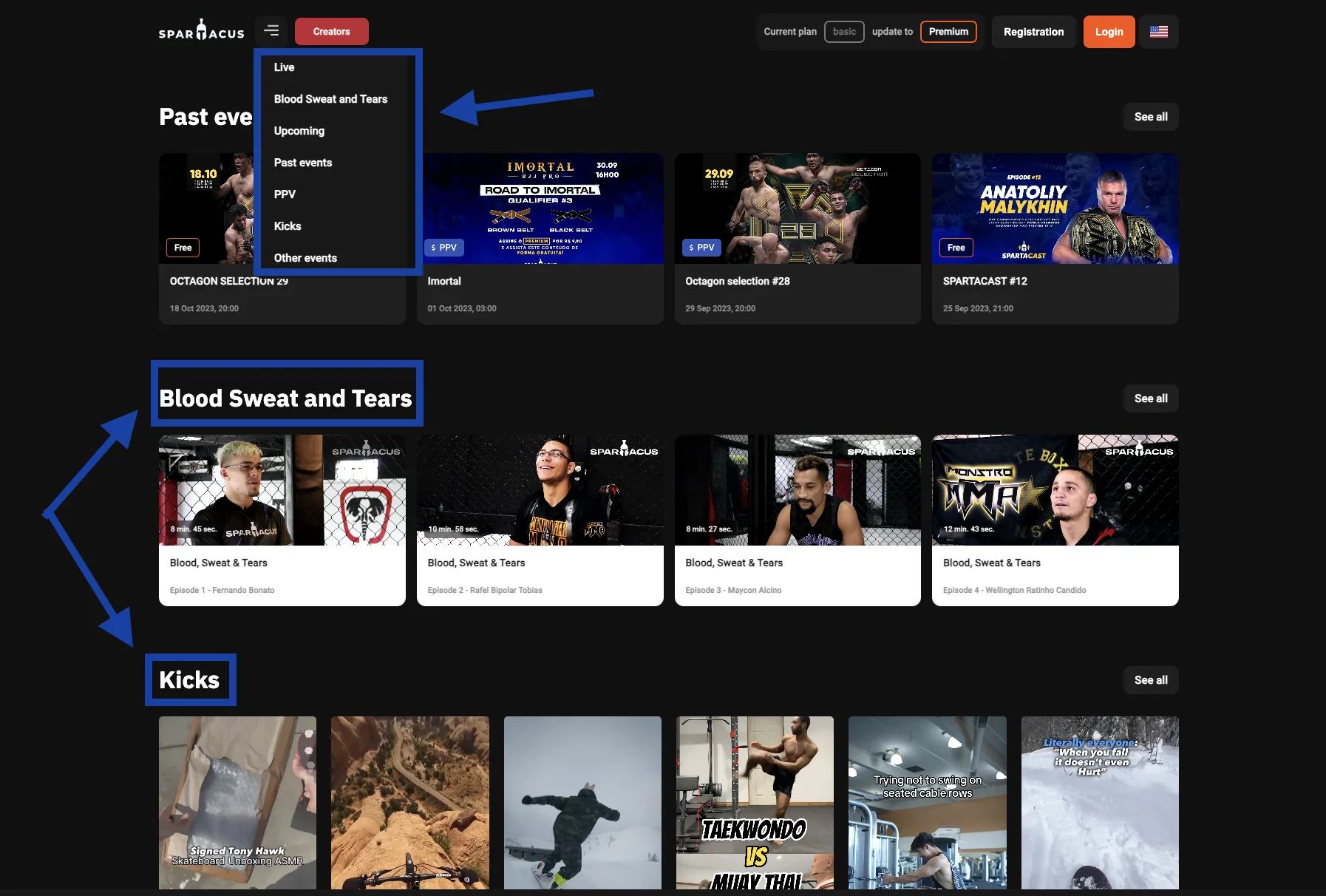
Here’s an excellent example from this mixed martial arts platform. To make it easier for users to navigate the site, they implemented both a dropdown menu and categorized sections after the top fold. From the moment users land on the page until they scroll down to explore, the layout is intuitively structured, guiding them smoothly to their point of interest with zero confusion.
2. High-Quality Product Images & Descriptions
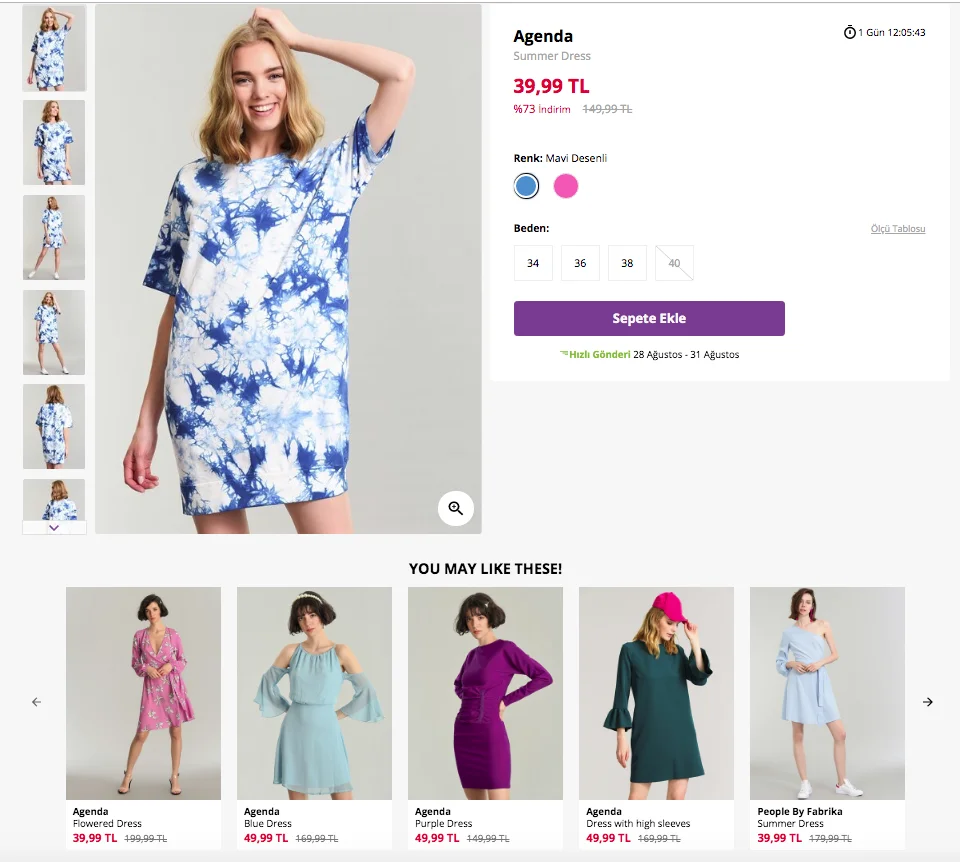
Exceptional product displays and in-depth descriptions serve as the digital equivalent of physically examining items in a brick-and-mortar store. While the product photos create a visual connection, the descriptions sew a narrative that collectively elevates the customer experience.
Shoppers can’t touch or try online products, making images a vital conduit to convey the look, feel, and quality of an item. From varied angles to zoom-in features, quality images offer a visual deep-dive, helping customers understand the product, its features, textures, and colors – crucial factors in their decision-making journey.
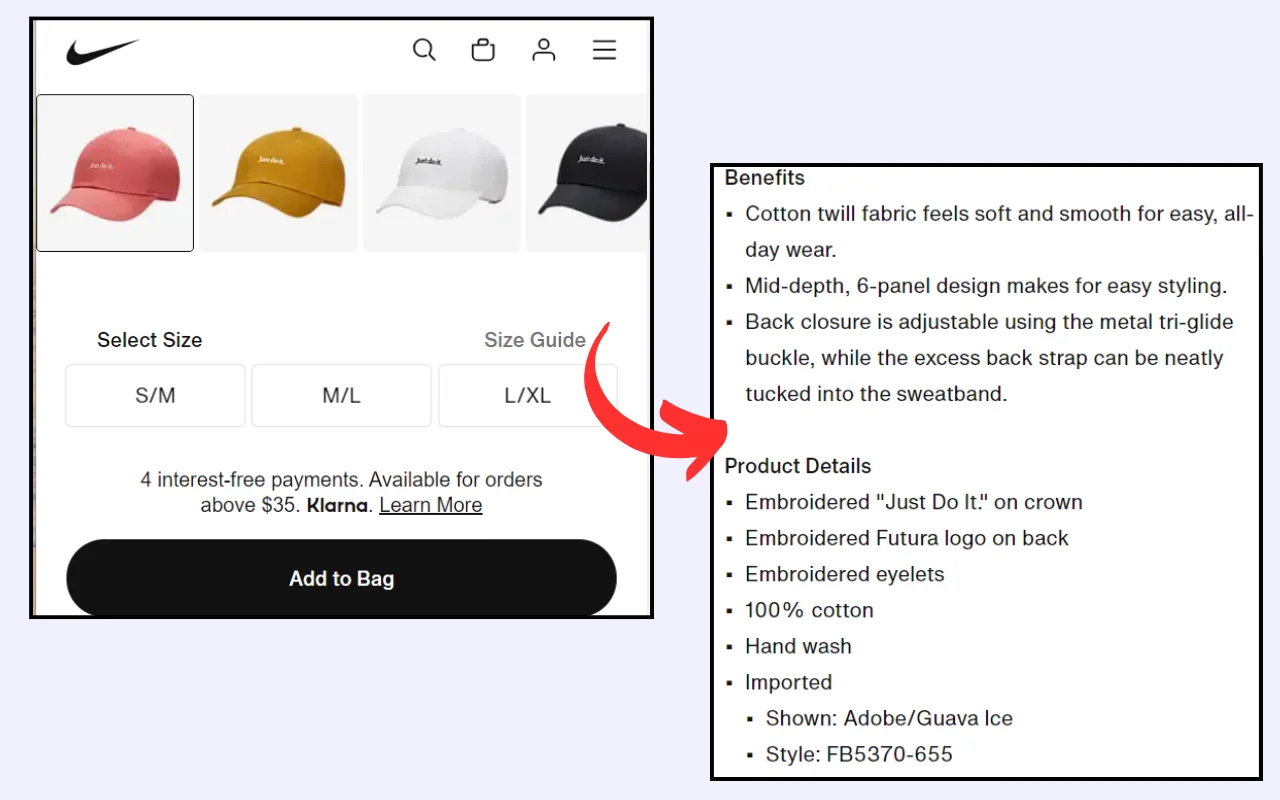
Product descriptions should answer pivotal questions like “What are its features?”, “How do I use it?”, and “Why should I buy it?”. The descriptions need to be a blend of vital details, benefits, and a touch of persuasive flair.
Strategies to Enhance Image & Description Quality
● High-Resolution Images: Users should be able to zoom in to crisp product details.
● Multiple Angles: Provide images from different angles and, if relevant, showcase the product in use.
● Engaging Descriptions: Keep them clear, informative, and customer benefit-focused.
● SEO Optimized: Use keywords judiciously in descriptions without compromising natural readability.
● Inclusion of Vital Details: Outline product specifications like size, material, and care instructions.
● Use of Bullets: Use bullet lists for easy skimming of key points.
● Mobile Optimization: Ensure images and text are viewable and readable on mobile devices.
3. Seamless Checkout Process
The checkout process is the thin line that separates a browsing visitor from becoming a paying customer. Any friction here can cause abandoned carts. Seamless checkout focuses on making this eCommerce experience smooth, quick, and trustworthy.
Every extra step, like forced registration, increases the chance of the user walking away without completing the purchase. It’s not just about the time it takes; it’s about the cognitive load, the decisions, and the potential hiccups of forgetting passwords or facing login issues. Ensuring a smooth checkout process reduces abandonment rates and boosts sales.
Strategies for a Seamless Checkout Process
● Show users their checkout stages.
● Highlight and explain checkout errors.
● Provide a variety of trusted payment gateways.
● Allow purchases without mandatory account creation.
● Display security badges to ensure secure transactions.
● Implement auto-fill capabilities for known user information.
● Allow easy modifications of cart contents during checkout.
● Allow users to save carts or favorite items for future reference.
● Provide clear post-purchase communication, including confirmation and tracking.
4. Personalization & AI Recommendations
Imagine entering eCommerce stores where the products are arranged in a way that’s uniquely tailored to your preferences and purchase history. That’s the ambiance AI recommendations strive to create in the digital sphere.
By analyzing user data and behavior, AI can curate product suggestions, enhance user engagement, and foster a sense of individualized attention. This improves customer satisfaction and maximizes conversion rates and average order values.
Efficient AI systems can pinpoint and promote items that a user is more likely to purchase, so you can leverage up-selling and cross-selling to tactically elevate purchase volumes.
Imagine AI as your savvy sales assistant and a strategic inventory manager in one. It checks at your stock levels, spots the overstocked items, and strategically promotes them as “recommended products” to potential eCommerce customers. It gives you a blend of smart marketing, customer care, and strategic inventory management.
Strategies to Implement Personalization & AI Recommendations
● Capture and analyze user data to understand their preferences, behaviors, and purchase history.
● Categorize customers based on shared attributes and shopping behaviors to deliver segment-specific content.
● Develop tailored content, deals, and messages for different user segments. Send them well wishes on special occasions coupled with a seasonal discount.
● Continuously train and optimize the AI algorithm to enhance the accuracy and relevance of product recommendations.
5. Mobile-First Design
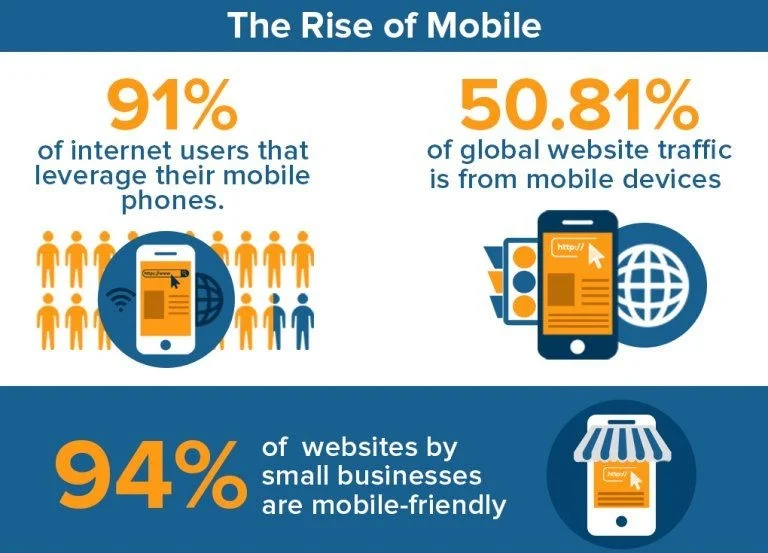
With over half of global web traffic coming from mobile, optimizing for mobile experience is no longer just a buzzword; it’s a necessity. It’s about ensuring that site components fluidly adjust to varying screen sizes to provide a cohesive experience from the smallest smartphone to the largest desktop. When we say mobile-first, we’re looking at layouts, buttons, menus, and even typography from a mobile perspective.
88% of customers don’t revisit an online store after a bad user experience. A mobile-optimized site doesn’t merely resize; it responds to mobile user behavior, ensuring every interaction feels natural.
Strategies for Mobile-First Design
● Design touch-friendly buttons and elements.
● Serve varying image sizes depending on the device.
● Use flexible grids that adjust based on the device’s width and orientation.
6. Speed Optimization
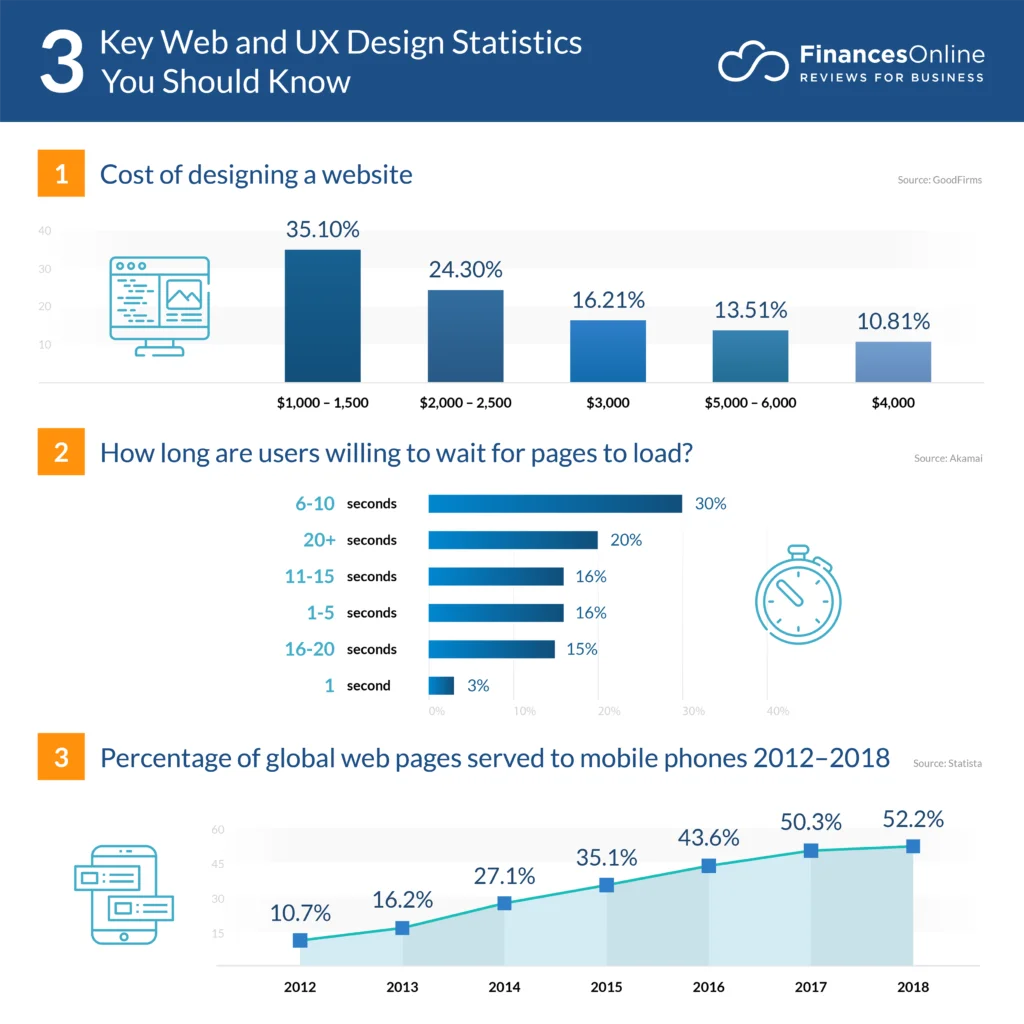
In the digital era, time is the ultimate luxury. Speed optimization ensures that users don’t waste theirs waiting for your website to load. Fast load times signal efficiency and professionalism. From server responses to visual content, every millisecond counts. Less than 2 seconds of loading speed increases user satisfaction, boosts search rankings, and directly impacts conversions.
Strategies for Speed Optimization
● Opt for a reliable hosting solution and consider using CDNs.
● Use browser caching to store and reuse frequently used data.
● Ensure all images are compressed without sacrificing quality.
● Reduce HTTP requests by combining files and minimizing external scripts.
● Combine and minimize JavaScript and CSS files for speedier page rendering.
● Apply lazy loading to show only necessary images/content, delaying the rest until needed.
7. Display Social Proof
Social proof validates the decision-making process because online shoppers feel more secure purchasing something that others recommend. Within eCommerce, social proof can take numerous forms; testimonials, popularity indicators (e.g., “Best Seller” tags), and user-generated content.
Knowing that a product is popular or well-received among peers builds trust in potential buyers. They act as a digital form of word-of-mouth, offering firsthand accounts of user experiences with products or services.
Display positive reviews from social media platforms like Instagram, Facebook, Reddit, etc. on your eCommerce website. Customer reviews provide additional information about the products, highlighting aspects that might not be covered in product descriptions. This helps customers in their purchasing decisions.
Strategies to Leverage Social Proof
● Incentivize Reviews: Encourage users to leave reviews by offering discounts or loyalty points.
● Highlight Reviews: Place user reviews prominently on product pages to make sure they are easily noticeable.
● Utilize User-Generated Content: Feature user-generated content (photos of real customers using the product) to provide relatable visuals and scenarios.
● Showcase Testimonials: Display testimonials close to CTAs, especially on landing pages and during checkout, to reinforce trust and reliability.
● Leverage Popularity Indicators: Use labels like “Best Seller” or “Popular Choice” to provide subtle nudges to products that other customers love.
8. Accessibility For All
An inclusive digital space ensures all users, regardless of their physical abilities or disabilities, can engage, navigate, and transact effortlessly. Some users rely on assistive technologies like screen readers, braille displays, or alternative input devices.
Various regions have established legal frameworks that mandate digital accessibility, safeguarding the digital rights of those with disabilities. Accessibility isn’t just about fostering inclusivity but also adhering to legislative requirements like the Americans with Disabilities Act (ADA) or the Web Content Accessibility Guidelines (WCAG).
An accessible website broadens your customer base and positively impacts brand perception, showing your commitment to inclusivity and ethical business practices.
Strategies to Ensure Accessibility
● Alt Text for Images: Include descriptive alt text for every image to convey context and content to users using screen readers.
● Keyboard Navigation: Ensure all interactive elements are keyboard accessible and navigable.
● Contrast and Readability: Guarantee text is readable by ensuring sufficient contrast and offering font size options.
● Consistent, Logical Layout: Keep a consistent layout to facilitate easier navigation for users with cognitive disabilities.
● Multimedia Alternatives: Provide text alternatives, such as transcripts or captions, for multimedia content.
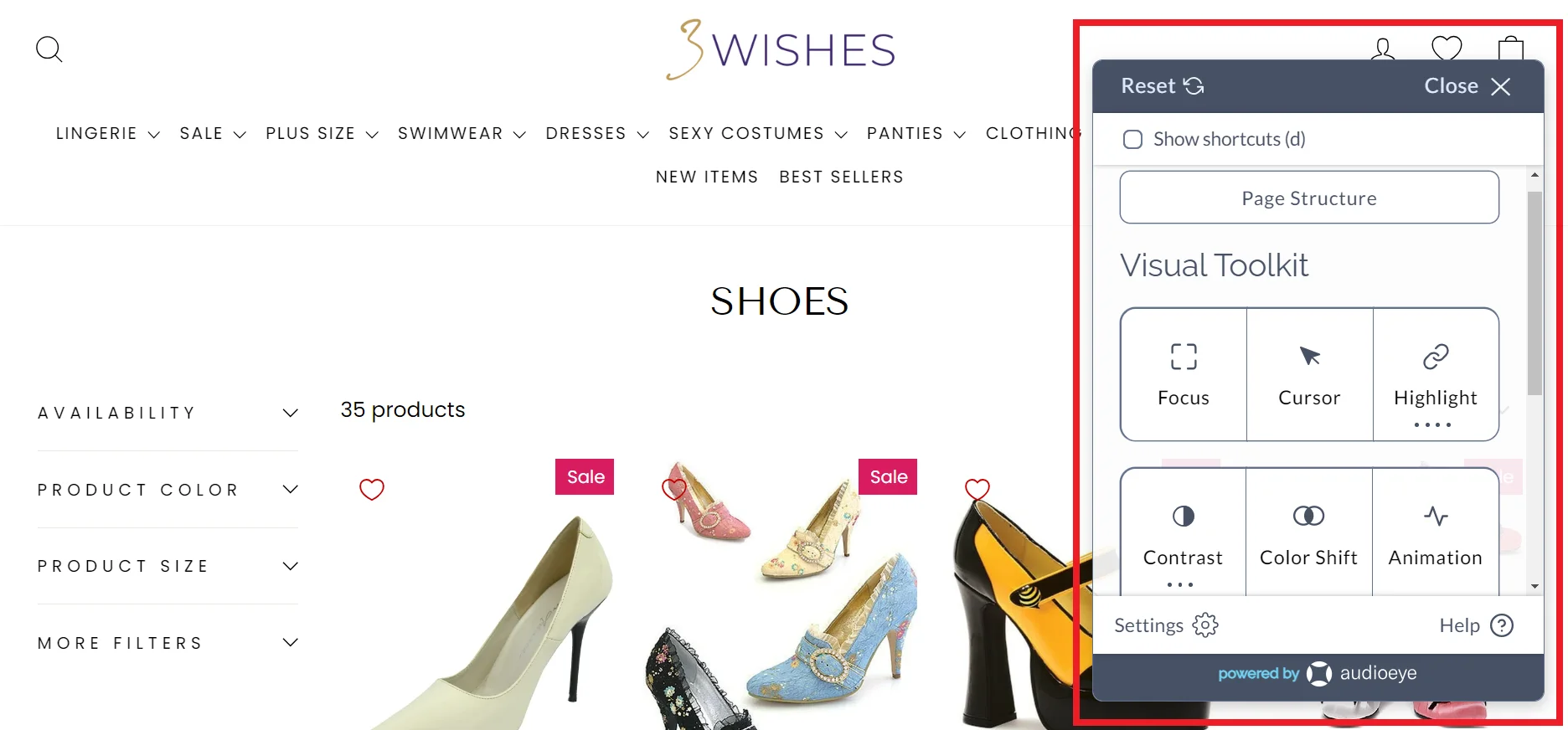
Take the standout example of this disability-friendly online lingerie store. It’s AudioEye Trusted, showing that it adheres to ADA and WCAG compliance. Features like alternative text for images, keyboard navigation, and screen reader compatibility come in handy for visually impaired users.
It ensures every user, regardless of their physical abilities, can navigate, understand, and interact with the website. This creates an enjoyable and frictionless online shopping experience for everyone.
This feature not only helps to expand the brand’s customer base but also builds customer trust. It shows they care and respect every individual in the online shopping journey. It gives a positive brand image and removes any legal risks that come with digital laws.
9. Customer Support & Live Chat
A seamless customer support experience is not just based on solving problems but proactively ensuring customers feel valued and supported. Effective customer support improves user experience by ensuring browsing to purchasing to post-purchase is as smooth and hassle-free as possible.
Representatives guide customers toward making informed decisions. They suggest additional items that complement their purchase and guide them toward alternative items that better suit their needs. This approach subtly enhances conversion and average order value.
Similarly, live chat systems serve as a real-time communication bridge between eCommerce businesses and customers. The immediacy of live chat enables customers to gain instant answers and solutions to their queries.
Both live chat and customer support facilitate personalized experiences. They can provide tailored advice, offer product recommendations, and create a one-on-one interaction that makes customers feel acknowledged and appreciated.
Strategies to Maximize Impact
● Aim for 24/7 live chat and support or communicate the available hours.
● Integrate smart chatbots for after-hours to provide immediate, albeit automated, responses.
● Integrate social networks like Telegram, Facebook Messenger, Instagram, etc. providing instant, on-the-go support.
● Ensure customer support teams are well-trained and knowledgeable about the products and policies. Help them develop self-evaluation to ensure they serve clients the best way possible.
● Leverage real-time data to provide personalized assistance and recommendations.
● Implement a task management system when handling email support so teams know what to prioritize.
Overlooking UX can be a costly misstep. Next, we’ll explore the pivotal advantages you could be forfeiting unless you implement the best practices discussed.
6 Benefits of Implementing eCommerce User Experience Best Practices
Investing in eCommerce User Experience directly impacts sales, brand perception, and customer loyalty. Let’s find out how a seamless website user experience can benefit your business:
A. Increased Conversion Rates
It’s easier for customers to find and purchase products when the shopping journey is intuitive. A smooth user experience will elevate conversion rates.
B. Customer Retention
A user-friendly site not only attracts new customers but retains existing ones. Consistent positive interactions create brand loyalty and a sense of online community. This ensures that customers keep returning for future purchases, thereby increasing each customer’s lifetime value.
C. Reduced Cart Abandonment Rate
Many eCommerce sites face the challenge of users adding products to the cart but not completing the purchase. A frictionless UX, from product selection to payment, minimizes these drop-offs.
D. Positive Brand Perception
An eCommerce site often serves as the first point of interaction between a brand and its potential customers. A well-thought-out UX reflects professionalism and a customer-centric approach, enhancing the brand’s image and credibility.
E. Lower Customer Support Costs
An eCommerce site that’s easy to navigate causes fewer issues or confusion. This means fewer customer support inquiries, saving costs in manpower and resources. Additionally, clear FAQ sections and self-help resources remove the need for direct customer support.
F. Enhanced Customer Satisfaction
Happy customers are more likely to spread the word. An enjoyable shopping experience builds positive reviews, social media shoutouts, and recommendations, serving as organic promotion channels for the brand.
Conclusion
Elevating your eCommerce business sales and customer satisfaction doesn’t merely rest on your offers but heavily on crafting an intuitive, seamless experience, and delightful user journey. Through potent UX best practices, you’re not just presenting a platform; you’re providing a path from browsing to purchasing.
This will make sure each visitor is not just a viewer but a potential happy customer. Apply the strategies and techniques discussed to convert your visitors into loyal customers.
Need more help enhancing the UX design of your website? At Telkoware, we do more than just set up shop for you online. We are a user experience design agency that creates your eCommerce website design to stand out in the digital crowd, ensuring that your site is not just another stop for your visitors but their go-to destination. Get ready to watch your site evolve into a bustling hub of conversions and sales by reaching out to us at info@telkoware.com OR (437)223-1771.
Author Bio
Burkhard Berger is the founder of Novum™. He helps innovative B2B companies implement revenue-driven SEO strategies to scale their organic traffic to 1,000,000+ visitors per month. Curious about what your true traffic potential is?
In today’s rapidly evolving digital landscape, choosing the right web app development agency has become a critical factor for businesses aiming to thrive and innovate. As companies increasingly turn towards digital solutions to enhance their operations and customer experiences, the challenge lies not in deciding whether to embark on this transformation journey, but in finding the perfect partner to travel alongside them. Imagine navigating through a maze of options, where every agency promises unparalleled expertise and revolutionary results, yet only a few truly understand your unique vision and requirements. This is where the art of selection becomes crucial—it’s not just about finding a service provider, but about choosing a collaborator who can bring your digital aspirations to life.
Embarking on a seamless digital transformation involves more than just technical proficiency; it requires a blend of strategy, creativity, and foresight. While the prospect might seem daunting, breaking down the process into manageable steps can illuminate your path. From assessing agency portfolios to delving into client testimonials, uncovering these essential aspects will empower you to make informed decisions. In this blog post, we explore 12 simple steps to guide you through this journey, ensuring that your chosen web app development agency not only meets your expectations but also propels your organization into a future of innovation and success. Strap in as we demystify the process, helping you forge a partnership that transforms your digital dreams into reality.
1. Understanding Your Digital Transformation Goals
Understanding your digital transformation goals is crucial before embarking on the journey of finding the ideal web app development agency. To achieve a seamless digital transformation, define your objectives clearly. Identify the specific areas within your business that require enhancement through technology. Conduct a thorough analysis of your current processes and systems to pinpoint the gaps that need to be filled.
Consider the scalability and flexibility required for your web applications. Assess how your chosen web app development agency can support your future growth and evolving needs. Look for a partner with a proven track record in delivering tailored solutions that align with your digital transformation goals.
Collaboration is key in achieving successful digital transformation. Ensure that the web app development agency you choose values open communication and constant collaboration throughout the project. Transparency and feedback are essential components for a smooth and effective transformation journey.
By understanding your digital transformation goals clearly, you can select the ideal web app development agency that will empower your business to thrive in the digital landscape.
2. Researching Potential Agencies
Researching potential agencies for your web app development project is a crucial step towards achieving a successful digital transformation. To find the ideal web app development agency, follow these simple steps:
1. Define Your Requirements: Clearly outline your project goals, budget, and timeline.
2. Search Online: Look for web app development agencies that specialize in your industry.
3. Read Reviews: Check client testimonials and reviews to gauge the agency’s reputation.
4. Portfolio Evaluation: Examine the agency’s portfolio to see if their previous work aligns with your vision.
5. Expertise Assessment: Ensure the agency has expertise in the latest technologies and trends.
6. Request Proposals: Ask for detailed proposals from shortlisted agencies.
7. Cost Comparison: Compare pricing structures and services offered by different agencies.
8. Meet the Team: Arrange meetings with the agency’s team to assess their communication and collaboration style.
9. Check References: Contact past clients to get feedback on their experience with the agency.
10. Contract Review: Carefully review the contract terms and conditions before finalizing.
11. Set Milestones: Establish project milestones for transparent progress tracking.
12. Sign the Agreement: Once satisfied, sign the agreement and kickstart your digital transformation journey.
3. Evaluating Agency Expertise and Experience
When evaluating agency expertise and experience, it’s crucial to look beyond surface-level claims. A reputable web app development agency should have a proven track record in delivering seamless digital transformation solutions.
Consider the agency’s portfolio to gauge their expertise in creating innovative web applications. Look for case studies that showcase their successful projects in various industries.
Experience plays a vital role in selecting the ideal web app development agency. An agency with years of experience is more likely to understand the complexities of digital transformation and provide tailored solutions to meet your specific needs.
Client testimonials and reviews are also valuable indicators of agency expertise. Positive feedback from satisfied clients can give you confidence in their capabilities.
Furthermore, assess the agency’s technical skills, team expertise, and their approach to project management. A collaborative and communicative agency will ensure a smooth development process and successful project delivery.
By following these steps, you can find the ideal web app development agency for your digital transformation journey.
4. Analyzing Portfolio and Case Studies
When analyzing a web app development agency’s portfolio and case studies, focus on key aspects to determine their capabilities. Look for diversity in the projects they have undertaken, showcasing their expertise in various industries and technologies. Check for successful outcomes and client satisfaction metrics in their case studies to gauge their effectiveness.
Portfolio evaluation involves assessing the agency’s design aesthetics, user experience, and technical proficiency across different platforms. Delve into case studies to understand their problem-solving approach, project management skills, and ability to deliver within deadlines.
By examining portfolios and case studies, you can identify patterns of innovation, creativity, and attention to detail that set a web app development agency apart. Pay attention to client testimonials, awards, and recognition to validate their credibility and track record of success in driving digital transformation for businesses.
5. Assessing Industry Reputation and Client Testimonials
Assessing industry reputation and client testimonials is crucial. Begin by researching the agency’s reputation within the web development community. Look for reviews, ratings, and feedback from previous clients to gauge their credibility.
Client testimonials play a vital role in showcasing the agency’s expertise and success stories. Client feedback can provide insights into the agency’s communication, project management, and overall satisfaction levels. Ensure to delve deep into these testimonials to understand the agency’s strengths and areas of improvement.
By analyzing the industry reputation and client testimonials, you can make an informed decision when selecting the ideal web app development agency for your project. Remember, a reputable agency with positive client feedback is more likely to deliver a seamless digital transformation experience.
6. Discussing Project Scope and Requirements
When discussing a project scope and requirements, it’s crucial to define the project’s objectives clearly. Understanding the desired outcomes will guide the web app development agency in delivering a tailored solution. Start by outlining the functionality and features needed for the web app. This step helps in setting clear expectations and avoiding scope creep during the development process.
Next, delve into the technical requirements such as platform compatibility, security measures, and scalability options.
Communicate any specific design preferences or branding guidelines to ensure the agency aligns with your vision. Collaborating on wireframes and prototypes can further refine the project scope and provide a visual representation of the final product.
Regularly review and update the project scope as needed to accommodate any changes or new insights. Clarity and transparency in discussing project scope and requirements lay a solid foundation for a successful partnership with your web app development agency.
7. Transparency in Communication and Collaboration
When it comes to transparency in communication and collaboration, it is crucial for any successful partnership, especially when selecting a web app development agency for your digital transformation journey.
By prioritizing transparency and open communication, you can establish a strong foundation for a successful partnership with your chosen web app development agency.
8. Budget Considerations and Negotiations
Budget considerations and negotiations play a vital role in the decision-making process. To ensure a seamless digital transformation, it’s crucial to follow a structured approach that aligns with your financial constraints.
Before diving into negotiations, define your budget clearly. Research the market rates for web app development services to have a realistic budget in mind. When engaging with agencies, be transparent about your financial boundaries while emphasizing the value you seek within that budget.
During negotiations, focus on the scope of work, delivery timelines, and payment terms. Be open to compromises while safeguarding your interests. Look for agencies willing to tailor their services to fit your budget without compromising quality.
By strategically addressing budget considerations and negotiating effectively, you can find the ideal web app development agency that not only meets your financial constraints but also delivers exceptional results for your digital transformation journey.
9. Ensuring Timely Delivery and Quality Assurance
To ensure timely delivery and quality assurance, communicate any critical deadlines early onwards and have the web app development agency prepare a detailed project plan with delivery dates for all key milestones. Conduct regular quality checks during the development phase to identify and address any issues early on. That way, the development team has enough time to fix those issues, while continue to deliver new features, as per agreed upon schedule. An ideal agency would implement feedback loops to fine-tune the web app before final delivery, ensuring optimal quality assurance.
10. Establishing Long-Term Support and Maintenance Plans
When looking to establish long-term support and maintenance plans, it’s crucial to consider a structured approach. Begin by evaluating your current systems and processes to identify areas that require continuous support. Implementing regular maintenance checks ensures smooth operations and minimizes downtime. You can also ask the agency to train a few of your team members on common issues and how to resolve them, leaving more critical issues / high-severity issues for the agency to resolve.
Regularly updating your web applications is essential to stay relevant in the ever-evolving digital landscape. Conducting thorough testing before each update guarantees a seamless user experience. Additionally, documenting all maintenance activities helps track progress and identify areas for improvement.
11. Finalizing the Partnership Agreement
Finalizing the partnership agreement with a web app development agency is a crucial step towards seamless digital transformation. Make sure that project scope with deliverables is well-defined in the agreement, along with any commitment of resources with specific skill sets. Pricing and payment schedule is also a key component of the agreement. Address intellectual property rights and confidentiality terms and conditions into the agreement.
Sign the partnership agreement only when you are fully satisfied with the terms and conditions, marking the beginning of a successful collaboration.
12. Monitor Progress and Provide Feedback
To successfully find the ideal web app development agency for your digital transformation journey, it’s crucial to monitor progress and provide feedback throughout the process. This ensures that the agency aligns with your goals and delivers the desired results.
Tracking progress allows you to stay informed about the project’s status, timelines, and any potential roadblocks. Regular updates from the agency help in identifying any deviations from the initial plan and enable timely interventions.
Feedback plays a key role in shaping the direction of the project. By providing constructive feedback at various stages, you can steer the development process towards meeting your expectations. Clear communication regarding your likes, dislikes, and desired changes is essential for a successful collaboration with the web app development agency.
In conclusion, monitoring progress and offering feedback are essential components of the collaboration process with a web app development agency. By actively engaging in these practices, you can ensure a seamless digital transformation journey that meets your business objectives.
If you are thinking about a digital transformation initiative, feel free to reach out to us to brainstorm ideas and we can help you come up with a clear, actionable plan to implement the solution. You can reach us at info@telkoware.com OR 1(437)223-1771.
When I began looking into Canadian web design agencies, I realized that Canada is full of talented professionals who excel in creating visually stunning and functionally superior websites. These agencies specialize in a wide array of areas that make the entire web design process smoother and more efficient for businesses.
Also, Canadian web design agencies are well-regarded for their innovative approaches and technical expertise. Here are key aspects to consider:
Expertise and Specializations
Canadian web design agencies typically offer comprehensive services, including:
Custom Web Design: Tailoring websites to reflect the unique identity and needs of a business.
Responsive Design: Ensuring websites work seamlessly across different devices and screen sizes.
E-commerce Solutions: Setting up online stores with secure payment gateways and user-friendly interfaces.
SEO Optimization: Implementing strategies to boost a website’s visibility on search engines.
Content Management Systems: Utilizing platforms like WordPress, Joomla, or Drupal to allow for easy content updates.
Website Maintenance: Providing ongoing updates and bug fixes to keep websites running smoothly.
Cutting-Edge Technology
Most agencies utilize the latest technologies, including:
Responsive Design: Ensures websites look great on all devices.
Content Management Systems: Expertise in platforms like WordPress, Joomla, and Drupal.
HTML5 and CSS3: For modern, dynamic, and aesthetically pleasing designs.
Dynamic Frameworks: Use of Angular, React, or Vue.js for versatile web applications.
Portfolio and Case Studies
Examining an agency’s portfolio can provide insights into their versatility and quality of work. Look for:
Variety: A range of projects that showcase different styles and industries.
Quality: High-caliber design and functionality.
Success Stories: Case studies that demonstrate measurable results and client satisfaction.
Client Feedback and Reputation
Consider the agency’s reputation within the industry. Evaluate their:
Client Testimonials: Honest feedback from previous clients.
Online Reviews: Reviews on platforms like Google, Clutch, or Yelp.
Awards and Recognition: Industry accolades that highlight their expertise and credibility.
Pricing and Packages
Understanding an agency’s pricing can help align your budget:
Transparent Pricing: Clear, upfront pricing without hidden costs.
Service Packages: Various packages that cater to different budget levels.
Value for Money: Evaluating what you get for your investment.
Communication and Collaboration
Effective communication is essential:
Responsive: Quick to respond to inquiries.
Collaborative: Open to involving you in the process and considering your ideas.
Project Management: Utilization of tools like Trello or Asana for seamless collaboration.
Geographic Considerations
While choosing a Canadian web design agency, consider:
Local Expertise: Understanding of local markets and consumer behavior.
Time Zone Alignment: Compatible working hours for smoother collaboration.
Face-to-Face Meetings: Possibility of in-person consultations if needed.
By taking into account these aspects, you can make an informed decision when selecting a Canadian web design agency that aligns with your project’s needs and goals.
Benefits of Hiring a Canadian Web Design Agency
When you choose a Canadian web design agency, you unlock numerous advantages that can propel your business to new heights.
1. High-Quality Standards
Canadian web design agencies adhere to rigorous quality standards. Canada boasts some of the best educational institutions, ensuring that designers have a solid foundation in their craft.
2. Cultural Understanding
With a web design agency in Canada, you benefit from their innate understanding of Canadian culture and market. This insight helps in creating a website that resonates with your target audience.
3. Bilingual Expertise
Many Canadian agencies offer bilingual services in English and French. This advantage broadens your reach, especially if you aim to cater to various demographics within Canada.
4. Advanced Technologies
Canadian designers often use the latest technologies and tools. You’re assured that your website will be innovative and up-to-date with current trends.
5. Strong Communication Skills
Canadian agencies are known for their excellent communication skills. You’ll find it easy to convey your vision and receive regular updates on project progress.
6. Reliability and Professionalism
Canadian web design companies are known for their reliability and professionalism. Hiring locally means you’re more likely to encounter fewer delays and misunderstandings.
7. Competitive Pricing
Compared to agencies in other countries, Canadian web design services often offer competitive pricing without compromising on quality. This balance of cost and quality is ideal for growing businesses.
8. Time Zone Compatibility
If you’re based in the U.S. or Europe, the time zone compatibility with Canada can be advantageous. It simplifies scheduling meetings and reduces waiting times for updates.
9. Strong Work Ethic
Canadian agencies are renowned for their strong work ethic. They often go above and beyond to ensure client satisfaction.
10. Local SEO Expertise
Canada-based agencies have a profound understanding of local SEO. They can implement strategies that improve your website’s visibility in Canadian search engines.
Hiring a Canadian web design agency offers you numerous benefits, from high-quality standards to effective SEO strategies.
Understanding Your Business Needs
Before diving into the selection process for a Canadian web design agency, it’s critical to identify and understand your business needs. Recognizing these needs will guide you in finding the right match and ensuring a successful partnership.
Identify Your Primary Goals
Consider what you aim to achieve with your website:
Brand Awareness: Are you looking to increase your brand’s online presence?
E-commerce: Will your site serve as an online store requiring seamless integration of payment systems?
Lead Generation: Is the primary focus of your site to generate leads and conversions?
Evaluate Your Audience
Understanding your target audience helps in designing an engaging and effective site:
Demographics: Who is your audience? Age, gender, location, and other demographic factors will influence design decisions.
Behavior: What are their online habits? Consider how they interact with similar websites.
Preferences: What do they value in a user experience? Navigation ease, aesthetic appeal, and loading times are key factors.
Determine Key Features
Essential features ensure that the website meets your business objectives:
Responsive Design: Ensure the site functions well across various devices.
SEO Optimization: The site should incorporate SEO practices to rank well in search engines.
Analytics: Implement tools to track user behavior and site performance.
Budget Considerations
Establishing a budget will help narrow down your choices:
Initial Cost: What is your budget for initial development, including design and setup costs?
Maintenance: Factor in costs for ongoing maintenance and updates.
Additional Services: Consider budget for additional services such as content creation, social media integration, or custom functionalities.
Assessing Technical Expertise
Knowing your technical needs will help you evaluate agency capabilities:
CMS Requirements: Do you need a specific Content Management System (CMS) like WordPress or Shopify?
Custom Development: Will you require custom coding or third-party integrations?
Security: Make sure the agency can implement necessary security measures.
Timeline and Scalability
Consider your project timeline and future growth:
Project Timeline: What is your desired launch date? Make sure the agency can meet your deadlines.
Growth Plans: Will your site need scalability for future growth, additional features, or increased traffic?
By clearly understanding and documenting your business needs, you set a solid foundation for evaluating potential web design agencies. This approach ensures you choose an agency well-suited to deliver a website that aligns with your business goals and audience needs.
Researching Potential Agencies
When you embark on the journey of selecting a Canadian web design agency, initial research is crucial. You need to explore various agencies to find the one that aligns best with your unique requirements. Below are key steps to guide you:
1. Define Your Needs
Begin by clearly defining what you need from a web design agency. This includes your website’s purpose, desired functionalities, and aesthetic preferences. Establish your budget and timeline as these factors will significantly influence your choices.
2. Look for Specializations
Not all web design agencies are the same. Some specialize in e-commerce, while others are experts in corporate websites or portfolios. Identify agencies that have experience and expertise in the type of project you’re planning.
3. Check Portfolios
Review the portfolios of potential agencies to gauge their design style and quality. Look for projects similar to yours and assess whether their work resonates with your vision. The portfolio should offer a diverse range of designs demonstrating the agency’s versatility.
4. Read Client Reviews and Testimonials
Client reviews and testimonials give you insights into the agency’s reliability and customer satisfaction. Look for reviews on their website, Google My Business, and other review platforms. Pay attention to recurring themes about their professionalism, communication, and adherence to deadlines.
5. Evaluate Their Website
A web design agency’s website serves as their digital resume. Evaluate it for user experience, design quality, and functionality. This reflects their capability to deliver a compelling website for you.
6. Reach Out for Case Studies
Case studies provide in-depth examples of how an agency approached and executed previous projects. They often detail challenges faced, solutions implemented, and the impact on the client’s business. Request case studies to see their problem-solving skills in action.
7. Assess Technical Skills
Ensure the agency has the technical skills necessary for your project. These may include:
Responsive Design: For mobile-friendly websites.
SEO Optimization: To enhance visibility on search engines.
CMS Proficiency: Expertise in platforms like WordPress, Drupal, or Joomla.
8. Inquire About the Process
Understanding the agency’s web design and development process can help you gauge their professionalism and transparency. Ask about the stages involved, from initial consultation to launch and aftercare services.
9. Schedule a Consultation
A consultation allows you to discuss your project in detail and assess the agency’s understanding and enthusiasm for your work. Evaluate their communication style and willingness to collaborate during this meeting.
10. Compare Quotes
Request quotes from different agencies and compare them against their proposed solutions and services. Ensure there are no hidden fees and that everything is clearly outlined in their proposal.
Thorough research is essential before making your final decision. A well-researched choice ensures that the agency you select will deliver a website that meets your needs and surpasses your expectations.
Evaluating Portfolios and Case Studies
When choosing a Canadian web design agency, scrutinize their portfolios and case studies to understand their capabilities. An agency’s portfolio showcases their past projects, giving you insight into their style and versatility. Case studies, on the other hand, provide detailed accounts of the challenges they faced and how they addressed them, proving their problem-solving skills.
Key Elements to Analyze
Design Quality: Look for visually appealing and user-friendly websites. Pay attention to layout, color schemes, typography, and imagery.
Diversity of Projects: Ensure the agency has experience across various industries. A diverse portfolio indicates adaptability and broader expertise.
Technical Proficiency: Evaluate their use of modern technologies, including responsive design, mobile optimization, and content management systems (CMS).
Important Questions to Ask
Have They Worked with Similar Businesses?: Assess their understanding of your industry and target audience.
Can They Provide References?: Confirm their reliability and quality of work by speaking with past clients.
What Were the Outcomes of Their Projects?: Look at metrics like increased traffic, improved engagement, and conversion rates in their case studies.
What to Look for in Case Studies
Problem Definition: The clarity with which they define the client’s challenge will reveal their analytical skills.
Solution Implementation: Detailed explanations of the strategies and technologies they used can showcase their expertise.
Results Measurement: Look for concrete data showing how their work positively impacted the clients’ business.
Red Flags to Watch
Lack of Detail: Vague descriptions may indicate inexperience or poor performance.
Outdated Design Trends: Ensure the agency stays current with design trends and technology.
Limited Portfolio: A sparse portfolio might suggest a lack of experience or variety.
Tips for Portfolio Evaluation
User Experience: Navigate through their past projects to gauge user experience. Notice loading speeds, navigation ease, and mobile responsiveness.
Consistency and Originality: Balance between a cohesive style and unique designs demonstrates creativity within a reliable framework.
Clientele Range: Working with both small businesses and large corporations indicates flexibility and scalability.
By thoroughly evaluating portfolios and case studies, you will be better equipped to select a Canadian web design agency that meets your specific needs and expectations. This approach ensures you partner with an agency that not only creates stunning websites but also delivers successful, measurable results.
Comparing Service Offerings and Pricing
When choosing a Canadian web design agency, comparing service offerings and pricing is crucial to make an informed decision. This step ensures you get the best value for your investment. Here’s a breakdown of what to consider:
Service Offerings
Website Design and Development:
Ensure the agency specializes in both UX (user experience) and UI (user interface) design.
Check if they offer responsive design for mobile and tablet compatibility.
Evaluate their expertise in various CMS platforms like WordPress, Drupal, or Joomla.
SEO and Digital Marketing:
Investigate if they provide SEO services to enhance your website’s visibility.
Look for additional services like content marketing, social media management, and PPC (pay-per-click) advertising.
E-commerce Solutions:
Confirm if they can develop secure and user-friendly e-commerce sites.
Assess their familiarity with platforms like Shopify, Magento, or WooCommerce.
Maintenance and Support:
Check their availability for ongoing support post-launch.
Ensure they offer maintenance packages to keep your website updated and secure.
Custom Solutions:
Verify if they can provide bespoke solutions tailored to your unique business needs.
Examine their capability to integrate third-party applications or custom features.
Pricing
Transparent Pricing Structure:
Look for agencies that provide clear and upfront pricing.
Compare packages and understand what is included in each.
Project-Based vs. Hourly Rates:
Determine if the agency charges a flat fee for the entire project or hourly rates.
Assess which option aligns better with your budget.
Additional Costs:
Inquire about any extra costs for services like hosting, domain registration, or premium plugins.
Be aware of potential hidden fees that might arise during development.
Payment Terms:
Understand the payment schedule—whether they require a deposit, milestone payments, or full payment upfront.
Clarify refund policies in case the project doesn’t go as planned.
Value for Money:
Compare the quality of services offered relative to their price.
Evaluate client reviews and testimonials to gauge their satisfaction with the delivered results.
Paying attention to these factors will allow you to effectively compare Canadian web design agencies based on their service offerings and pricing, ensuring you choose the right partner for your project.
The Importance of Communication and Collaboration
When selecting a Canadian web design agency, evaluating their communication and collaboration practices is crucial. Effective communication ensures your vision is translated accurately into the final design, while seamless collaboration fosters a productive working relationship. Here are essential considerations:
Transparent Communication:
Ensure the agency maintains open channels for regular updates.
Assess how clearly they explain technical details and project timelines.
Confirm they offer multiple ways to contact them, such as email, phone, or video calls.
Collaborative Approach:
Determine if the agency encourages your input at each project stage.
Check if they use collaborative tools like Slack, Trello, or Asana for project management.
See how they handle feedback and revisions to make sure they value your perspective.
Responsiveness:
Gauge their response times to your inquiries during the initial consultation.
Look for promptness in addressing concerns and providing updates.
Fast responsiveness can indicate their readiness to tackle urgent issues during development.
Client Onboarding Process:
Investigate the agency’s onboarding process to understand their approach to new projects.
Good onboarding includes detailed discussions about your project’s objectives and expectations.
Regular Updates:
Verify if the agency schedules regular meetings or check-ins to discuss the project’s progress.
Regular updates keep you in the loop and allow for timely adjustments.
Cross-functional Teams:
Examine if the agency has integrated teams comprising designers, developers, and content creators.
Cross-functional teams generally exhibit better intra-team communication and cohesive work output.
Cultural Fit:
Consider the agency’s cultural values to ensure they align with your business ethics.
A good cultural fit can enhance mutual understanding and respect.
Project Management Skills:
Check the project management methodologies they adopt, such as Agile, Scrum, or Waterfall.
Effective project management practices can facilitate smoother processes and timely delivery.
Experience with Canadian Market:
Opt for agencies familiar with the Canadian market to leverage local nuances.
They will better understand the market’s unique needs and user behaviors.
Ultimately, solid communication and effective collaboration with your chosen Canadian web design agency can significantly impact the success of your web project. Prioritizing these aspects will help ensure your goals are met and the process remains efficient and enjoyable.
Checking Client Reviews and Testimonials
Before you finalize your decision on a Canadian web design agency, it’s essential to check client reviews and testimonials. This process offers insightful information about the agency’s reliability and the quality of its services.
Where to Find Reviews and Testimonials
Official Website:
Most reputable agencies showcase client testimonials on their websites. Look for a dedicated testimonial page or client feedback section.
Third-Party Review Sites:
Platforms like Clutch, Trustpilot, and Google Reviews provide unbiased client reviews. These sites can give you a broader perspective on the agency’s reputation.
Social Media:
Check their social media profiles. Clients often leave reviews and comments that can provide additional insights.
What to Look For
Consistency:
Ensure that the reviews are consistently positive. A mix of highly positive and extremely negative reviews might indicate inconsistency in service quality.
Specific Feedback:
Look for reviews that offer specific details rather than generic praise. Detailed testimonials can provide you with a clearer picture of what to expect.
Response to Negative Reviews:
How an agency handles negative feedback is crucial. An agency that addresses criticism professionally and resolves issues effectively demonstrates good client relations.
Analyzing the Testimonials
Project Scope:
Focus on testimonials that discuss projects similar to yours in scope and complexity. This ensures the agency can handle your specific requirements.
Client Satisfaction:
Check if multiple clients mention high satisfaction with the results. This indicates the agency’s ability to meet or exceed client expectations.
Repeat Clients:
Look for mentions of repeat clients. A high number of repeat clients suggests that the agency strives for long-term customer satisfaction.
Red Flags to Watch For
Overly Generic Testimonials:
Be cautious of reviews that are too vague or overly positive without substantial details. These could be fabricated or incentivized.
Lack of Recent Reviews:
An absence of recent reviews might signal that the agency hasn’t had many recent projects or that clients aren’t willing to share their experiences.
Negative Trends:
If you notice recurring complaints about specific issues like communication, missed deadlines, or poor quality, take heed. These patterns can be significant red flags.
By thoroughly investigating customer reviews and testimonials, you gain a comprehensive understanding of a web design agency’s capabilities and client satisfaction levels, ensuring you make an informed decision.
Legal Considerations and Contracts
When choosing a Canadian web design agency, it is crucial to consider legal aspects and ensure you have solid contracts in place. Legal considerations safeguard your interests and clarify expectations on both sides. Here are the key areas to focus on:
Understanding Intellectual Property (IP)
Ownership Rights: Clarify who owns the final design. Typically, you should own the design, but verify this in the contract.
Usage Rights: Specify how your business can use the design. Distinguish between exclusive and non-exclusive rights.
Transfer of Rights: Ensure the contract includes a clause that transfers all IP rights to you upon project completion and payment.
Confidentiality and Non-Disclosure Agreements (NDAs)
Protecting Sensitive Information: A well-drafted NDA ensures the agency keeps your business information confidential.
Duration: Specify how long the confidentiality obligations will last. This is usually two to five years.
Scope: Clearly define what constitutes confidential information to avoid any ambiguity.
Service Level Agreements (SLAs)
Performance Metrics: Detail expected deliverables and timelines. Include quality standards the agency must meet.
Penalties: Outline penalties for missed deadlines or subpar work. This could include financial compensation or fee rebates.
Support and Maintenance: Describe any ongoing support or maintenance services post-launch. Define response and resolution times.
Payment Terms
Fee Structure: Define how and when payments will be made. Include any milestones triggering partial payments.
Refunds and Cancellations: Include terms for refunds or cancellations. Specify conditions under which you can request a refund.
Additional Costs: Identify any potential additional costs, such as third-party services or software licenses.
Dispute Resolution
Governing Law: Identify the legal jurisdiction that will govern the contract. Typically, this should be based on Canadian laws.
Arbitration and Mediation: Consider adding clauses regarding arbitration or mediation to resolve any disputes. This can be faster and less expensive than going to court.
Termination Clauses: Define the terms under which either party can terminate the contract. Include notice periods and any exit fees.
Compliance with Canadian Laws
Data Protection: Ensure the agency complies with Canadian privacy laws, such as PIPEDA, protecting customer data.
Accessibility Standards: Verify the agency adheres to Canadian web accessibility standards (AODA) in their designs.
Taxation: Make sure the agency includes applicable taxes in the contract to avoid surprises later.
Documentation
Detailed Proposals: Request a detailed proposal outlining the scope, timeline, and cost breakdown. This minimizes misunderstandings.
Change Orders: Include provisions for change orders, detailing how changes to the project will be handled and billed.
Regular Updates: Ensure the contract mandates regular progress updates and transparent communication channels.
Testing and Finalizing Your Decision
Before finalizing your choice of a Canadian web design agency, it’s crucial to conduct thorough testing and gather all necessary information to make an informed decision.
Request a Mockup or Prototype
Ask for a demo: Request a mockup or prototype of your website. This will give you a tangible sense of their design skills and how they align with your vision.
Functionality check: Ensure the prototype includes basic functionalities you’ll need. This clarity helps in visualizing the end product.
Assess Communication and Responsiveness
Evaluate communication: Throughout your interactions, take note of their responsiveness and willingness to answer queries. Effective communication is vital for a smooth project.
Project management tools: Inquire about the tools they use for project management and collaboration. Platforms like Trello, Asana, or Basecamp can streamline the process.
Review Case Studies and References
Check case studies: Look at their previous work, especially projects similar to yours. Pay attention to design aesthetics, functionality, and client feedback.
Contact references: Ask for references and speak directly with past clients. Get insights into their working experience and satisfaction level.
Understand Their Technical Expertise
Technical audit: Have a tech-savvy consultant review the technical aspects of their past projects. Ensure the code is clean, SEO-friendly, and follows best practices.
Compatibility: Confirm that their technical skills align with your website’s requirements, including CMS preferences and third-party integrations.
Testing Their Customer Support
Support services: Evaluate the type of support they offer post-launch. Check if they provide ongoing maintenance, updates, and troubleshooting assistance.
Availability: Ensure their support team is accessible during your business hours, particularly if your time zone differs.
Pricing and Contract Terms
Transparent pricing: Make sure the pricing structure is transparent, covering all potential costs like updates, plugins, and additional features.
Contract review: Go through the contract terms meticulously. Understand project timelines, payment schedules, and clauses related to scope changes or potential delays.
Make a Decision
Final assessment: Combine all the gathered information. Weigh your options based on design quality, communication, technical expertise, and cost.
Trust your gut: While facts are important, your comfort level with the agency also matters. Choose the agency that not only meets the technical criteria but also feels right for your project.
Long-term Relationship and Ongoing Support
When selecting a Canadian web design agency, it’s crucial to consider the long-term relationship and ongoing support they offer. A long-term partnership can significantly impact your website’s success and overall business growth. Here are key factors to evaluate:
Communication
Effective and timely communication ensures that both parties are on the same page. Ask these questions:
How frequently will updates be provided?
What is the primary mode of communication: email, phone, or meetings?
Is there a dedicated point of contact?
Maintenance and Updates
Websites require continuous updates and maintenance. Before making a decision, inquire about:
What kind of maintenance services are included in the package?
How are updates handled?
Is there a separate fee for major updates?
Do they offer performance monitoring and reporting services?
Technical Support
Robust technical support is indispensable for resolving issues that may arise. Evaluate their:
Availability of 24⁄7 support
Response time guarantee
Expertise in troubleshooting so you can focus on your core business activities
Training and Resources
Empower your team with the necessary skills to manage the website. Confirm:
Do they provide training sessions?
Are there any manuals or resources available?
What kind of post-launch support is available?
Client Testimonials and Case Studies
Reviewing client testimonials and case studies can offer insights into their reliability and support. Look for information on:
Past client experiences
Longevity of their client relationships
Real-world examples of support and long-term success
Flexibility and Scalability
Your business will evolve, and so should your website. Investigate:
How adaptable and scalable are their solutions?
Can they accommodate future growth and changes?
Are they experienced in implementing new technologies or trends?
Financial Considerations
A clear understanding of the financial commitment is vital. Clarify:
Are there recurring costs for ongoing support and maintenance?
What’s included in these costs?
Are there hidden fees to be aware of?
Legal and Contractual Obligations
Ensure that all legalities are transparent. Discuss:
What are the terms of the contract?
Is there a termination clause?
Are there confidentiality agreements in place to protect your data?
By thoroughly evaluating these factors, you can foster a strong, long-term relationship with your chosen Canadian web design agency, ensuring that you receive continuous support and value as your business grows.
Conclusion and Next Steps
Choosing the right Canadian web design agency can be crucial for the success of your online presence. To make an informed decision, you need to consider several factors and follow a structured approach.
Here are the steps you should take to ensure you select the best web design agency for your needs:
Determine Your Needs and Goals:
Identify the primary purpose of your website.
Set clear, measurable goals for your online presence.
Consider specific features and functionalities you need.
Research Potential Agencies:
Look for agencies with a strong portfolio.
Check client testimonials and reviews.
Verify their expertise in your industry.
Assess Their Expertise:
Evaluate their design and development skills.
Confirm their proficiency with the latest web technologies and trends.
Ensure they have experience with search engine optimization (SEO).
Evaluate Communication and Collaboration:
Assess their communication style and responsiveness.
Ensure they are willing to collaborate closely with you.
Look for a team that understands your vision.
Request Proposals and Quotes:
Ask for detailed proposals outlining their approach.
Compare quotes to ensure they fit within your budget.
Analyze the value they offer for the price.
Review Contracts and Agreements:
Carefully read through contracts to understand the scope of work.
Clarify any terms or conditions you don’t understand.
Ensure there are clearly defined milestones and deliverables.
Monitor Progress and Provide Feedback:
Stay involved throughout the project.
Provide timely and constructive feedback.
Ensure the project stays on track and meets deadlines.
By following these steps, you can choose a Canadian web design agency that aligns with your business goals and delivers a website that enhances your online presence. The right agency will not only create a visually appealing site but also ensure it is functional, user-friendly, and optimized for search engines.
Taking the time to carefully assess your options and maintain open communication with your chosen agency will lead to a successful collaboration and a website that supports your objectives.
Shopify is a leading e-commerce platform designed to enable businesses to create, develop, and manage online stores effortlessly. Recognized for its user-friendly interface and robust capabilities, Shopify has become a popular choice among startups and established brands for eCommerce store development.
Key Features of Shopify
Ease of Use:
Shopify offers an intuitive, drag-and-drop interface that simplifies the creation of websites.
No advanced technical skills are required to set up and manage an online store.
Customizable Storefronts:
A variety of themes are available which can be customized to reflect a brand’s unique style.
Access to HTML, CSS, and Liquid, Shopify’s templating language, allows for deeper customization.
Secure and Reliable:
Shopify ensures data security with SSL certification and is PCI DSS compliant.
Automatic updates and backups ensure the platform’s reliability and security.
Scalable Solutions:
Suitable for businesses of all sizes, from startups to large enterprises.
Plans and features can scale according to the growth and needs of the business.
Seamless transactions with support for international currencies and shipping calculations.
Benefits for Businesses
Cost-Effective:
Affordable pricing plans with transparent fees. No hidden costs for essential features.
Reduces the expense of hiring web developers and IT support.
Comprehensive App Store:
Access to a wide range of apps and plugins to enhance functionality.
Tools available for marketing, SEO, inventory management, and customer service.
SEO and Marketing Tools:
Built-in SEO features to help stores rank higher in search engine results.
Integration with social media platforms and tools for email marketing campaigns.
Customer Support:
24⁄7 support through various channels including phone, email, and live chat.
Extensive documentation and community resources for troubleshooting and guidance.
“Shopify allows businesses to focus on growth and innovation rather than technicalities.”
Setting Clear Objectives for Shopify Store Development: Defining Business Goals
A fundamental aspect of a successful Shopify website development involves the precise articulation of business goals. Clarity in objectives ensures that all developmental efforts are aligned with the overarching vision of the enterprise. The process begins with understanding and specifying what the business aims to achieve through its online platform.
Identifying Primary Objectives
To start, businesses need to identify their core objectives. These could include:
Revenue Growth: Aiming for a specific increase in sales volume over a defined period.
Brand Awareness: Enhancing the visibility and reputation of the brand within target markets.
Customer Acquisition: Increasing the customer base by a particular number or percentage.
Customer Retention: Improving customer loyalty through repeat purchases and engagement.
SMART Goals Framework
Adopting the SMART (Specific, Measurable, Achievable, Relevant, Time-bound) framework serves as a structured approach. For example:
Specific: Clearly define what needs to be achieved, such as a 20% increase in sales.
Measurable: Quantify the objective to track progress, like attaining 1,000 new subscribers.
Achievable: Ensure goals are realistic given current resources and market conditions.
Relevant: Align goals with broader business strategies and market needs.
Time-bound: Set a deadline, for instance, achieving the objective within the next six months.
Aligning with Business Strategy
Objectives must align with the broader business strategy, incorporating insights from market research, competitive analysis, and customer behavior studies. This ensures that the goals resonate with the market demands and competitive landscape. Alignment also influences:
Inventory Management: Stocking products based on predicted demand tied to specific goals.
Marketing Campaigns: Designing campaigns that drive towards achieving set objectives.
Customer Service: Enhancing support systems to improve customer satisfaction rates.
Monitoring and Adjusting Objectives
A crucial part of setting clear objectives is the willingness to monitor progress and make necessary adjustments. Utilizing analytics tools within Shopify can provide real-time data to assess performance against goals. Regular reviews help:
Spot Trends: Identify emerging patterns that indicate whether adjustments are needed.
Reallocate Resources: Shift focus and resources towards more effective strategies.
Continuous Improvement: Implement iterative improvements to align with evolving business needs.
By setting clear, well-defined objectives, businesses can streamline their Shopify website development, ensuring that all efforts contribute effectively towards accomplishing their unique business aspirations.
Choosing the Right Shopify Plan for Shopify Website Development
Selecting the appropriate Shopify plan is crucial for aligning with business needs and goals. Shopify offers multiple plans: Basic Shopify, Shopify, and Advanced Shopify, each with distinct features and pricing. It is best to consult with Shopify website development company you are working with, to select the most appropriate plan for your company.
Basic Shopify
Basic Shopify is ideal for new businesses or those with modest sales volumes. This plan offers essential features such as:
Online Store – Includes a website and blog.
Unlimited Products – No cap on the number of products listed.
Storage – Unlimited file storage.
Sales Channels – Integration with marketplaces and social media.
24⁄7 Support – Round-the-clock customer assistance.
SSL Certificate – Secure transactions ensuring customer data protection.
Manual Order Creation – Direct order processing from admin interface.
Shopify
The “Shopify” plan is suitable for growing businesses needing advanced report functionality and additional staff permissions:
All Basic Features – Includes all functionalities in the Basic plan.
Professional Reports – Detailed analytics for better business insights.
Gift Cards – Attractive options for customer retention and acquisition.
Staff Accounts – Up to five staff accounts for better management.
Extended Staff Accounts – Up to fifteen staff accounts.
Lower Fees – Even lower credit card and transaction fees compared to lower-tier plans.
Considerations
Business owners should consider several factors when choosing a plan:
Budget – Assess the monthly cost against business revenue.
Sales Volume – Choose a plan that minimizes transaction fees and maximizes profit margins.
Required Features – Align feature offerings with specific business needs.
Scalability – Opt for a plan that supports business growth.
Future Projections – Anticipate future requirements to avoid frequent plan upgrades.
Designing Your Shopify Store: Themes and Customization
Shopify offers an array of themes, catering to diverse business needs. Choosing an appropriate theme is the foundation of your store’s visual appeal and user experience. Here are key points to consider when designing your Shopify store:
Selecting a Theme
Determine Your Needs: Identify the theme that aligns with your business model. Prioritize themes that support your product range, customer demographics, and brand aesthetics.
Customizability: Opt for themes that allow extensive customization. This flexibility ensures that the store can be tailored to meet specific branding requirements.
Responsive Design: Ensure the theme is mobile-responsive. A significant portion of users shop using smartphones, and a responsive design enhances user experience and SEO performance.
Support and Updates: Choose themes with consistent updates and robust support. Regular updates ensure compatibility with the latest Shopify features and security standards.
Customization Options
Once a theme is chosen, customizing it to fit the brand’s unique style is essential:
Theme Editor
Sections: Leverage Shopify’s theme editor, which allows the addition and rearrangement of sections on each page. Sections can include elements like slideshows, testimonials, and featured products.
Settings: Customize colors, fonts, and styles directly through the theme editor. This helps in maintaining brand consistency throughout the store.
Shopify Liquid
Liquid Templates: For deeper customization, engage with Shopify’s Liquid templating language. Liquid allows developers to create dynamic, content-rich pages by modifying the HTML structure.
CSS and JavaScript
Styling: Tailor CSS to tweak detailed design elements. This includes adjusting margins, padding, and other stylistic elements that are not directly accessible via the theme editor.
Enhancements: Integrate JavaScript to add advanced interactive features like custom sliders, pop-up notifications, and enhanced user interfaces.
Third-Party Apps
Enhanced functionalities can be achieved through Shopify’s extensive app marketplace:
Product Management Apps: Enhance product pages with advanced features like 3D product views, zoom functionalities, and customizable options.
Marketing Tools: Implement apps for email marketing, social media integration, and SEO optimization to boost traffic and sales.
By meticulously choosing and customizing a Shopify theme, businesses can launch a visually appealing, functionally robust online store that meets their unique demands.
Product Management: Adding and Organizing Your Inventory
Product management on Shopify involves several critical steps to ensure a well-structured and easy-to-navigate online store.
Adding Products
To add products, businesses should:
Access the Admin Dashboard: Navigate to the “Products” section.
Click on “Add Product”: Start with the primary fields like Title, Description, and Type.
Enter Details:
Title and Description: Use compelling and SEO-friendly titles and descriptions.
Price: Set the retail price and compare-at price if offering a discount.
Categories and Tags: Select relevant categories and add tags for better discoverability.
Images and Media:
Upload Images: Use high-resolution images showcasing the product from different angles.
Alt Text: Add descriptive alt text for better accessibility and SEO.
Inventory Management:
SKU and Barcode: Assign unique SKUs and barcodes to streamline inventory tracking.
Stock Levels: Input current stock levels and enable the ‘Track Quantity’ option.
Shipping and Variants:
Weight and Dimensions: Add accurate weight and size for shipping calculations.
Variants: Create product variants for different sizes, colors, or other attributes.
SEO Optimization: Fill in SEO title, meta description, and URL handle for the product.
Organizing Products
To organize products effectively, businesses need to:
Create Collections:
Manual Collections: Handpick specific products for promotional or thematic collections.
Automated Collections: Set criteria based on tags, price range, or stock status.
Sort Orders:
Default Sorting: Choose from alphabetical, by best-selling, or custom order.
Navigation Menus:
Add to Menus: Integrate collections into the main or footer navigation menus for easy access.
Product Types and Vendors: Use these fields to further filter and categorize inventory.
Search Filters:
Enable Filters: Allow customers to filter products by price, size, color, etc.
Staying organized ensures a user-friendly shopping experience and efficient inventory management within the Shopify platform. Proper product management is crucial for both user experience and backend operations.
Optimizing User Experience: Navigation, Search, and More
Optimizing user experience is pivotal for increasing engagement and driving conversions on a Shopify website. Properly structured navigation and efficient search functionalities are critical components of user experience.
Navigation
A well-organized navigation menu ensures that visitors can easily find products and essential information. Consider the following best practices:
Hierarchy: Arrange categories and sub-categories in a logical hierarchy. Main categories should cover broad topics while subcategories handle more specific items.
Labels: Use clear and concise labels for menu items. Avoid jargon and ensure that labels accurately describe the content they link to.
Visibility: Primary navigation should be prominently displayed at the top of the page. Secondary navigation can be nested or placed in sidebars.
Responsive Design: The navigation structure should adapt seamlessly across devices, ensuring mobile users have an equally accessible experience.
Search Functionality
Empowering users to quickly find products and content through a search bar is essential. Key elements of effective search functionality include:
Auto-Suggestions: Implement auto-suggestions to help users find products faster and reduce typographical errors.
Filtering: Allow users to filter search results by categories, brands, price ranges, and other relevant attributes.
Synonyms and Common Misspellings: Enhance search accuracy by accounting for synonyms and common misspellings.
No Results Handling: Offer users suggestions or alternative products when their search query returns no results.
Additional User Experience Enhancements
Beyond navigation and search, several other elements can significantly enhance user engagement:
Breadcrumbs: Utilize breadcrumb trails to help users understand their current location on the site and navigate back to previous pages.
Loading Speed: Optimize image sizes, leverage browser caching, and minify CSS and JavaScript files to ensure fast page loading times.
Accessibility: Ensure the site is accessible to users with disabilities by following WCAG guidelines.
Customer Support: Provide easy access to customer support via live chat, contact forms, or extensive FAQs to assist users with their queries.
Enhancing user experience by focusing on these aspects will make navigation intuitive, searches efficient, and overall interaction more enjoyable on the Shopify website.
Integrating Essential Apps and Tools During Shopify Website Development
In the rapidly evolving landscape of eCommerce, leveraging the right tools and integrations can make a significant difference in the performance and functionality of a Shopify website. Integrating essential apps and tools improves efficiencies and enhances user experience.
E-commerce Plugins
Upsell and Cross-sell Plugins: Tools such as Bold Upsell and Cross-Sell by BeeKeting can increase the average order value by suggesting additional products at checkout.
Review and Rating Systems: Apps like Yotpo and Judge.me enable customers to leave feedback, which builds trust and informs future customers about product quality.
Marketing Tools
Email Marketing: Mailchimp and Klaviyo offer seamless integration with Shopify, facilitating automated email campaigns, customer segmentation, and personalized marketing strategies.
SEO Tools: Apps like SEO Manager and Plug in SEO help optimize the website’s content for search engines, driving organic traffic to the site.
Inventory Management
Stock Synchronization: Platforms like TradeGecko and Skubana can integrate with Shopify, providing real-time inventory updates and efficient order management.
Product Sourcing: Oberlo enables dropshipping businesses by simplifying product importation directly from suppliers.
Customer Support
Live Chat Systems: Tools such as Tidio and Gorgias optimize customer service by offering real-time interaction capabilities, ensuring customer inquiries are handled promptly.
Help Desk Solutions: Zendesk integrates with Shopify to provide a comprehensive support ticket system, improving customer satisfaction.
Analytics Tools
Google Analytics: Integrating Google Analytics can provide critical insights into customer behavior, site performance, and conversion tracking.
Hotjar: Allows businesses to visualize user interactions with heatmaps and recordings, helping to optimize the website’s design and user experience.
Social Media Integration
Social Sharing Buttons: Apps like Social Share Button by Elfsight enable easy sharing of products on social media platforms, driving referral traffic.
Instagram Shop: Shopify apps allow businesses to create shoppable Instagram posts, linking images directly to product pages.
Payment Gateways
Multiple Payment Options: Integrating platforms like PayPal, Stripe, and Shopify Payments can cater to different customer preferences, enhancing the checkout experience and reducing cart abandonment.
Strategically integrating these essential apps and tools can streamline various aspects of running an online business, from marketing and sales to customer service and analytics, ultimately leading to improved operational efficiency and customer satisfaction.
SEO and Marketing Strategies for your Shopify Store
Implementing effective SEO and marketing strategies is vital for the success of any Shopify store. Here are several strategies to consider:
On-Page SEO
Optimize Product Descriptions and Titles:
Use relevant keywords naturally within product titles and descriptions.
Ensure product titles are clear, concise, and aligned with what customers are searching for.
Incorporate high-ranking keywords but avoid keyword stuffing.
Meta Descriptions and Tags:
Write compelling meta descriptions that include primary keywords and a call to action.
Use appropriate tags for all products and blog posts to aid in search engine indexing.
Image Optimization:
Use alt text for all images, describing them with keywords where appropriate.
Compress images to improve site speed without compromising quality.
Off-Page SEO
Backlinks:
Build high-quality backlinks by collaborating with influencers, bloggers, and authoritative websites within the industry.
Participate in forums and social media groups relevant to your niche.
Social Media Presence:
Engage with followers on social platforms like Facebook, Instagram, Pinterest, and Twitter.
Share your products, promotions, and engaging content to drive traffic.
Content Marketing
Blog Posts:
Regularly update a blog with informative, engaging, and keyword-rich content.
Share stories, buying guides, tutorials, and industry news.
Email Marketing:
Develop targeted email marketing campaigns to reach potential and existing customers.
Use personalized messages, promotional offers, and new product releases to encourage purchases.
Paid Advertising
Google Ads:
Create targeted Google Ads campaigns to reach users searching for specific keywords related to your products.
Use product listing ads to display products directly in search results.
Social Media Ads:
Utilize Facebook and Instagram ads to target specific demographics with tailored content.
Experiment with different ad formats, such as carousel, video, and story ads.
User Experience & Mobile Optimization
Responsive Design:
Ensure the Shopify store is mobile-friendly, as a significant portion of traffic comes from mobile devices.
Use a responsive design theme that works well across various screen sizes.
Site Speed Optimization:
Improve page load times through image compression, minifying CSS/JS files, and choosing a reliable hosting service.
Analytics and Tracking
Google Analytics:
Set up Google Analytics to track user behavior, traffic sources, and conversion rates.
Use data to inform decisions and optimize marketing efforts.
Heatmaps:
Implement heatmaps to understand where users click and scroll, helping to fine-tune the website layout.
Understanding and implementing these strategies will help improve visibility, drive traffic, and increase sales for Shopify stores.
Setting Up Payment Gateways and Checkout
Setting up payment gateways and checkout on a Shopify website involves several important steps that ensure a smooth transaction process for customers. This section will cover the necessary steps businesses must take to effectively configure these features.
1. Selecting a Payment Gateway
Shopify supports various payment gateways. To select the right one, consider factors like transaction fees, payment methods, and geolocation.
Shopify Payments: This is Shopify’s built-in solution, offering seamless integration and lower fees.
Third-Party Gateways: Options include PayPal, Stripe, Square, and others. Each has its pros and cons.
International Gateways: For businesses targeting global customers, gateways that support multiple currencies should be considered.
Research each option to determine the best fit for the business’s needs.
2. Configuring Payment Gateways
Once a payment gateway is selected, the next step involves configuring it:
Navigate to Settings: Go to the Shopify admin panel, then click on “Settings” at the bottom left.
Select Payments: Click “Payments” in the left-hand menu.
Choose Provider: Select the chosen payment gateway provider.
Enter Credentials: Enter the necessary API keys or other credentials provided by the payment gateway.
Activate Gateway: Save changes to activate the payment gateway.
3. Customizing the Checkout Process
Customizing the checkout process enhances user experience. Consider the following elements:
Customer Accounts: Decide whether to make accounts mandatory or optional.
Shipping Options: Configure shipping settings, including shipping rates and carrier options.
Taxes: Set up tax rates based on the region.
Abandoned Cart: Enable automated emails to remind customers of their abandoned carts.
Policy Pages: Ensure pages like Privacy Policy, Terms of Service, and Return Policy are visible during checkout.
4. Testing the Checkout Process
Before going live, perform multiple tests:
Simulate Transactions: Use test payment gateways to simulate transactions.
Mobile Testing: Ensure the checkout is mobile-friendly.
Error Handling: Verify that the system handles errors gracefully.
5. Monitoring and Optimization
After setting up, continuously monitor and optimize the checkout process:
Analytics: Use Shopify’s built-in analytics to track conversion rates.
Customer Feedback: Collect and act on feedback related to payment and checkout.
A/B Testing: Experiment with different checkout elements to see what works best.
Ensuring Security and Compliance
In Shopify store development, ensuring security and compliance is paramount. This involves implementing robust measures to protect both customer and business data. Adhering to legal and industry standards is critical for maintaining credibility and trust.

Implementing Security Protocols
SSL Certificates: Shopify automatically provides an SSL certificate for secure connections. Using HTTPS instead of HTTP encrypts data, preventing unauthorized access.
Regular Updates: Keeping Shopify and any integrated apps updated is vital for protecting against vulnerabilities and exploits.
Strong Password Policies: Encourage the use of complex passwords and implement multi-factor authentication (MFA) to add an extra layer of security.
Access Controls: Limit administrative access to essential personnel only. Implement role-based permissions to minimize the risk of internal threats.
Payment Security
PCI Compliance: Shopify is Level 1 PCI DSS compliant. This ensures that all credit card data is processed, stored, and transmitted securely.
Secure Checkout: Utilizing Shopify’s secure checkout process helps protect customer payment details. Shopify Payments can be used as it complies with stringent security standards.
Data Protection
Encryption: Ensure that all sensitive data, both in transit and at rest, is encrypted. This includes customer information and transaction details.
Backup and Recovery: Regularly back up the site data and have a recovery plan in place. Shopify’s infrastructure includes redundant backups to facilitate this process.
Privacy Policies: Clearly outline data collection, usage, and protection practices. Providing transparency about data handling instills confidence in customers.
Compliance Requirements
GDPR: For businesses operating in the EU, adherence to General Data Protection Regulation (GDPR) is mandatory. This involves obtaining explicit consent for data collection, ensuring data portability, and allowing customers to request data deletion.
CCPA: Compliance with the California Consumer Privacy Act (CCPA) is necessary for businesses that serve California residents. This includes offering the right to opt-out of data selling and prompt responses to data access requests.
Accessibility Standards: Shopify sites should conform to the Web Content Accessibility Guidelines (WCAG) to ensure that individuals with disabilities can access and navigate the website easily.
Monitoring and Incident Response
Security Audits: Conduct regular security audits to identify and rectify vulnerabilities. Utilize available tools and third-party services to perform comprehensive assessments.
Real-Time Monitoring: Implement real-time monitoring for unusual activities or potential breaches. Services like Shopify’s built-in monitoring or third-party solutions can alert to suspicious actions.
Incident Response Plan: Develop a robust incident response plan to address potential security breaches efficiently. Define clear steps for containment, investigation, and communication to mitigate impact.
Integrating these security and compliance practices within the Shopify website development process ensures that the store remains reliable, trustworthy, and legally sound.

Shopify Analytics serves as a robust tool for businesses seeking to gauge their eCommerce performance. Through a variety of reports and tools, Shopify provides insights into critical aspects of the online store. This section explores essential features of Shopify Analytics and how to effectively leverage them.
Overview Dashboard
The Overview Dashboard offers a snapshot of key metrics. Users can review:
Total Sales
Session by Location
Online Store Conversion Rate
Average Order Value
Reports
Shopify offers a comprehensive range of reports to delve deeper:
Sales Reports: Examine sales over time, including by product, sales channel, and customer.
Customer Reports: Analyze new versus returning customers, customer retention rates, and lifetime customer value.
Product Reports: Observe top-selling products, low-stock items, and inventory turnover.
Finance Reports: Evaluate financial summaries including taxes, payments, and liabilities.
Live View
The Live View feature allows real-time watching of activity on the website. Key elements include:
Active Cart Visualization
Current Visitors
Live Map of Customer Locations
Custom Reports
Businesses can also create custom reports to focus on specific data points:
Select the Data Source: Choose elements such as sales, products, or customers.
Filter Data: Apply filters to refine results.
Save and Schedule: Save custom parameters and schedule regular updates.
Integrations
Businesses can integrate other tools with Shopify Analytics to enhance insights:
Google Analytics: For deeper web traffic analysis.
Facebook Pixel: For tracking advertising efforts.
Klaviyo: For understanding email campaign performance.
Utilizing Cohorts
Cohort analysis helps in understanding customer retention and behavior over time:
Create Cohorts: Group customers by specific periods.
Track Performance: Measure how each cohort progresses in terms of sales and engagement.
Key Metrics to Monitor
Key metrics should be consistently monitored:
Traffic Sources
Customer Acquisition Cost (CAC)
Return on Investment (ROI)
Bounce Rate
Cart Abandonment Rate
In summary, Shopify Analytics offers a powerful suite of tools and reports to monitor and enhance the performance of an online store.
Maintaining and Updating Your Store: Best Practices
Ensuring the continuous success of a Shopify store requires diligent maintenance and regular updates. Here are some best practices to consider:
Regularly Update Products
Keep the product listings current by adding new items and removing discontinued products.
Ensure accurate descriptions, specifications, and high-quality images.
Monitor Inventory Levels
Use Shopify’s inventory management tools to track stock levels.
Set up alerts for low inventory to avoid running out of popular items.
Optimize Store Performance
Regularly test the website speed using tools like Google PageSpeed Insights.
Minimize the use of heavy scripts and large image files to improve load times.
Implement Security Measures
Enable and update SSL certificates to encrypt data.
Use two-factor authentication (2FA) for added security on admin accounts.
Review Analytics
Analyze sales data, customer behavior, and traffic sources through Shopify’s analytics dashboard.
Adjust marketing strategies based on performance data to maximize ROI.
Engage with Customers
Respond promptly to customer inquiries and reviews.
Implement a loyalty program to encourage repeat purchases.
Update Themes and Plugins
Keep the store’s theme and plugins up to date to ensure functionality and security.
Routinely check for updates and apply them as necessary for optimal performance.
Backup Data
Use apps or third-party services to backup store data regularly.
Schedule automatic backups to prevent data loss.
Conduct Regular Audits
Periodically audit the store’s design, user experience, and checkout process.
Identify and fix issues that may hinder customer satisfaction.
Stay Informed About Shopify Updates
Follow Shopify’s official blog and forums to stay informed about new features and updates.
Attend webinars and training sessions offered by Shopify to enhance store management skills.
By following these best practices, businesses can maintain a well-functioning Shopify store that offers an excellent shopping experience while maximizing operational efficiency. This approach not only safeguards the store’s functionality but also contributes to sustained growth and customer satisfaction.
Conclusion: Achieving Long-Term Success with Shopify
To achieve sustained success with a Shopify website, businesses must prioritize several key elements. Firstly, continuous monitoring and optimization of website performance are crucial. This includes tracking metrics such as traffic, conversion rates, and customer behavior. Utilizing Shopify’s built-in analytics and third-party tools, businesses can make data-driven decisions.
Maintaining an updated and visually appealing storefront remains paramount. Regular updates to product listings, visuals, and overall design keep the site fresh and engaging. Incorporating seasonal themes or promotions can attract and retain customers.
Essential Practices for Long-Term Success:
Customer Experience:
Enhance navigation, search functionality, and checkout process.
Implement personalized recommendations based on user behavior.
SEO Optimization:
Continuously refine on-page SEO elements like meta tags and descriptions.
Create high-quality, keyword-optimized content such as blog posts or product descriptions.
Mobile Responsiveness:
Ensure the website is optimized for mobile devices.
Regularly test and update mobile-specific features to maintain seamless usability.
Customer Engagement:
Utilize email marketing campaigns to keep customers informed and engaged.
Leverage social media to interact with the audience and promote products.
Security and Updates:
Keep the Shopify platform and any plugins updated to protect against vulnerabilities.
Employ robust data protection measures to ensure customer information security.
Customer Feedback:
Actively seek customer feedback to identify areas for improvement.
Implement changes based on feedback to enhance customer satisfaction.
Growth Strategies:
Expanding Product Lines:
Introduce new products based on market research and customer demand.
Maintain a balance between new and existing product inventory.
Strategic Partnerships:
Collaborate with influencers or complementary businesses.
Explore opportunities for cross-promotions to reach wider audiences.
Advanced Marketing Techniques:
Implement retargeting campaigns to recover abandoned carts.
Use A/B testing to refine marketing messages and strategies.
Financial Planning:
Budget Management:
Regularly review financial health and adjust budgets to optimize spending.
Invest in marketing, technology, and customer service based on ROI analysis.
Diversifying Revenue Streams:
Explore subscription models, gift cards, or exclusive membership offers.
Identify and capitalize on seasonal trends to boost sales.
A holistic approach, focusing on customer experience, technical optimization, and strategic growth, ensures that businesses can achieve long-term success with their Shopify websites.
Introduction to Professional Website Design and Development
Professional website design and development are crucial components in establishing a strong online presence for businesses. High-quality design ensures that a website is visually appealing and user-friendly, while expert development guarantees that the site functions smoothly and efficiently. This section explores the essentials of both disciplines.
Key Elements of Professional Website Design
Aesthetic Appeal
Visual Hierarchy: Organize elements to guide the user’s eye.
Color Theory: Use colors that align with the brand and audience.
Typography: Select readable and complementary fonts.
User Experience (UX)
Ease of Navigation: Ensure users can easily find information.
Responsive Design: Make sure the site functions well on various devices.
Interactive Elements: Incorporate elements like buttons and forms that enhance engagement.
Brand Consistency
Logo: Display prominently and consistently across pages.
Imagery: Use images that represent the brand’s ethos.
Voice and Tone: Maintain a uniform writing style throughout.
Core Aspects of Professional Website Development
Technical Foundations
HTML/CSS: The backbone of web structure and styling.
JavaScript: Adds interactive features.
Content Management Systems (CMS): Platforms like WordPress for easier site management.
Performance Optimization
Loading Speed: Optimize images and code to reduce load times.
SEO: Implement best practices for search engine visibility.
Security: Secure the site against threats with SSL certificates and updating protocols.
Scalability and Maintenance
Modular Code: Write code that can easily adapt to future changes.
Regular Updates: Keep all plugins and frameworks up to date.
Backup: Regularly backup site data to avoid data loss.
Integration of Design and Development
Professional websites seamlessly integrate design and development:
Communication: Regular interaction between designers and developers ensures mutual understanding.
Feedback Loops: Regular testing and feedback improve site performance and user satisfaction.
Prototyping Tools: Utilize tools for design prototypes to streamline the development process.
In summary, excellence in professional website design and development is achieved through meticulous attention to detail and ongoing collaboration. This synergy ensures a compelling and functional digital presence.
Key Benefits of Hiring a Professional Website Designer and Website Developer
Engaging a professional website designer and website developer brings numerous advantages to any website project.
Enhanced User Experience
A professional web designer focuses on creating user-friendly interfaces and seamless navigation. This ensures visitors can easily find information, leading to higher engagement and conversion rates.
Customization and Flexibility
Professionals offer custom solutions tailored to specific business needs. Unlike templates, a custom-designed site can adapt to brand requirements and future growth.
High-Quality Visual Design
Skilled professional website designers use advanced tools and techniques to produce visually appealing websites. High-quality visuals attract attention, improve credibility, and leave a lasting impression on visitors.
SEO Optimization
Experts implement best practices in search engine optimization (SEO), improving the website’s ranking on search engines. This leads to increased visibility and traffic.
Responsive Design
A professional web developer ensures that website is responsive, functioning well on various devices such as desktops, tablets, and smartphones. This broadens the potential user base.
Technical Expertise
A professional web developer’s technical skills ensure the website functions smoothly, offering a better user experience. They handle complex coding tasks, reducing the incidence of bugs and downtime.
Security Features
Professionals integrate advanced security measures to protect against cyber threats. This includes SSL certificates, data encryption, and regular security updates.
Time Efficiency
Hiring experts allows for quicker project completion. Their experience means they can manage deadlines efficiently, enabling businesses to launch their websites faster.
Ongoing Support and Maintenance
Professional services often include ongoing support and maintenance, ensuring the website remains updated and functional. This is crucial for long-term business success.
Innovation and Creativity
Experienced designers bring fresh ideas and innovative solutions, helping businesses stand out from the competition. They stay updated with industry trends and incorporate them into their designs.
Cost-Effective in the Long Run
Though hiring professionals might seem expensive initially, the long-term benefits outweigh the costs. A professionally designed and developed website requires fewer updates and fixes, saving money over time.
The key benefits outlined illustrate why businesses should consider hiring professional web designers and developers for their web projects. The value offered extends beyond aesthetics, encompassing functionality, security, and overall user experience.
Essential Skills and Qualities to Look For
When selecting a professional website designer and website developer, certain skills and qualities are non-negotiable. Evaluating these factors can ensure you hire a candidate capable of delivering an exceptional website.
Web Development Skills
Proficiency in HTML/CSS: The candidate must be adept in these core technologies for building and styling websites.
JavaScript Knowledge: Understanding JavaScript is crucial for enhancing website functionality and interactivity.
Familiarity with CMS Platforms: Knowledge of Content Management Systems like WordPress, Joomla, or Drupal is essential for managing and updating content.
Responsive Design: The ability to create designs that work on various devices and screen sizes is vital.
SEO Basics: Understanding Search Engine Optimization helps in designing websites that perform well on search engines.
Version Control Systems: Proficiency with version control tools such as Git is important for collaborative development environments.
Backend Development: Skills in server-side languages like PHP, Python, or Ruby can be advantageous.
Web Design Skills
User Experience (UX) Design: The capacity to create intuitive and user-friendly interfaces is critical.
Graphic Design Tools: Proficiency in tools like Adobe Photoshop, Illustrator, and Sketch for creating visuals.
Typography and Color Theory: Knowledge in these areas ensures the website is visually appealing and readable.
Wireframing and Prototyping: Ability to create wireframes and prototypes to visualize design concepts.
Project Management Skills
Time Management: Effective time management to meet project deadlines.
Communication Skills: Clarity in communicating ideas and updates to clients and team members.
Problem-Solving Abilities: Capacity to troubleshoot and resolve issues swiftly.
Attention to Detail: Ensuring every element of the website meets standards and requirements.
Interpersonal Qualities
Adaptability: Willingness to adapt to changing technologies and project requirements.
Creativity: Innovativeness to make unique and engaging website designs.
Reliability: Dependability to complete tasks as promised.
Collaboration: Ability to work well with others, including clients and team members, to achieve project goals.
These key skills and qualities are essential in choosing a professional website designer and developer, ensuring a successful partnership and the delivery of a high-quality website.
Understanding Your Website Requirements and Goals
A clear understanding of the website’s requirements and goals is fundamental. These elements serve as the foundation upon which successful website design and development projects are built. Begin with a comprehensive assessment to ensure alignment with business objectives.
Hosting Needs: Determine appropriate hosting solutions based on expected traffic volume and security requirements.
Integration with Other Systems: Identify any needed integrations, such as CRM tools, payment gateways, or marketing platforms.
Security Measures: Outline protocols for protecting user data and ensuring compliance with regulations such as GDPR.
Budget and Timeline
Budget Constraints: Being upfront about budget limitations helps in making realistic decisions about feasible design and functionality.
Project Timeline: Establish a timeline for the project, including key milestones and deadlines to ensure timely delivery.
By meticulously defining these elements, a comprehensive roadmap for the website development process can be created, facilitating smoother communication with designers and developers and ensuring that the final product aligns with overall business strategy.
Evaluating Portfolios and Previous Work
A thorough examination of a web designer and web developer’s portfolio is critical in assessing their suitability for a project. This section will explore key aspects to evaluate when scrutinizing portfolios and previous work.
Diversity:
Evaluate the range of projects covered. A versatile portfolio featuring various industries and design styles indicates adaptability.
Look for work across different platforms, including desktop, tablet, and mobile. Responsive design is essential in today’s digital landscape.
Design Aesthetics:
Analyze the visual appeal of the work. Consistency in colors, typography, and layout is fundamental.
Examine the use of white space and balance within the designs. Well-designed sites should not appear cluttered or overwhelming.
Functionality and User Experience:
Test the websites showcased in the portfolio. Ensure they are intuitive and navigation is seamless.
Evaluate the loading times and responsiveness of these sites. Fast, efficient performance is a key indicator of advanced technical skills.
Technical Skills:
Identify the use of contemporary design trends and technologies. A proficient designer should employ up-to-date and relevant practices.
Check for custom development work versus templates. Custom work generally showcases a higher level of expertise and attention to detail.
Client Feedback and Testimonials:
Review client feedback available on the portfolio page or on third-party sites. Positive testimonials reflect reliability and ability to meet client needs.
Pay attention to repeated clients, which indicate satisfaction and the ability to build long-term relationships.
Case Studies:
Look for detailed case studies that outline the objectives, processes, and outcomes of previous projects.
Evaluate how challenges were approached and resolved. Clear, articulate case studies signify a systematic and transparent work ethic.
Innovation and Creativity:
Identify unique solutions and creative approaches to common problems. Innovation in design and function sets leading professionals apart.
Examine the balance between creativity and practicality. An innovative yet functional design offers significant value.
Always ensure that the portfolio aligns with the specific requirements and vision of the project at hand. The objective is to find a professional who not only displays excellent technical and aesthetic skills but also aligns well with the project’s goals and values.
The Importance of Client Testimonials and Reviews
Client testimonials and reviews fundamentally influence the decision-making process when selecting a professional website designer and developer. These insights offer firsthand accounts of a professional’s work ethic, skill set, and reliability.
Building Trust and Credibility
Authenticity: Genuine feedback from previous clients provides an unfiltered view of a designer or developer’s competencies.
Reputation: Consistently positive reviews establish a robust professional reputation, instilling confidence in potential clients.
Validation: Endorsements from recognized brands or industry leaders serve as strong validation of the professional’s expertise.
Demonstrating Quality of Work
Portfolio Insights: Reviews often highlight specific aspects of a designer’s portfolio, bringing attention to standout projects or unique skills.
Problem-Solving Abilities: Clients often detail how the designer or developer addressed challenges, reflecting their problem-solving abilities and adaptability.
Collaboration: Feedback can reveal how effectively a professional collaborates and communicates throughout the project’s lifecycle.
Influencing Decision-Making
Comparative Analysis: Potential clients can compare testimonials from different designers or developers, offering a clearer perspective on who might be the best fit.
Expectation Setting: Reviews help in setting realistic expectations regarding delivery times, communication, and overall service quality.
Risk Mitigation: Identifying red flags mentioned in reviews can prevent clients from making regrettable decisions.
Enhancing Marketing Efforts
Leverage for Promotions: Positive testimonials can be a powerful marketing tool, often featured prominently on websites, social media, and marketing materials.
SEO Benefits: Reviews and testimonials frequently contribute to SEO rankings, making the professional’s services more discoverable online.
Word-of-Mouth Expansion: Satisfied clients naturally recommend services within their networks, amplifying reach through word-of-mouth marketing.
Encouraging Continual Improvement
Feedback Loop: Constructive criticism through reviews can help professionals identify areas for improvement, promoting continuous personal and professional growth.
Quality Assurance: Regular positive feedback encourages designers and developers to maintain high standards and strive for excellence in their work.
In sum, client testimonials and reviews are indispensable tools in evaluating and selecting a professional website designer and developer. They build trust, demonstrate quality, influence decision-making, enhance marketing efforts, and encourage continual improvement.
Questions to Ask During the Initial Consultation
When selecting a professional website designer and developer, initiating the consultation with the right questions is critical. These queries help evaluate expertise, compatibility, and project alignment.
Experience and Expertise
How many years have you been in the web design and development industry?
Can you provide examples of your previous work or a portfolio?
Do you have experience working with clients in my industry?
Process and Approach
What is your design and development process?
How do you handle project timelines and deadlines?
What is your approach to mobile-friendly or responsive design?
Technologies and Tools
What programming languages and frameworks do you use?
Which content management systems (CMS) are you proficient with?
How do you stay updated with current web design and development trends?
Communication and Collaboration
How often will we communicate during the project?
What tools or platforms do you use for project management and collaboration?
How do you handle client feedback and revisions?
Post-Launch Support
Do you offer ongoing maintenance and support after the website is launched?
What kind of training or documentation do you provide for managing the website?
How do you handle potential issues or bugs that may arise post-launch?
Budget and Pricing
Can you provide a detailed quote or breakdown of costs for the project?
Are there any additional costs to consider, such as for plugins or third-party services?
What is your payment structure, and do you offer any payment plans?
SEO and Performance
How do you ensure the website is optimized for search engines?
What strategies do you use to improve website loading speed and performance?
Do you offer any specific SEO services or recommendations?
Asking these questions during the initial consultation will help gauge the suitability of the professional and ensure a smooth, successful partnership. Understanding the answers to these questions will clarify expectations and create a foundation for effective collaboration.
Comparing Costs and Value for Money
Engaging a professional website designer and developer involves several cost considerations. Understanding the factors that influence pricing ensures selecting a provider who balances quality with affordability.
Factors Affecting Costs
Experience and Expertise: A seasoned professional usually charges more due to a proven track record and comprehensive skill set.
Project Complexity: More intricate websites with custom features and functionalities require higher investment.
Design and Development Tools: Use of premium tools and technologies may elevate costs.
Turnaround Time: Projects requiring faster completion often incur additional fees.
Ongoing Maintenance: Regular updates and support add to the overall expense.
Understanding Value for Money
Evaluating value involves assessing not just the initial outlay but the benefits received. Key considerations include:
Quality of Work: High-quality design and development lead to better user experience, which can drive conversion rates and customer retention.
Customization: Tailored solutions that align with specific business needs and branding add far more value than generic templates.
SEO Optimization: Ensuring the site is optimized for search engines can significantly impact organic traffic and visibility.
Scalability: A site designed to grow with the business can save future redesign and redevelopment costs.
Breaking Down Common Pricing Models
Hourly Rates: Payment is based on the number of hours worked. Ideal for small, well-defined projects or ongoing work.
Fixed Pricing: A set price for an entire project. Suitable for clearly scoped projects with specific deliverables.
Packages: Bundled services at a set price, offering standardized solutions that meet common needs.
Retainers: Monthly payments for ongoing services. Useful for businesses requiring regular updates and maintenance.
Evaluating Proposals
When comparing proposals, consider the following:
Detailed Breakdown: Comprehensive quotes outlining all costs prevent hidden fees and allow accurate budget planning.
Portfolio Review: Analyze past projects to gauge quality and relevance to your requirements.
Client References: Testimonials and reviews provide insights into reliability and client satisfaction.
Ensuring value for money involves balancing cost with the quality and scope of services provided, ultimately leading to a worthwhile investment.
Assessing Post-Launch Support and Maintenance
Evaluating post-launch support and maintenance is critical when selecting a professional website designer and developer. Ongoing upkeep ensures that the website operates efficiently and stays current with technological advancements.
Support Plans:
Determine if the designer/developer offers ongoing support plans.
Consider the inclusivity of services such as bug fixes, updates, and backups.
Look for flexible support plans that can be adjusted based on changing business requirements.
Response Time:
Evaluate the average response time for support requests.
Ensure that the designer/developer commits to timely responses to critical issues.
Engage directly with current or past clients to gauge the accuracy of stated response times.
Maintenance Tasks:
Identify the scope of maintenance tasks covered in the agreement.
Essential tasks include security updates, CMS updates, and compatibility checks.
Verify the frequency of these maintenance tasks, such as monthly or quarterly evaluations.
Emergency Support:
Confirm if 24⁄7 emergency support is available for high-priority issues.
Assess the protocol for escalating issues during non-business hours.
Understand any additional fees associated with emergency support services.
Communication Channels:
Examine the availability of multiple communication channels (email, phone, chat).
Preferred communication methods should align with client preferences for seamless interaction.
Evaluate the effectiveness of these channels through trial interactions, if possible.
Reporting:
Determine if regular reports on performance and issues are part of the support offering.
Look for detailed reports that provide actionable insights rather than generic summaries.
Reports should cover uptime, security incidents, and ongoing improvements.
Client Training:
Assess the availability of post-launch training for the client team.
Training should cover the CMS, basic troubleshooting, and content updates.
Verify the method of training delivery, whether through in-person sessions, webinars, or video tutorials.
Contract Terms:
Review the contract terms for clarity on support and maintenance commitments.
Ensure the contract specifies the duration, scope, and renewal terms for support services.
Look for a section addressing the resolution of disputes related to support and maintenance.
Feedback Mechanism:
Establish the process for providing feedback on support services.
A structured feedback mechanism should be in place to continually improve service quality.
Review any documented improvements made based on client feedback from existing clients.
Properly examining these elements ensures the website remains robust, secure, and efficient long after its initial launch.
Important Contractual and Legal Considerations
When selecting a professional website designer and developer, it is crucial to address several contractual and legal considerations to protect all parties involved.
Clear Scope of Work:
Define the project’s objectives, features, and functionalities.
Detail expected deliverables and associated timelines.
Include specifications for revisions and how they will be managed.
Payment Terms:
Clearly specify the total project cost and any payment milestones.
Outline policies for deposits, progress payments, and final payment.
Address additional costs for extra features or unforeseen work.
Ownership and Intellectual Property Rights:
State who will hold the rights to the website’s code, design, and content.
Ensure transfer of ownership is documented once payment is complete.
Discuss the use and modification rights of any third-party tools or resources.
Confidentiality Agreements:
Include clauses to protect sensitive business information.
Ensure the designer and developer do not disclose client data or project details to third parties.
Define the duration of the confidentiality obligations.
Termination Clauses:
Outline conditions under which either party can terminate the contract.
Detail the process for handling outstanding work and payments upon termination.
Specify notice periods required for contract termination.
Warranty and Support:
Define any post-launch support and maintenance responsibilities.
Establish the warranty period for bug fixes or technical issues.
Clarify what constitutes ongoing “maintenance” versus additional services.
Dispute Resolution:
Identify the process for resolving disagreements or conflicts.
Consider including mediation or arbitration clauses.
Detail the jurisdiction and legal framework governing the contract.
Compliance with Laws:
Ensure the website complies with relevant laws and regulations, such as GDPR or ADA.
Include clauses addressing data protection and user privacy.
Require compliance with industry standards and best practices.
Liability Limitations:
Limit liability for breaches, negligence, or service interruptions.
Include indemnification clauses to protect against third-party claims.
Define scenarios where liabilities may be excluded or capped.
Properly addressing these legal and contractual elements can minimize risks, establish clear expectations, and foster a positive working relationship between all parties involved.
Case Studies: Successful Projects by Professional Developers
Project A: E-commerce Platform Redesign
A retail company struggling with an outdated and cumbersome e-commerce platform turned to a professional development team for a complete overhaul. The project included the following key elements:
Technology Stack: Utilized a combination of React.js and Node.js.
User Experience: Focused on creating a seamless, intuitive user journey, leading to a 40% increase in user retention within the first three months.
Performance: Implemented server-side rendering to significantly reduce load times.
Outcome: The revamped site resulted in a 50% increase in sales and a 30% reduction in cart abandonment.
Project B: Custom CRM System for a Growing SME
A growing SME needed a custom CRM to manage its expanding customer base more effectively. A professional development team was enlisted to design and implement the system, which featured:
Technology Stack: Built using Django and PostgreSQL.
Integration: Seamless integration with existing tools such as email marketing and sales software.
Functionality: Tailored features including custom reporting, automated follow-ups, and lead scoring.
Outcome: Enhanced customer relationship management led to a 25% boost in customer satisfaction scores and a 20% increase in lead conversion rates.
Project C: Mobile Application for Health and Fitness
A fitness startup sought a professional developer to bring their mobile app concept to life. The project involved:
Technology Stack: Developed using Flutter for cross-platform compatibility.
Features: Incorporated features such as activity tracking, meal planning, and social sharing.
User Interface: Focused on an engaging and interactive UI/UX design.
Outcome: Achieved over 100,000 downloads within the first six months, with a user rating of 4.8 stars on app stores.
Project D: Enterprise-Level Website for a Financial Institution
A financial institution required a robust, secure enterprise-level website. A professional development team handled the project with the following details:
Technology Stack: Utilized Angular for the frontend and Spring Boot for the backend.
Security: Implemented advanced security features, including multi-factor authentication and end-to-end encryption.
Data Analytics: Integrated data analytics tools for real-time reporting and insights.
Outcome: Launched successfully with a 35% increase in new client acquisitions and a 40% improvement in user engagement metrics.
Project E: Interactive Learning Platform for Education
An educational organization aimed to expand its online learning capabilities. The professional development team delivered a platform featuring:
Scalability: Designed for scalability to accommodate future growth.
Outcome: Within the first year, the platform hosted over 200 courses and attracted 15,000 new users.
Common Mistakes to Avoid When Hiring a Website Designer
When engaging a professional website designer, several pitfalls can lead to subpar results or unnecessary complications. It is crucial to navigate these challenges effectively to ensure that the website meets the required standards and expectations.
Not Conducting Thorough Research:
Many fail to research the designer’s background, portfolio, and client reviews.
Skipping a detailed investigation can lead to hiring a designer who may not be the right fit for the project.
Ignoring Experience and Specializations:
Overlooking a designer’s experience in specific industries or types of websites could result in a site that does not align with business goals.
Specific platforms may require specialized knowledge, which should not be disregarded.
Focusing Solely on Cost:
Opting for the cheapest option often leads to less experienced designers or substandard work.
Adequate investment in a good designer is essential for a quality website.
Lack of Clear Communication:
Miscommunications regarding vision, objectives, and technical requirements can derail projects.
Regular and clear updates between both parties are vital for successful collaboration.
Absence of Contract and Scope Clarification:
Skipping a detailed, written contract can result in scope creep or misunderstandings.
Contracts should outline timelines, deliverables, and responsibilities clearly.
Overlooking Mobile Optimization:
In the current digital age, ignoring mobile responsiveness can alienate a significant portion of users.
A proficient designer ensures a site is functional across all devices.
Neglecting SEO Considerations:
A functional website that is not search engine optimized may fail to attract traffic.
Designers should have a grasp of basic SEO principles to incorporate into their designs.
Disregarding Maintenance and Updates:
Websites require regular maintenance and updates for security and performance.
Discussing post-launch support and ongoing maintenance is crucial before finalizing any agreement.
Ignoring Design and Brand Consistency:
The chosen design should align with the company’s branding and marketing efforts.
Inconsistencies can dilute brand message and confuse users.
Not Testing the Designer:
A trial project can assess a designer’s capabilities and compatibility.
Small initial tasks can verify whether the designer meets expectations before engaging in a full-scale project.
To avoid these common mistakes, companies must remain diligent, prioritize clear communication, and ensure adequate research and preparation.
The Future of Web Design and Development
The field of web design and development is rapidly evolving, driven by technological advancements and changing user expectations. Understanding these future trends is essential for selecting the right professional for your project. Forward-thinking designers and developers will need to stay abreast of several key areas:
Artificial Intelligence (AI) and Machine Learning: AI is set to revolutionize web design by providing personalized user experiences through adaptive learning. Tools powered by AI can automate repetitive tasks, analyze user behavior, and optimize design workflow.
Responsive and Accessible Design: With the emphasis on inclusivity, future web designs will prioritize accessibility and responsiveness. Professionals will need to ensure websites cater to users with disabilities and function seamlessly across various devices and screen sizes.
Progressive Web Apps (PWAs): PWAs combine the best of web and mobile applications, providing a native app experience through a web browser. As they grow in popularity, developers will need to adopt frameworks and techniques unique to PWAs.
Blockchain Technology: While still in its infancy within web development, blockchain has the potential to offer unprecedented security, transparency, and decentralization. Forward-looking professionals will explore how to integrate blockchain solutions in web applications.
Voice Search Optimization: With the rise of voice-activated devices like smart speakers, designing websites to handle voice search queries effectively will become paramount. Developers will need to optimize search algorithms and user interfaces accordingly.
Augmented Reality (AR) and Virtual Reality (VR): AR and VR technologies are transforming user interaction on websites. Professionals will leverage these immersive technologies to create engaging, interactive experiences for users.
Cybersecurity: As cyber threats grow more sophisticated, maintaining robust security protocols will be indispensable. Developers will be expected to have comprehensive knowledge of cybersecurity measures and integrate them into their practices seamlessly.
Coding and No-Code Platforms: The trend of no-code and low-code platforms, which allow users to create websites without extensive coding knowledge, is gaining traction. However, skilled developers will still be needed to handle complex functionalities and integrations that these platforms can’t adequately address.
"The future of web design and development will require a balance of technical expertise, creativity, and adaptability."
By identifying these trends and preparing accordingly, businesses can ensure they employ professionals who are not only competent today but also ready for tomorrow’s challenges.
Summary and Final Thoughts
Selecting the right professional website designer and developer is critical to the success of a business. It demands a careful assessment of skills, experience, portfolio, and communication abilities.
Key Factors to Evaluate
Technical Proficiency:
Knowledge of HTML, CSS, JavaScript, and other essential languages.
Familiarity with modern web development frameworks and tools.
Experience and Portfolio:
Review of previous projects.
Assessing consistency in delivering quality work across various industries.
Design Skills:
Understanding of UX/UI principles.
Ability to create visually appealing and user-friendly designs.
Client Testimonials:
Feedback from past clients.
Direct contact for references can provide further insights.
Communication:
Clarity in explaining technical concepts.
Regular updates on project progress.
Budget and Timeline:
Understanding of project cost estimates.
Ability to adhere to deadlines and deliver milestones on time.
Red Flags to Avoid
Lack of a Detailed Contract: Ambiguous terms may lead to future disputes.
Overpromising and Under-delivering: Unrealistic promises often result in subpar outcomes.
Limited or No Maintenance: Post-launch support and updates are crucial for website longevity.
“Ensuring a balance between cost and quality without compromising essential features is vital for online success.”
Collaborative Processes
Initial Consultations:
Detailed discussion of project requirements.
Mutual understanding of objectives and goals.
Mockups and Prototypes:
Early-stage visual representations.
Feedback loops for refinement.
Final Delivery and Testing:
Thorough testing for functionality and performance.
Training for in-house teams if necessary.
Future Considerations
Scalability and Flexibility:
Websites should accommodate future growth and changes.
SEO and Digital Marketing:
Integration of SEO best practices from the design phase.
Enabling future digital marketing initiatives.
By implementing these strategies, businesses can make informed decisions, leading to successful online presence and growth. Whether hiring a freelance professional or a dedicated agency, thoughtful consideration of the aspects mentioned above ensures an effective partnership.
Introduction to the Importance of Web Design and SEO
Building a website that ranks well in search engine results involves an intricate blend of web design and search engine optimization (SEO). Both elements play pivotal roles in the landscape of digital visibility.
The Role of Web Design
Web design encompasses several key factors:
User Experience (UX): Good web design enhances the user experience by making the site easy to navigate. A positive user experience can reduce bounce rates and increase the time spent on the site.
Mobile Responsiveness: With a significant portion of web traffic coming from mobile devices, a responsive design ensures the site looks and functions well on all screen sizes.
Loading Speed: Slow-loading websites frustrate users and are penalized by search engines. Optimal design ensures quick loading times.
The Influence of SEO
SEO aims to improve a website’s visibility on search engines like Google. Some crucial aspects include:
Keywords: Integrating relevant keywords into the content and metadata increases the likelihood of appearing in search results.
Backlinks: These links from other reputable websites enhance the site’s authority, contributing to better rankings.
Content Quality: High-quality, valuable content not only attracts visitors but also encourages sharing, which aids SEO efforts.
Intersection of Web Design and SEO
The integration of web design and SEO involves:
SEO-Friendly URLs: Clean, easily readable URLs help both users and search engines understand the webpage content.
Schema Markup: This helps search engines understand the context of the content, improving visibility.
Image Optimization: Properly tagged and compressed images contribute to faster loading times and improve search engine rankings.
Understanding the relationship between web design and SEO allows one to create a website that is not only visually appealing but also strategically structured to rank well in search engine results.
The Fundamentals of SEO: What You Need to Know
SEO (Search Engine Optimization) refers to the process of optimizing a website to improve its visibility in search engine results pages (SERPs). Mastery of SEO is essential for increasing organic traffic and ensuring a website ranks well. Several key elements are fundamental to effective SEO:
Keywords
Keyword Research: Identifying relevant keywords and phrases that potential visitors use when searching for related content.
Long-Tail Keywords: Using specific, longer phrases that target niche demographics.
Keyword Placement: Incorporating keywords naturally into titles, headings, meta descriptions, and content.
On-Page SEO
Meta Tags: Crafting compelling meta titles and descriptions for each page.
Headings: Properly utilizing H1, H2, and lower heading tags for content hierarchy.
Content Quality: Producing engaging, valuable, and relevant content that answers users’ search intents.
Image Optimization: Using descriptive file names, alt texts, and compressing images for faster loading.
Technical SEO
Site Speed: Ensuring a fast-loading website through techniques like image compression, browser caching, and reducing server response times.
Mobile-Friendliness: Implementing responsive design to provide a good user experience across all devices.
Sitemap: Creating and submitting XML sitemaps to search engines for better indexing.
Site Structure: Maintaining a logical URL structure and clear navigation for user and bot accessibility.
Off-Page SEO
Backlinks: Securing quality inbound links from reputable websites to enhance domain authority.
Social Signals: Leveraging social media presence to improve brand visibility and traffic.
Guest Posting: Writing guest posts on authoritative blogs to gain exposure and backlinks.
User Experience (UX)
User Engagement: Focus on metrics like bounce rate, time on site, and page views.
Internal Linking: Using appropriate internal links to guide visitors and enhance on-site navigation.
Accessibility: Ensuring content is accessible to all users, including those with disabilities.
Understanding and implementing these fundamentals provide the groundwork for a well-optimized website, creating a strong foundation for higher rankings in search engine results. Effective SEO practices not only improve visibility but also enhance overall user experience.
Role of Web Design in User Experience and SEO
Web design significantly impacts user experience (UX) and search engine optimization (SEO). A well-designed website facilitates easy navigation and helps users find the information they seek quickly. Proper layout, intuitive navigation, and responsive design contribute to a positive user experience.
Key Elements of Web Design for UX
Navigation:
Clear menus and site maps ease the user journey.
Bread crumbs help users track their location within the site.
Layout:
Utilize a clean, uncluttered design.
Optimize the use of white space for readability.
Speed:
Fast loading times improve user satisfaction.
Regularly optimize images and code to maintain speed.
Accessibility:
Ensure compatibility with screen readers.
Use alt tags for images and proper heading structures.
Mobile Responsiveness:
Design layouts that adapt to various screen sizes.
Structured data and schema markup improve search visibility.
Content Placement:
Prioritize key information above the fold.
Well-placed CTAs (Call To Actions) drive conversions.
Visual Appeal and Branding
Consistent Branding:
Maintain uniform color schemes and typography.
Consistency builds brand recognition.
Aesthetics:
Attractive designs draw user attention.
Balancing graphics and text ensures clarity and engagement.
By incorporating these design principles, a website not only enhances user experience but also aligns with SEO best practices, resulting in better search engine rankings and higher user satisfaction.
Technical SEO: Optimizing Website Structure and Code
Technical SEO focuses on improving the underlying framework and code of a website to enhance its search engine visibility. This involves elements such as site speed, mobile-friendliness, crawlability, and secure connections. Effective technical SEO ensures that search engines can easily access, crawl, and index a site.
Site Speed
Site speed is crucial for both user experience and search engine rankings. Improving site speed can be achieved through:
Image Optimization: Compressing images without losing quality.
Browser Caching: Allowing browsers to store copies of files for quicker loading on repeat visits.
Minifying CSS, JavaScript, and HTML: Removing unnecessary characters and lines.
Server Response Time: Ensuring a responsive host and optimized server settings.
Mobile-Friendliness
Google uses mobile-first indexing, meaning it primarily uses the mobile version of the content for indexing and ranking. Key factors include:
Responsive Design: Ensuring the website layout adjusts to different screen sizes.
Viewport Configuration: Setting the viewport width to match the device’s screen size.
Readable Text Size: Ensuring text is legible without zooming.
Crawlability
Crawlability refers to a search engine’s ability to access and navigate a website. Strategies to enhance crawlability include:
Robots.txt File: Directing search engine crawlers on which pages to crawl.
XML Sitemap: Providing a roadmap of the website for search engines.
Proper Link Structure: Using internal links to help crawlers find and index content.
Secure Connections
Websites with HTTPS are given preference over non-secure counterparts. Steps to secure a website involve:
SSL Certificates: Ensuring data transmitted between the user and the server is encrypted.
Proper Redirects: Redirecting HTTP traffic to the HTTPS version.
Clean and Efficient Code
Well-structured code ensures faster loading times and better performance. Practices include:
Semantic HTML: Using HTML tags for their intended purpose.
Avoiding Inline Styles: Keeping style separate from HTML.
Using External Scripts Sparingly: Reducing the number of external resources.
Structured Data
Implementing structured data (schema markup) allows search engines to understand content more effectively. Benefits include:
Enhanced Snippets: Displaying rich information in search results.
Content Strategy: Crafting SEO-Friendly and Engaging Content
Creating content that appeals to both search engines and human readers is vital for a successful website. A balanced content strategy combines keyword optimization, valuable information, and engaging storytelling.
Keyword Research
Identify Primary and Secondary Keywords: Start by identifying core keywords relevant to the site’s niche. Use tools like Google Keyword Planner or SEMrush for comprehensive research.
Long-Tail Keywords: Incorporate long-tail keywords to capture specific search intents. These are less competitive and often lead to higher conversion rates.
Semantic Keywords: Use related terms to cover a broader scope of a topic, aiding in semantic search engine understanding.
On-Page SEO
Title Tags and Meta Descriptions: Craft unique and compelling title tags and meta descriptions for each page. These components should include primary keywords and prompt action.
Header Tags: Implement H1, H2, and H3 tags appropriately. They aid in content structure and improve readability.
Keyword Placement: Include keywords naturally within the content, avoiding overstuffing. Keywords should appear in the first 100 words, headers, and throughout the body.
Content Quality
Original Content: Google values original, non-plagiarized content. Ensure that all articles, blogs, and pages are unique.
Comprehensive Information: Cover topics thoroughly. Well-researched content with in-depth insights is more likely to rank higher.
Engaging and Readable: Use a conversational tone and break content into digestible parts. Utilize bullet points, numbered lists, and short paragraphs.
Multimedia Integration
Images and Alt Text: Use high-quality images and describe them with descriptive alt text containing keywords.
Videos: Integrate video content to enhance engagement. Ensure videos are optimized for quick loading.
Infographics: Present information visually through infographics, which can be highly shareable and beneficial for backlinking.
Regular Updates
Content Audit: Regularly audit existing content for relevance and accuracy. Update outdated information and refine SEO practices.
New Content: Continuously add new content based on current trends and user interests. Consistent posting can foster user retention.
By following these guidelines, website content will be both SEO-friendly and engaging, meeting the expectations of search engines and users alike.
Mobile Optimization: Ensuring a Mobile-Friendly Experience for Web Design and SEO
In today’s digital landscape, mobile optimization is an essential aspect of web design and SEO. As a significant portion of web traffic comes from mobile devices, it is crucial to ensure that websites provide a seamless mobile-friendly experience. Here are several key components to consider:
Responsive Design
A responsive design adjusts the layout of a website based on the device’s screen size. This approach ensures that content is easily accessible and visually appealing on devices ranging from smartphones to tablets.
Fast Loading Times
Speed is a critical factor for mobile users. Websites should be optimized to load quickly on mobile devices by compressing images, using efficient coding practices, and leveraging browser caching.
Mobile-Friendly Navigation
Navigation should be intuitive and easy to use on smaller screens. Implementing features such as expandable menus, large touch targets, and a user-friendly interface can significantly enhance the mobile user experience.
Optimized Images and Media
Ensuring that images and media are optimized for mobile devices involves reducing file sizes without compromising quality. Utilizing modern image formats like WebP and implementing responsive image techniques improve performance.
Content Prioritization
Mobile users often look for specific information quickly. Organizing content in a way that prioritizes essential information and minimizes excessive scrolling enhances usability and engagement.
Font Size and Readability
Text should be easily readable without requiring users to zoom in. Using responsive typography techniques ensures that fonts scale appropriately across different devices.
Pop-ups and Interstitials
Intrusive pop-ups can hinder the mobile experience. Websites should avoid large pop-ups and opt for non-intrusive banners or inline elements when engaging users on mobile devices.
Touch Screen Compatibility
Ensuring that all interactive elements are compatible with touch screens is important. Buttons and links should have sufficient spacing and be large enough to be tapped without difficulty.
Test Across Devices
Regular testing on various mobile devices and browsers can help identify potential issues. Using tools like Google Mobile-Friendly Test and browser developer tools ensures consistent performance.
> "A website optimized for mobile users not only enhances the user experience but also positively impacts search engine rankings."
Implementing these mobile optimization techniques ensures that websites cater to the growing number of mobile users, offering a seamless and convenient browsing experience.
Critical Impact of Website Speed and Performance on Web Design and SEO
Website speed and performance are crucial elements that significantly affect SEO rankings. Search engines prioritize websites that deliver a seamless user experience, and one of the key factors influencing this experience is loading time. When a website loads quickly, users are more likely to stay and interact with content, reducing bounce rates and increasing dwell time.
Search engines use various metrics to gauge website speed and performance:
First Contentful Paint (FCP): Measures the time it takes for the first piece of content to appear on the screen.
Time to Interactive (TTI): Assesses the time required for a page to become fully interactive.
Largest Contentful Paint (LCP): Evaluates the loading performance of the largest content element visible in the viewport.
Cumulative Layout Shift (CLS): Measures unexpected layout shifts during the page loading phase.
Google’s Core Web Vitals emphasizes these metrics, and they serve as ranking factors. Websites that score well in these areas are more likely to appear higher in search results. Hence, optimizing these elements can lead to significant SEO benefits.
Improving website speed often involves several strategies:
Image Optimization: Compressing images without losing quality.
Browser Caching: Storing parts of a website in users’ browsers for faster loading in subsequent visits.
Minifying CSS, JavaScript, and HTML: Reducing the file size of scripts and stylesheets.
Content Delivery Network (CDN): Distributing website content across multiple servers worldwide to reduce latency.
A case study by Google demonstrates that a one-second delay in mobile load times can impact conversion rates by up to 20%. This statistic illustrates the direct correlation between site speed and user engagement. Consequently, faster websites not only rank better but also drive higher user satisfaction and revenue.
Monitoring tools such as Google Lighthouse and GTmetrix provide detailed insights into a website’s performance, identifying areas that need improvement. Regularly reviewing and optimizing these aspects is an ongoing necessity to maintain high SEO rankings and provide an optimal user experience.
Integrating Social Media and SEO: Maximizing Reach and Engagement
Incorporating social media into SEO strategies can amplify a website’s reach and engagement. Social signals, while not direct ranking factors, influence SEO by boosting visibility and driving traffic. Here’s how to effectively blend social media with SEO:
Cross-Promote Content: Sharing website content on social media platforms increases exposure and backlink opportunities. Users sharing links to valuable content generate organic traffic.
Optimized Profiles: Ensure social media profiles are complete and optimized with relevant keywords and links back to the website. This drives SEO value through branded search results and authority.
User-Generated Content: Encouraging users to create content related to the brand can lead to increased engagement and natural backlinks. This content should be shared and highlighted on social channels.
Engagement Metrics: Engagement on social media, such as likes, shares, and comments, can indicate content quality and relevance. High engagement can influence search engines by portraying content as valuable.
Consistent Branding: Maintain consistent branding across social media and the website. This cohesive approach strengthens the brand’s identity, aiding in recognition and trust.
Social Sharing Buttons: Integrate social sharing buttons on website pages and blog posts. Easy sharing options encourage visitors to distribute content across their networks, increasing reach.
Influencer Collaboration: Partnering with influencers can expand reach significantly. Influencers share content with their followers, redirecting traffic back to the website and enhancing SEO through diverse backlinks.
Regular Updates: Fresh, updated content on social media profiles can lead to frequent crawling by search engine bots. Regular updates maintain audience interest and keep the brand relevant.
Analytics Integration: Use tools like Google Analytics and social media insights to monitor how social media impacts website traffic and engagement. This data helps refine strategies for better results.
Mobile Optimization: Ensure the website is mobile-friendly since social media mostly operates on mobile devices. A seamless transition from social media to the website enhances user experience and reduces bounce rates.
Implementing these practices can help create a synergy between social media and SEO, fostering greater reach and user engagement.
Common Mistakes to Avoid in Web Design and SEO
In the endeavor to construct a website that ranks well in search engines, several common mistakes can derail efforts. These errors, often overlooked, can have significant consequences on user experience and search engine optimization (SEO).
Poorly Structured URLs
Using complex, non-descriptive URLs.
Not incorporating keywords.
Changing URLs frequently without setting up proper redirects.
Neglecting Mobile Optimization
Failing to implement a responsive design.
Longer load times on mobile devices.
Ignoring mobile-specific SEO practices.
Low-Quality Content
Publishing thin, low-value content.
Keyword stuffing.
Duplicate content.
Inconsistent Use of Headers
Skipping heading tags (H1, H2, etc.).
Overusing H1 tags.
Inconsistent text formatting.
Ignoring Internal Linking
Lack of strategic internal links.
Using generic anchor text.
Creating orphan pages.
Slow Page Load Times
Overloading pages with large images or videos.
Not leveraging browser caching.
Ignoring minification of CSS and JavaScript files.
Improper Use of Alt Texts
Skipping alt texts on images.
Using non-descriptive alt texts.
Keyword stuffing in alt texts.
Neglecting User Experience (UX)
Poor navigation structures.
Using intrusive pop-ups.
Overloading pages with ads.
Improper Meta Tags
Missing or duplicate meta descriptions.
Overlooking title tags.
Failing to update meta tags for each page.
Not Utilizing HTTPS
Keeping the site on HTTP.
Misconfiguring SSL certificates.
Ignoring the security aspect entirely.
Overlooking Analytics and Tracking
Not setting up Google Analytics.
Neglecting data analysis.
Ignoring user behavior insights.
By addressing these common mistakes, one can improve both web design and SEO efforts, resulting in a site that not only ranks well but also provides an optimal user experience.
Measuring Success: Tools and Metrics for SEO and Web Design
Accurately measuring the success of a website involves utilizing various tools and metrics. Monitoring these elements helps understand how well the site functions and its impact on search engine rankings.
Key Metrics for SEO:
Organic Traffic:
The number of visitors coming from search engines.
Tracked using Google Analytics.
Bounce Rate:
The percentage of visitors who leave the site after viewing only one page.
A high bounce rate may indicate poor user experience or irrelevant content.
Page Load Time:
The duration it takes for a webpage to fully load.
Tools like Google PageSpeed Insights measure and suggest improvements.
Keyword Rankings:
Position of specific keywords in search engine results.
Monitored through tools like SEMrush or Ahrefs.
Click-Through Rate (CTR):
The ratio of users who click on a specific link to the number of total users who view a page.
Tracked through Google Search Console.
Essential Metrics for Web Design:
User Engagement:
Measured by average session duration and pages per session.
Indicates how long users stay and interact with the site.
Conversion Rate:
The percentage of visitors who complete a desired action (e.g., sign-ups, purchases).
Analyzed through platforms like Google Analytics and Hotjar.
Mobile Responsiveness:
The ability of a website to adjust to different device screens.
Google Mobile-Friendly Test provides insights into mobile performance.
Usability Scores:
Evaluations from tools like Crazy Egg or UserTesting, examining user interaction and satisfaction.
Surveys and feedback mechanisms also contribute to usability assessments.
Broken Links:
Checking for and fixing broken links which can disrupt user experience.
Utilized through tools like Screaming Frog or Dead Link Checker.
Evaluation Tools:
Google Analytics: Offers comprehensive insights into website traffic and user behavior.
Google Search Console: Provides data on search performance, indexing status, and technical issues.
SEMrush/Ahrefs: SEO tools that track keyword rankings, backlinks, and competitor analysis.
Hotjar: Visual tools for understanding user behavior, including heat maps and session recordings.
Google PageSpeed Insights: Evaluates site speed and performance, providing optimization suggestions.
Understanding and leveraging these metrics and tools enables businesses to make data-driven decisions for continuous improvement in both SEO and web design.
Future Trends: What to Expect in Web Design and SEO
Web design and SEO continue to evolve, driven by advancements in technology, shifts in user behavior, and changes in search engine algorithms. Understanding these future trends is essential for staying ahead. Here are some key trends to expect:
Artificial Intelligence and Machine Learning:
AI and machine learning will enhance personalized user experiences.
Smart algorithms will predict user behavior, helping design more tailored websites.
Advanced SEO algorithms will require constant adaptation for optimal ranking.
Voice Search Optimization:
With the rise of voice assistants, optimizing for voice search will become crucial.
Websites will need to focus on long-tail keywords and natural language processing.
Content should be concise and structured for quick retrieval by voice search devices.
Mobile-First Indexing:
Google’s shift to mobile-first indexing means the mobile version of a site will be the primary basis for ranking.
Ensure websites are responsive and provide seamless experiences on all devices.
AMP (Accelerated Mobile Pages) will gain importance for faster loading times.
Core Web Vitals:
Core Web Vitals will remain a significant ranking factor, focusing on user experience elements like loading speed, interactivity, and visual stability.
Regularly monitor and enhance site performance metrics.
Tools like Google PageSpeed Insights will become essential for optimization.
Visual and Video Content:
Visual and video content will dominate, making it essential to optimize images and videos for SEO.
Use descriptive alt texts for images and transcriptions for videos.
Leverage platforms like YouTube and Instagram for broader reach.
Enhanced Security Features:
Security features like HTTPS will become non-negotiable.
Implement robust security measures to protect user data and maintain trust.
Regular security audits will be necessary to stay compliant with regulations.
Augmented Reality (AR) and Virtual Reality (VR):
AR and VR will revolutionize user engagement, making websites more interactive.
Integrate AR/VR features for immersive shopping experiences or virtual tours.
Stay updated with AR/VR trends to capitalize on early adoption advantages.
Sustainable Web Design:
Sustainability in web design will gain traction, focusing on reducing digital carbon footprints.
Implement energy-efficient coding practices and optimized media usage.
Promote sustainability initiatives to align with environmentally conscious users.
By keeping pace with these trends, web designers and SEO specialists can create cutting-edge websites that deliver superior performance, user experience, and search engine rankings.
A NEWSLETTER YOU WILL WANT TO OPEN
Sign-up below to receive the latest technology news, web trends, and valuable tips and tricks to grow your business !