
Shopify ADA Compliance: Audit, Fixes, and Ongoing Care
Does your Shopify store need to be ADA compliant? If you sell to customers in the United States, you should plan as if it does. Online stores are the most common target of ADA website claims, and those claims point to WCAG as the technical benchmark. Shopify gives you an accessible foundation, but your theme, content, and apps decide whether your store works for shoppers who use screen readers, keyboards, or captions.
Find out where your store stands, then have it fixed by the team that builds Shopify stores.
Free scan form:
Is Shopify ADA compliant? What Shopify handles and what you own
| Layer | Who controls it | What to watch |
|---|---|---|
| Theme (layout, menus, buttons, colors) | You and your developer | Contrast, keyboard navigation, headings, focus states |
| Your content (images, product copy, forms) | You | Missing alt text, unlabeled fields, unclear link text |
| Third-party apps (reviews, chat, subscriptions, popups) | The app vendor, but you chose the app | Issues you cannot fix in your own code |
| Hosted checkout | Shopify | Shopify maintains it; Shopify Plus merchants who add checkout extensions own the accessibility of those additions |
Shopify WCAG compliance: the standard your store is measured against
WCAG (the Web Content Accessibility Guidelines) is the international technical standard for web accessibility. It is not itself a law, but it is the benchmark that ADA website claims and settlements most often reference.
WCAG has three conformance levels (A, AA, AAA). Level AA is the usual target for online stores. We test against WCAG 2.1 AA, which is most commonly cited in ADA cases and adds newer criteria, such as larger touch targets and focus that is not hidden behind other elements.
WCAG is organized around four principles: content must be perceivable, operable, understandable, and robust.
Shopify website accessibility: where stores usually fail
The same problems appear again and again on Shopify stores:
- Product images without useful alt text. Shoppers using screen readers hear “image” instead of what the product is.
- Low color contrast. Sale badges, light-gray text, and banner overlays that many shoppers cannot read.
- Form fields without labels. Search, newsletter signup, and cart notes that a screen reader cannot identify.
- Keyboard traps and missing focus. Menus, cart drawers, quick-view windows, filters, and variant selectors that a keyboard-only shopper cannot use.
- Broken heading structure. Pages where headings skip levels or are used only for styling, making navigation confusing.
- Icon buttons and links with no accessible name. A cart icon that a screen reader announces only as “button.”
- Popups and sliders that interrupt shoppers or cannot be closed without a mouse.
- Third-party app widgets (reviews, chat, subscriptions) that add problems outside your theme.
Each of these can stop a real customer from finding a product or completing a purchase, which is why accessibility work also protects revenue.
What we found scanning 950 Shopify stores
Telkoware Shopify accessibility research 2026
Headline numbers
| Metric | Result |
|---|---|
| Stores with at least one failing WCAG 2.1 check | 100% of 950 |
| Stores with 25 or more failing elements | 85% |
| Stores with 100 or more failing elements | 58% |
| Average failing elements per store | 108 |
| Average failing elements per page scanned | 21.6 |
| Stores with zero failing checks | 0 stores |
Most common failures
- Stores with images missing alt text: 85%
- Stores with color contrast failures: 48%
- Stores with form fields missing labels: 15%
- Stores with links or buttons with no accessible name: 14%
- Stores with heading-order problems: 12%
- Stores missing a “skip to content” link: 9%
- Stores with a missing or incorrect page language: 6%
- Stores failing at least one WCAG 2.1-specific check: 100%
- Share of failures by severity (critical / serious / moderate / minor): 11% / 14% / 19% / 56%
- Mobile vs desktop average failing elements: 130 vs 86
- Share of failing elements traced to third-party scripts: approximately 10%
Widgets, statements, and basics
- Stores with an accessibility overlay or widget detected: 14%
- Average failing elements, stores with an overlay vs without: 35 vs 120
- Stores with an accessibility statement page: 4%
Methodology
- Sample: 950 US Shopify stores, selected randomly across multiple industries
- Dates: Sep-2026 to Nov-2026
- Pages scanned per store: Homepage, one collection, one product, cart, and 1 other page
- Standard: WCAG 2.1, Level AA
- Counting: Each failing element counts once.
- Tool and version: Telkoware scanner
- Limits: Automated scans detect only a portion of accessibility barriers. These results show failures our scanner detected, not how accessible any store is overall. No store is named, and results are aggregated.
Why accessibility widgets don’t solve it
Many store owners first try a one-line widget that promises instant compliance. These tools add a layer on top of your page. They do not fix the underlying theme code, where most barriers live.
The legal data points the same way. In UsableNet’s 2025 mid-year report, 22.6% of sites sued over ADA website claims already had an overlay installed when the suit was filed.
Some widget features may help individual visitors. They are not a substitute for fixing the code. Real accessibility work happens in the theme, the content, and the testing.
How the free audit works
- Enter your store URL. Tell us where to look.
- We scan 5 to 10 public pages. Our automated scanner checks them against WCAG 2.2.
- Get your report. You receive a detailed report with screenshots, the most consequential barriers and how they affect customers, and a list of recommended fixes. You can then book a short call to walk through the findings.
Packages & Pricing
Free accessibility audit report: $0
- Automated review of 5–10 public pages
- Detailed report with screenshots, the most consequential barriers, and their effect on customers
- Comprehensive list of recommended fixes
- A brief call to walk through the findings
One-time remediation
Pricing depends on your store’s size and customizations. We set your tier after reviewing your templates.| Starter | Growth | Complex | |
|---|---|---|---|
| Price | From $500 | From $1,500 | Custom quote, from $4,000 |
| Best for | Stock or lightly customized theme, small catalog | Customized theme, custom sections, mid-size catalog | Heavily custom or headless builds, large catalogs, multi-language or multi-currency, Shopify Plus customizations |
| Templates covered | Up to 8 | Up to 15 | Scoped per project |
| Manual testing | Product discovery, product page, cart, checkout (within Shopify’s editable limits), contact form | Starter scope plus account area, search and filtering, custom features, mobile interactions | Full journey testing with assistive technology across devices |
| Product content fixes | Up to 50 products | Up to 250 products | Unlimited products |
| Retest rounds | 1 | 2 | 3 |
| You receive | Completion report, accessibility statement page | Same, plus a fix log for future developers | Same, plus a remediation roadmap |
Monthly accessibility care plans
Available after your store has been remediated by Telkoware.| Essential | Standard | Plus | |
|---|---|---|---|
| Price | $95/month | $195/month | $295/month |
| Automated scans | Full storefront, monthly | Full storefront, fortnightly | Full storefront, weekly |
| Manual spot-checks | None | 5 key pages monthly | 10 pages monthly plus a quarterly full-journey retest |
| Included fix hours | 1 | 3 | 6 |
| Change reviews | None | Checks after theme or app updates | Pre-launch review of new campaigns, collections, and landing pages |
| Response time | 5 business days | 2 business days | 1 business day |
| Reporting | Monthly status report | Monthly status report | Monthly report plus accessibility statement upkeep |
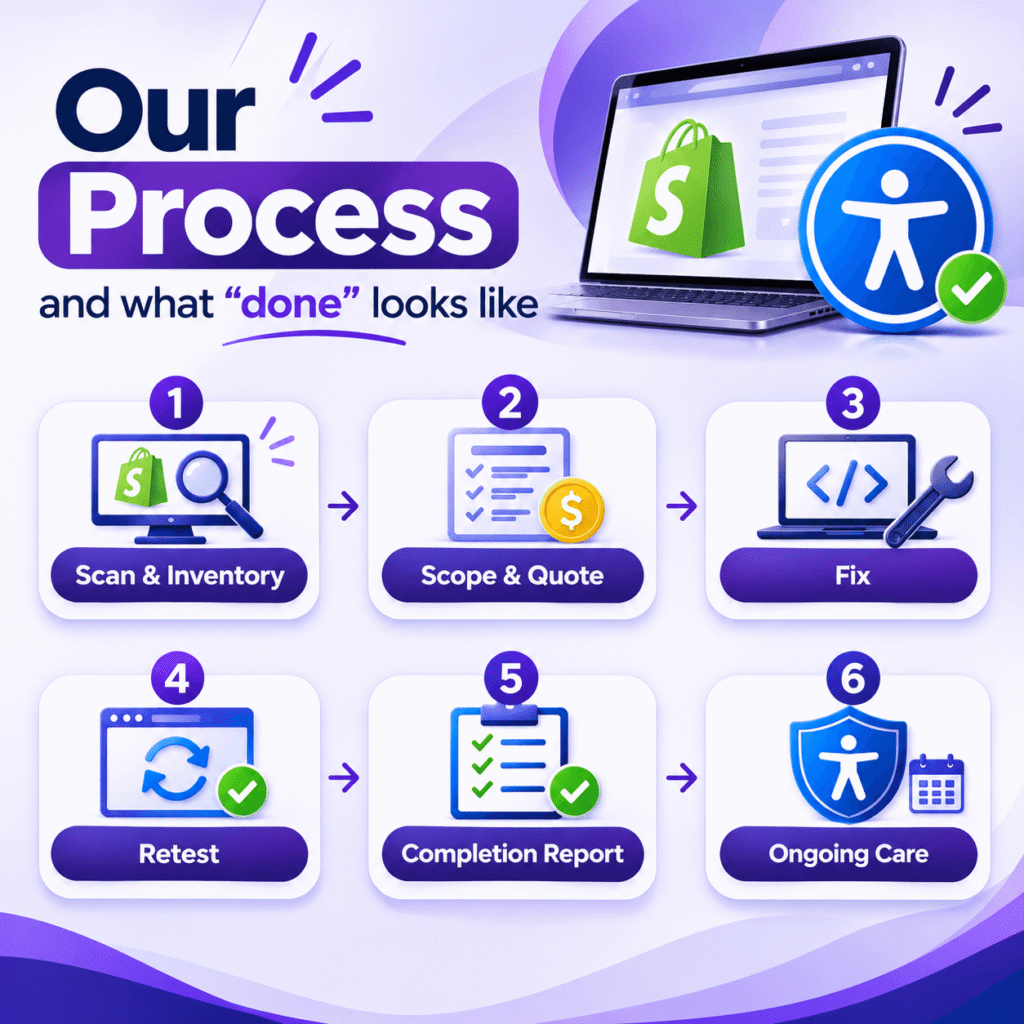
Our process and what “done” looks like
- Scan and inventory. We map your templates, apps, and key shopping journeys.
- Scope and quote. You get a fixed price and a clear list of what’s included.
- We correct issues in your theme code and content.
- We rescan and manually retest the shopping journeys.
- Completion report. You receive a record of what was found, what was fixed, and what remains.
- Ongoing care (optional). Scans and fixes as your products, promotions, and apps change.
Why Telkoware?
- We build Shopify stores, so we know how to fix them. Accessibility work happens in your theme and templates, which is the work we do every day.
- Fixed, visible pricing. No surprises, and you know what’s included before we start.
- Testing beyond a scan. Automated scans plus manual checks of key shopping steps.
- A clear line on what we can’t control. We tell you which issues come from third-party apps and what your options are.
- More than a decade building and supporting web stores, with teams in Canada and the United States.
Shopify Accessibility Fixes: Results from Real Stores
Summary: 3 Shopify stores, 505 failing elements found, 467 resolved on rescan (92.5%). Each project was completed in 2 to 4 weeks.
Accurate Fishing: a technical product store
Accurate Fishing is a premium manufacturer of fishing reels and equipment. Our scan of 10 pages found 140 failing elements affecting technical product information and shopping functionality. We made targeted HTML and CSS corrections, code improvements, and plugin updates focused on product content and storefront components.
Result: 120 of 140 resolved on rescan (85.7%). The remaining 20 came from third-party plugins and integrations outside Shopify.
Project duration: 4 weeks
Curve Theory: an inclusive fashion retailer
Curve Theory is an online fashion retailer that wanted a more inclusive shopping experience. Our scan of 10 pages found 165 failing elements affecting visual presentation and navigation. We made theme enhancements, custom HTML and CSS fixes, and plugin updates, while keeping the brand’s look and shopping experience intact.
Result: 157 of 165 resolved on rescan (95.2%). The remaining 8 came from third-party plugins and integrations outside Shopify.
Project duration: 3 weeks
BoysSuits.com: a U.S. Shopify retailer
BoysSuits.com is a U.S.-based Shopify retailer that wanted to improve its accessibility. Our scan of 10 pages found 200 failing elements, including poor color contrast, image accessibility problems, improper heading structure, and HTML errors. We made Shopify theme updates, custom HTML and CSS changes, plugin updates, and improvements aligned with WCAG.
Result: 190 of 200 resolved on rescan (95%). The remaining 10 came from third-party plugins and integrations outside Shopify. Project duration: 4 weeks
FAQs
Do I need ADA compliance for my Shopify store?
Is Shopify ADA compliant out of the box?
What is WCAG, and which level should my store meet?
Do accessibility widgets protect me from lawsuits?
How much does Shopify ADA compliance cost?
How long does remediation take?
What about checkout and third-party apps?
What should I do if I received a demand letter?
Will accessibility fixes change how my store looks?
What does the monthly care plan include?