
Telkoware

Shopify Integration Guide: How to Connect Shopify With Inventory, CRM, ERP, Fulfillment and Custom Applications

Shopify integration guide

A reliable Shopify integration connects commerce with the systems that run the rest of the business. This Shopify Integration guide explains how to integrate Shopify with inventory platforms, CRMs, ERPs, fulfillment providers, and custom or legacy applications using Shopify’s stable GraphQL Admin API, webhooks, and the newer event-integration model.

What is Shopify integration?

Shopify integration is the controlled exchange of data and business actions between Shopify and another system. That other system may be an inventory platform, customer relationship management system, enterprise resource planning platform, warehouse management system, third-party logistics provider, accounting application, product information management system, marketplace, or custom-built application.

A good integration does more than copy records. It defines which system owns each data element, when information should move, how conflicts are resolved, what happens when an API or downstream system is unavailable, and how the business confirms that the two systems still agree.

For example, an order may begin in Shopify, be enriched in an ERP, allocated in a warehouse system, fulfilled by a 3PL, and returned to Shopify with tracking information. The customer sees one order, but the transaction may cross several applications. The integration is the operational layer that keeps those applications synchronized.

Why integrate Shopify with inventory, CRM, ERP, fulfillment, or custom applications?

Manual re-entry can work at low order volumes, but it becomes slower, more expensive, and more error-prone as a business grows. A properly designed Shopify integration can:

  • Reduce duplicate data entry and spreadsheet handoffs.
  • Keep available inventory more accurate across stores, warehouses, and sales channels.
  • Move orders to finance, production, or fulfillment without waiting for manual processing.
  • Give sales and service teams a fuller view of customers and order history.
  • Return fulfillment status and tracking information to Shopify faster.
  • Apply established pricing, tax, credit, approval, and accounting rules consistently.
  • Preserve a valuable legacy application while modernizing the customer-facing experience.
  • Create an auditable data flow with monitoring, retries, and exception handling.

The objective is not to connect every field. It is to automate the workflows that create measurable operational value while keeping ownership and accountability clear.

The core Shopify integration architecture

Most production integrations use three complementary mechanisms: APIs for reading or changing Shopify data, events or webhooks for detecting changes, and a middleware layer for business rules and reliability.

1. Shopify’s GraphQL Admin API

The GraphQL Admin API is Shopify’s primary administrative API for apps and integrations. It can be used to query and modify products, variants, inventory, orders, customers, companies, fulfillment data, metafields, and other Shopify resources, subject to the app’s scopes and Shopify’s platform rules.

GraphQL lets an integration request the fields it needs instead of receiving a large fixed payload. Its calculated query-cost model also encourages efficient queries. The integration should select a supported stable API version, test upgrades before the version reaches end of support, and monitor Shopify’s developer changelog for affected fields and operations.

2. Events and webhooks

An event-driven design reacts when something changes instead of repeatedly polling the entire store. Shopify’s classic webhook model remains important and widely used. An app subscribes to a topic, Shopify sends an HTTPS request when the event occurs, and the receiving service verifies and processes the message.

Shopify’s newer Next Generation Events model provides a more flexible event-integration option for supported topics. It is designed around subscriptions and event delivery rather than tightly coupling every consumer to a large fixed webhook payload. This can make it easier to request relevant fields and evolve integrations, but topic coverage and migration requirements must be checked before adoption.

Next Generation Events do not automatically replace every webhook. A sensible architecture uses the most appropriate supported model for each workflow and treats delivery as asynchronous in both cases.

3. Middleware or an integration service

Direct point-to-point connections can become fragile when business rules, transformations, retries, and multiple systems are involved. Middleware provides a controlled layer between Shopify and downstream applications. It can:

  • Authenticate to each platform without exposing credentials to the storefront.
  • Map identifiers and transform data formats.
  • Queue work and absorb temporary outages.
  • Prevent duplicate processing.
  • Apply business rules and validation.
  • Record an audit trail and surface exceptions.
  • Reconcile records on a schedule.

4. Scheduled reconciliation and bulk processing

Events provide speed, but reconciliation provides confidence. A scheduled job should compare important records—such as inventory, unfulfilled orders, tracking status, and failed transactions—and repair or escalate discrepancies.

For large catalog exports, migrations, historical synchronization, or high-volume data maintenance, Shopify bulk operations can be more appropriate than thousands of individual API calls. The right design combines real-time events, targeted API calls, and scheduled bulk or reconciliation processes.

How to integrate Shopify with an inventory system

A Shopify inventory integration synchronizes stock information between Shopify and the application responsible for purchasing, receiving, manufacturing, allocation, or warehouse control.

Decide what the quantity means

The first challenge is semantic, not technical. “Inventory” may refer to on-hand, available, committed, reserved, damaged, in-transit, safety stock, or future supply. Publishing the ERP’s on-hand value directly to Shopify can oversell products if some units are already allocated or unavailable for e-commerce.

A common calculation is:

Shopify available quantity = sellable on-hand − committed quantity − safety stock ± approved channel adjustments

The exact formula depends on how the business allocates stock and which system owns those rules.

Map products, variants, and locations

Every Shopify variant should map to a durable identifier in the inventory system—normally a SKU, variant ID, ERP item number, or an explicit cross-reference table. Product titles are not reliable identifiers. Each Shopify location must also map to the correct warehouse, store, virtual pool, or fulfillment location.

Use event-driven updates with reconciliation

Order, cancellation, return, transfer, receipt, and manual-adjustment events may all affect availability. The integration should update the affected item and location promptly, then run periodic reconciliation to detect missed events, mapping problems, and manual changes.

Plan for concurrency

Two channels may sell the same final unit within seconds. No integration can remove every race condition, but the risk can be reduced with reservations, buffers, short processing intervals, conditional updates, and a clearly defined conflict policy.

Typical inventory data flow:

  1. Shopify sends an order or inventory-related event.
  2. Middleware verifies the event and places it in a queue.
  3. The inventory system allocates or recalculates stock.
  4. The integration updates the affected Shopify inventory item and location.
  5. A scheduled process compares Shopify with the authoritative inventory source.

How to integrate Shopify with a CRM

A Shopify CRM integration can help marketing, sales, and customer service teams understand the relationship behind each transaction. Depending on the CRM and the business model, the integration may synchronize customer profiles, consent, orders, lifetime value, company relationships, customer segments, service issues, abandoned checkouts, or sales opportunities.

Choose the CRM use case first

Do not begin by copying every Shopify customer field. Define the decision the CRM must support. Examples include:

  • Creating a service case with relevant order and shipment details.
  • Alerting an account manager when a B2B customer places a high-value order.
  • Segmenting customers by purchase category, frequency, or recency.
  • Measuring revenue influenced by a marketing or sales campaign.
  • Associating Shopify buyers with B2B companies, contacts, and locations.

Resolve customer identity carefully

Email address alone is often insufficient. Customers may use different addresses, check out as guests, share a company domain, or change contact information. A robust integration maintains Shopify IDs and CRM IDs in a cross-reference and defines rules for matching, merging, and handling ambiguous records.

Respect consent and purpose

Order processing data is not automatically marketing consent. The integration should preserve relevant consent status, record its source and timestamp where appropriate, limit access, and avoid copying sensitive data that the CRM does not need.

Separate operational and analytical synchronization

A service agent may need near-real-time order status, while a marketing dashboard may only need a nightly aggregate. Different use cases can use different synchronization schedules instead of forcing every data point into a real-time pipeline.

How to integrate Shopify with an ERP

An ERP integration usually connects Shopify commerce to finance, purchasing, inventory, production, pricing, tax, and order-management processes. It often creates the greatest operational value—and carries the greatest design risk—because both platforms may contain overlapping versions of products, customers, orders, inventory, and pricing.

Create a system-of-record matrix

Before development begins, decide which platform owns each data domain.

Data domain Common authoritative system Typical direction
Product content and merchandising Shopify or PIM Shopify/PIM to connected systems
Item number, cost, procurement data ERP ERP to Shopify where required
Available inventory ERP, WMS, or inventory platform Authoritative source to Shopify
Web order capture Shopify Shopify to ERP
Invoice, financial posting, and credit ERP ERP to reporting or Shopify when needed
Fulfillment and tracking ERP, WMS, or 3PL Fulfillment source to Shopify

This is an example, not a universal rule. The correct ownership model depends on the company’s operating process.

Map the full order lifecycle

Order integration must account for more than the original sale. Map taxes, discounts, gift cards, duties, shipping charges, payment status, capture, cancellation, edits, partial fulfillment, returns, exchanges, refunds, and chargebacks. If B2B commerce is involved, also consider companies, company locations, purchase-order numbers, payment terms, negotiated pricing, and tax exemptions.

Use an internal canonical model

Shopify and an ERP rarely represent data identically. A canonical internal model can isolate each system’s vocabulary from the other. Instead of embedding ERP-specific rules throughout Shopify handlers, the integration translates Shopify data into a normalized order, customer, product, or inventory representation, then maps it to the ERP.

Return operational status to Shopify

A one-way order export leaves customers and service teams without current information. When appropriate, return fulfillment status, tracking numbers, cancellations, inventory changes, and other customer-relevant outcomes to Shopify.

How to integrate Shopify with fulfillment providers, warehouses, and 3PLs

A fulfillment integration sends releasable orders to the warehouse or 3PL and returns fulfillment outcomes to Shopify. Depending on the operation, it may also exchange inventory, receiving, transfer, cancellation, and return information.

Define when an order is ready to release

Not every new order should immediately go to the warehouse. Release rules may depend on payment authorization or capture, fraud review, address validation, pre-order status, customer-service holds, inventory allocation, or B2B approval.

Support partial and split fulfillment

An order may ship from several locations or on several dates. The integration must preserve the relationship between the Shopify order, fulfillment order, line items, location, package, carrier, and tracking number. Treating an order as a single all-or-nothing shipment creates inaccurate status and poor customer communication.

Handle changes and cancellations safely

A cancellation request can race with warehouse picking. The integration should send the request, wait for acknowledgement, and update Shopify based on the confirmed outcome. It should not assume that a successful API request means a physical operation has already stopped.

Design returns as a separate workflow

A return may involve authorization, carrier labels, warehouse receipt, inspection, restocking, disposition, refund approval, and financial posting. These steps may occur in different systems. Model them explicitly instead of treating a return as the reverse of shipment.

How to integrate Shopify with a custom or legacy application

A custom Shopify integration is often the best option when the business depends on specialized workflows that packaged connectors do not support. The existing application can remain the system of record while Shopify provides a modern commerce experience.

Use an adapter instead of rewriting the legacy system

A middleware adapter can translate between Shopify and the legacy application’s database, API, file export, message queue, or scheduled process. This reduces changes to stable business logic and creates a boundary that can be modernized in phases.

Protect the legacy database

A Shopify event handler should not write directly into production tables unless the legacy application was explicitly designed for that access pattern. Prefer an existing service layer, supported API, import table, stored procedure, or validated staging process. Direct writes can bypass business rules and create records the original application cannot safely interpret.

Modernize by workflow

Prioritize one measurable process at a time—for example, exporting orders, synchronizing inventory, returning tracking information, or publishing contract pricing. This creates value earlier and avoids a high-risk “replace everything” project.

Recover undocumented business rules

Older applications often contain years of exceptions in code, reports, spreadsheets, and staff knowledge. Integration discovery should document those rules before automation. AI-assisted analysis can accelerate code and document review, but operational owners still need to validate which rules remain necessary.

Should you use a Shopify app, iPaaS, middleware, or custom integration?

Approach Best fit Main advantages Key considerations
Prebuilt Shopify app or connector Common platforms and standard workflows Fast deployment; lower initial effort May not support unusual rules, data models, or volumes
iPaaS or automation platform Moderate complexity and several SaaS applications Visual workflows; reusable connectors; managed infrastructure Usage pricing, platform limits, debugging, and vendor dependence
Custom middleware Complex rules, legacy systems, higher volume, or strict control Precise behavior, observability, and extensibility Requires engineering ownership and ongoing maintenance
Hybrid architecture Businesses with both standard and specialized workflows Uses packaged components where they fit and custom logic where it matters Needs clear boundaries, ownership, and consolidated monitoring

The cheapest connector is not always the lowest-cost solution. Compare implementation, transaction or task fees, exception-handling effort, operational risk, support, future changes, and the cost of incorrect data.

How to make a Shopify integration reliable and secure

Authenticate and authorize correctly

Use Shopify’s supported authentication method, request only the scopes the integration needs, store tokens and secrets in a managed secret store, rotate credentials according to policy, and separate development, test, and production credentials. Never expose Admin API credentials in storefront JavaScript.

Verify incoming messages

For webhook deliveries, validate Shopify’s HMAC signature using the raw request body and the application’s client secret before trusting the payload. Reject unverifiable requests and protect the public endpoint with appropriate network, application, and abuse controls.

Assume events may be duplicated or arrive out of order

Event delivery systems are designed for resilience, so duplicate delivery is possible. Store a unique event or delivery identifier and make processing idempotent. When sequence matters, compare timestamps or current resource state rather than assuming arrival order represents business order.

Acknowledge quickly and process asynchronously

The receiving endpoint should verify the request, persist or queue the work, and respond promptly. Slow ERP or warehouse calls should run in a worker process. This prevents downstream latency from causing avoidable redelivery or timeout problems.

Use bounded retries and a dead-letter path

Retry temporary errors with exponential backoff and jitter. Do not retry permanent validation or mapping errors forever. Move exhausted messages to a dead-letter queue or exception table, alert an owner, and provide a controlled replay mechanism.

Respect API limits

Shopify’s GraphQL Admin API uses calculated query cost. Integrations should request only necessary fields, batch work appropriately, throttle based on available capacity, use bulk operations for large datasets, and avoid synchronized retry storms.

Monitor business outcomes, not only server health

An endpoint can return HTTP 200 while orders remain stuck. Monitor operational indicators such as orders awaiting export, inventory discrepancies, events older than a threshold, fulfillment updates not returned to Shopify, repeated SKU mapping failures, and reconciliation differences.

Minimize and govern personal data

Transfer only the customer data required for the defined purpose. Apply access controls, retention rules, encryption, deletion workflows, logging, and Shopify’s applicable privacy requirements. If an integration serves multiple merchants, isolate tenant data and credentials.

A practical Shopify integration implementation process

  1. Discovery: document systems, owners, workflows, volumes, peak periods, exceptions, compliance requirements, and business objectives.

  2. System-of-record design: assign ownership for products, variants, customers, companies, inventory, prices, orders, payments, fulfillment, returns, and financial records.
  3. Data mapping: map identifiers, fields, enumerations, locations, units, currencies, time zones, taxes, and status transitions.
  4. Architecture: choose events or webhooks, API operations, queues, middleware, scheduled jobs, bulk processing, and reconciliation.
  5. Security design: define app scopes, secrets, personal-data handling, access control, audit logging, and incident procedures.
  6. Incremental development: build one workflow at a time with automated tests and representative data.
  7. End-to-end testing: test happy paths and exceptions, including duplicates, outages, cancellations, partial fulfillment, refunds, rate limits, and invalid mappings.
  8. Cutover: define migration, freeze windows, initial synchronization, reconciliation, rollback, and support ownership.
  9. Operations: monitor business outcomes, review failures, test recovery, update supported APIs, and refine rules as the business changes.

Shopify integration FAQ

Can Shopify integrate with an ERP?

Yes. Shopify can be integrated with an ERP through a prebuilt connector, an integration platform, custom middleware, or a hybrid solution. The integration can exchange products, inventory, customers, B2B companies, orders, payments, taxes, fulfillment status, refunds, and financial references.

The difficult part is rarely the API connection itself. The important design work is deciding which system owns each data domain, how Shopify concepts map to the ERP, and how edits, cancellations, partial shipments, returns, and failures are handled. A dependable implementation starts with a system-of-record matrix and a complete order-lifecycle map.

Which ERP systems can connect to Shopify?

Shopify can connect to many commercial and custom ERP systems, including platforms in the Microsoft, Oracle NetSuite, SAP, Sage, Acumatica, Epicor, Infor, Odoo, and industry-specific ecosystems. Availability and quality of packaged connectors vary by ERP edition, Shopify plan, geography, and required workflow.

A connector’s existence does not guarantee fit. Before selection, validate support for locations, bundles, B2B companies, payment terms, multiple currencies, tax handling, partial fulfillment, returns, and the expected data volume. A custom adapter may be appropriate when a packaged connector cannot represent established business rules.

Should Shopify or the ERP be the system of record?

There is usually no single system of record for everything. Ownership should be assigned by data domain. Shopify may own online merchandising and web-order capture, while the ERP owns item numbers, cost, procurement, accounting, credit, and inventory availability. A PIM may own product content, and a WMS or 3PL may own warehouse execution.

The critical rule is to avoid two systems independently overwriting the same field. Document the authoritative source, permitted direction, update trigger, conflict policy, and exception owner for every synchronized object.

How do multi-store or multi-channel merchants keep Shopify inventory synchronized?

Use a central inventory source—or an explicitly defined allocation service—to calculate the sellable quantity for each item and location. Events from Shopify, POS, marketplaces, the ERP, the WMS, and receiving processes should update that source. The integration then publishes revised availability to the relevant channels.

Near-real-time updates reduce overselling, but they should be reinforced with scheduled reconciliation, safety-stock rules, reservation logic, and monitoring for unmapped SKUs or locations. The design must also account for concurrent sales and the possibility that two channels act on the same final unit.

What is the difference between on-hand and available inventory?

On-hand inventory is the physical quantity recorded at a location. Available inventory is the quantity the business is willing and able to sell after accounting for commitments, reservations, safety stock, damage, quality holds, or channel allocation. In-transit supply may be tracked separately and should not automatically be treated as sellable.

This distinction is essential in a Shopify integration. Sending on-hand values without applying allocation rules can create overselling. The integration should publish the quantity defined by the business as available to the online channel.

Can Shopify inventory be synchronized in real time?

It can be synchronized in near real time. Events can trigger targeted updates within seconds, but no distributed integration can guarantee that every system changes at exactly the same instant. Network latency, API throttling, queue depth, downstream outages, and concurrent orders can create short delays.

A reliable design defines a target synchronization window, uses queues and idempotent workers, applies buffers where appropriate, and runs reconciliation. It also measures the age of pending updates so the team knows when the target is being missed.

What are Shopify Next Generation Events?

Next Generation Events are Shopify’s newer event-integration model for supported topics. They provide a subscription-based way for apps to receive Shopify changes and can offer more control over the data selected for delivery than traditional fixed webhook payloads.

They are useful for reducing payload noise and designing event consumers around the data they require. Adoption should still be based on the topics, delivery behavior, access requirements, and operational needs of the specific integration. They do not remove the need for authentication, deduplication, asynchronous processing, retries, monitoring, and reconciliation.

Do Shopify Next Generation Events replace webhooks?

Not universally. Classic webhooks remain a stable and important part of Shopify integration architecture, and not every existing workflow should be migrated immediately. Topic availability, payload needs, app architecture, and operational maturity should determine which model is used.

Many businesses will operate a hybrid model during adoption: new event subscriptions for supported use cases and existing webhooks for mature or uncovered workflows. The shared reliability pattern remains the same—verify, queue, process idempotently, monitor, and reconcile.

Should an existing Shopify webhook integration migrate immediately?

No. A functioning production integration should not be changed only because a newer mechanism is available. First inventory current subscriptions, downstream dependencies, payload fields, volumes, retry behavior, and monitoring. Then compare those requirements with supported Next Generation Events topics and build a migration plan.

For higher-risk workflows, run the old and new paths in parallel without applying duplicate business actions. Compare payloads and outcomes, resolve differences, and cut over gradually with a tested rollback plan.

Why does Shopify sometimes send a webhook or event more than once?

Distributed delivery systems may retry when an acknowledgement is delayed, lost, or uncertain. A message can therefore be delivered more than once even if the first attempt was processed. This behavior supports resilient delivery and must be expected by the receiving application.

Store a unique delivery or event identifier and make every handler idempotent. Creating an ERP order, issuing a refund, or adjusting inventory should produce the same business outcome whether the message is processed once or several times.

Can Shopify events or webhooks be missed?

Delivery mechanisms are designed to be reliable, but no production architecture should depend on a single message path without verification. Temporary outages, expired subscriptions, authentication problems, endpoint changes, application defects, or exhausted retries can produce gaps.

Maintain delivery and processing logs, alert on failures and lag, and run scheduled reconciliation against Shopify’s current state. The integration should be able to recover from a time window or replay safely without duplicating completed business actions.

Can orders created in an ERP or another sales channel be imported into Shopify?

Sometimes, but the correct approach depends on why Shopify needs the record. An ERP-originated transaction may be represented as a Shopify order, a draft-order workflow, a customer timeline reference, or an external record surfaced through a custom interface. The right option depends on payment, tax, inventory, reporting, notification, and fulfillment requirements.

Do not assume every external transaction should become a native Shopify order. Importing it can trigger inventory changes, customer communications, analytics, automations, taxes, or downstream apps. Define the desired business effect first, then confirm the supported API behavior and test all side effects.

How does Shopify integrate with a CRM?

Shopify can send customer, order, company, product-interest, and purchase data to a CRM. The CRM may return account ownership, lifecycle stage, service status, segmentation, or selected profile information. Synchronization can be event-driven for operational actions and scheduled for reporting or segmentation.

Identity resolution and consent require special attention. Preserve stable Shopify and CRM IDs, avoid merging on email alone when ambiguity is possible, distinguish transaction processing from marketing permission, and transfer only the data needed for a defined purpose.

How does Shopify integrate with a 3PL or fulfillment warehouse?

The integration sends orders or fulfillment requests after they meet release criteria, then receives acceptance, rejection, shipment, tracking, inventory, and sometimes returns information. Shopify’s fulfillment concepts should be mapped carefully to the 3PL’s warehouses, shipments, packages, carriers, and line-item statuses.

The design should support partial and split shipments, backorders, address corrections, cancellation races, failed labels, and warehouse exceptions. Monitoring should identify orders accepted by Shopify but not acknowledged by the fulfillment provider within an agreed period.

How should returns and refunds be integrated?

Returns and refunds are related but distinct. A return concerns merchandise and may include authorization, receipt, inspection, disposition, and restocking. A refund concerns money and may be full, partial, delayed, or issued without a physical return.

Map each state separately and decide which system owns approval and execution. The integration must prevent duplicate refunds, preserve tax and discount allocations, handle partial quantities, and update customer-facing status only after the relevant operational step is confirmed.

Can Shopify connect to a custom or legacy application?

Yes. Shopify’s APIs and event mechanisms can connect to a custom system through a supported API, database-safe service layer, file exchange, message queue, or purpose-built adapter. The legacy application can remain the system of record while Shopify provides a modern storefront and checkout.

Start with a narrow workflow and avoid direct database writes that bypass established business logic. Document hidden rules, validate identifiers, use a staging or adapter layer, and add reconciliation before expanding the integration.

Is a prebuilt app, an iPaaS platform, or custom middleware better?

A prebuilt app is often best for a standard integration between widely used systems. An iPaaS platform can be effective when several SaaS applications need moderate transformation and orchestration. Custom middleware is appropriate when the business has proprietary workflows, legacy systems, high volumes, strict security requirements, or complex exception handling.

A hybrid model is common. Evaluate functional coverage, total recurring cost, transaction limits, observability, data residency, vendor dependence, support, extensibility, and the consequences of failure—not only initial implementation speed.

How secure is a Shopify integration?

A Shopify integration can be secure when it uses supported authentication, least-privilege scopes, verified webhook signatures, encrypted transport, protected secrets, access controls, audit logging, dependency management, and disciplined deployment practices. Security also includes limiting personal data and maintaining deletion and retention procedures.

Risk often arises outside Shopify: exposed middleware, long-lived credentials, excessive ERP permissions, insecure logs, public storage, unpatched libraries, or overly broad administrative access. Review the full data path and every connected system.

How much does a Shopify integration cost?

Cost depends on the number of systems and workflows, data quality, availability of supported connectors, transaction volume, historical migration, B2B requirements, exception handling, testing, compliance, and ongoing support. A simple standard connector may require limited configuration, while a bi-directional ERP, inventory, fulfillment, and returns integration is a software project.

Request a discovery phase before a fixed implementation estimate. A useful proposal should separate one-time implementation, licenses or usage fees, infrastructure, monitoring, support, change management, and contingency for source-system limitations.

How long does a Shopify integration take?

A narrow integration using mature connectors may be implemented in weeks. A custom, multi-system program can take several months. The schedule is shaped by requirements clarity, API quality, access to test environments, data mapping, stakeholder availability, exception complexity, user acceptance testing, and cutover constraints.

The safest approach is phased: prove one end-to-end workflow, validate it with real operational users, then add the next. This exposes mapping and ownership issues earlier and produces usable value sooner.

Does a Shopify integration require ongoing maintenance?

Yes. Shopify, ERPs, CRMs, fulfillment providers, and internal processes all change. Integrations require monitoring, incident response, credential rotation, dependency updates, supported API upgrades, regression testing, reconciliation review, and adjustment when fields or business rules change.

Ongoing support should define who responds to alerts, how quickly failures are investigated, how messages are replayed, how changes are tested, and who approves production releases. The integration should be managed as an operational product, not a one-time script.

How can a business tell whether its Shopify integration is working?

Measure business outcomes and compare systems. Useful indicators include order-export success and latency, unacknowledged fulfillment requests, inventory discrepancies, duplicate-processing prevention, dead-letter queue size, webhook or event lag, reconciliation differences, and the age of unresolved exceptions.

A healthy dashboard should answer: What failed? Which customers or orders are affected? How long has the issue existed? Can it be replayed safely? Who owns the resolution? Periodic operational reviews are as important as uptime monitoring.

Build a Shopify integration that the business can depend on

The most valuable Shopify integrations are not the ones with the most connections. They are the ones that reduce manual work, protect data quality, recover from failures, and make ownership visible.

Telkoware helps businesses integrate Shopify with inventory, CRM, ERP, fulfillment, and custom or legacy applications. Our local, in-house team can assess the current data flow, identify integration risk, recommend the right architecture, and implement the highest-value workflows in manageable phases.

Start with a Shopify Integration Health Check. We will review system ownership, data mappings, APIs, events and webhooks, exception handling, monitoring, security, and reconciliation—then provide a practical roadmap for improvement.

Talk to Telkoware about your Shopify integration.

Authoritative Shopify integration resources


Crafting Digital Perfection: Finding Your Ideal eCommerce Web Designer

eCommerce Web Designer

In the bustling digital marketplace, where first impressions are crafted in mere milliseconds, the artistry of an eCommerce web designer becomes a brand’s silent ambassador. Picture a vibrant online store: its digital aisles brimming with products, enticing images beckoning even the most casual browsers to linger and explore. Yet, behind this seamless virtual experience lies a meticulously woven tapestry of design elements, coding expertise, and user-centric innovation—crafted by the skilled hands of an eCommerce web designer. These designers are the modern-day architects of the digital realm, sculpting online spaces that are not only visually captivating but also intuitively functional.

Delving into the world of eCommerce web design unveils a fascinating intersection of technology and creativity. It’s a realm where aesthetics meet analytics, and the nuances of user behavior guide every pixel and pathway. In this blog post, we explain how you can find the ideal eCommerce web designer for your business. Whether you’re starting a new venture or revamping an existing digital storefront, understanding the qualities that constitute a masterful design partner is crucial. From identifying the right skill set to aligning their vision with your brand’s narrative, we will explore the essential steps to ensure your online presence not only competes but thrives in the ever-evolving digital landscape. So, prepare to navigate this exciting terrain and unlock the secrets to crafting digital perfection.

eCommerce web designer

Understanding the Role of an eCommerce Web Designer

When it comes to the success of an online business, the role of an eCommerce web designer is paramount. An eCommerce web designer is not just a creator of visually appealing websites; they are architects of seamless user experiences that drive conversions.

An eCommerce web designer must possess a blend of creativity and technical skills. They should understand the latest design trends, user behavior, and e-commerce best practices. By creating user-friendly interfaces, optimizing for mobile responsiveness, and implementing intuitive navigation, an eCommerce web designer can enhance the overall shopping experience for customers.

Moreover, an eCommerce web designer plays a crucial role in building brand identity and establishing credibility. Through cohesive branding elements, captivating product displays, and secure payment gateways, they help businesses stand out in the competitive online market.

In conclusion, the eCommerce web designer is not just a designer but a strategic partner in the success of any online business. Their expertise in blending design aesthetics with functionality is key to crafting digital perfection for your e-commerce platform.

eCommerce web designer

Defining Your Design Needs and Goals

When it comes to defining your design needs and goals for your eCommerce website, understanding the role of an eCommerce web designer is crucial. Your eCommerce web designer is the key to crafting digital perfection for your online store.

To start, evaluate the specific requirements of your eCommerce business. Consider factors like user experience, branding consistency, and conversion optimization. These elements will guide you in finding the ideal eCommerce web designer who can bring your vision to life.

Next, set clear goals for your website design. Define what success looks like for your eCommerce store – whether it’s increased sales, improved customer engagement, or enhanced brand visibility. Communicate these goals to your eCommerce web designer to ensure alignment in the design process.

By defining your design needs and goals upfront, you can collaborate effectively with your eCommerce web designer to create a visually appealing and functional online store that resonates with your target audience.

Researching and Shortlisting Potential eCommerce Web Designers

When looking for an eCommerce web designer, conducting thorough research and shortlisting potential candidates is crucial. Start by defining your design requirements and budget, then begin your search.

Begin by exploring online platforms dedicated to connecting businesses with talented designers. Look for portfolios that showcase relevant eCommerce projects to ensure they have the expertise you need.

Consider reaching out to your professional network for recommendations or posting on job boards to attract suitable candidates. When shortlisting, prioritize designers who have experience in creating user-friendly interfaces and optimizing conversions for eCommerce websites.

Don’t forget to assess their communication skills and ability to understand your brand identity and vision. Schedule interviews or design challenges to evaluate their problem-solving skills and creativity.

By investing time in researching and shortlisting potential eCommerce web designers, you increase your chances of finding the perfect fit for your digital project.

Evaluating Portfolio and Experience

When evaluating a potential designer for your online store, it’s crucial to assess their portfolio and experience. Look for examples of their previous work to determine if their design style aligns with your brand’s aesthetic. Pay attention to the functionality of the websites they have created to ensure they can deliver a seamless shopping experience for your customers.

eCommerce web designer
Close-up Of A Female Designer Working On Multiple Computer At Workplace

Experience plays a vital role in the success of your eCommerce website. An experienced designer will have a better understanding of industry trends, user behavior, and conversion optimization strategies. They will be able to anticipate potential challenges and provide effective solutions to enhance your online store’s performance.

By thoroughly evaluating the portfolio and experience of an eCommerce web designer, you can make an informed decision that will benefit your business in the long run. Remember, finding the ideal designer is not just about their technical skills but also about their ability to bring your digital vision to life.

Assessing Design Process and Methodology

When it comes to assessing design process and methodology, finding the ideal eCommerce web designer is crucial for crafting digital perfection. A skilled eCommerce web designer must have a structured approach to their design process. This includes understanding the client’s brand identity, target audience, and unique selling points.

Methodology plays a significant role in determining the success of a web designer. An effective methodology involves conducting thorough research, creating detailed wireframes, and implementing user-friendly interfaces. By following a systematic methodology, an eCommerce web designer can ensure a seamless design process that meets the client’s requirements.

In the realm of eCommerce, design plays a critical role in attracting and engaging customers. A well-crafted website not only enhances the user experience but also boosts conversions and sales. Therefore, choosing the right eCommerce web designer who excels in design process and methodology is essential for achieving digital perfection in the competitive online market.

Ensuring Alignment with Brand Vision and Values

To ensure alignment with the brand vision and values, it is crucial to select an eCommerce web designer who understands and embodies these core principles. Your ideal eCommerce web designer should not only possess technical expertise but also resonate with the essence of your brand. They should be able to translate your brand’s vision into the digital realm seamlessly.

When crafting digital perfection for your eCommerce website, consider the designer’s portfolio to see if their style aligns with your brand aesthetics. Communication is key in conveying your brand values effectively to the designer. Collaborate closely to ensure every design element reflects your brand’s essence.

By choosing an eCommerce web designer who shares your brand vision and values, you can create a website that not only looks visually appealing but also resonates with your target audience on a deeper level. This alignment will help establish a stronger brand identity and enhance customer trust and loyalty.

Communication and Collaboration Strategies

When it comes to establishing a successful online presence, effective communication and collaboration strategies are key in ensuring the seamless execution of your digital projects. For eCommerce businesses looking to elevate their online platforms, finding the right eCommerce web designer is crucial.

Communication plays a vital role in conveying your brand’s vision and requirements to the eCommerce web designer. Clear and concise communication ensures that your designer understands your expectations and can bring your digital vision to life.

Collaboration between you and the eCommerce web designer is essential for creating a website that resonates with your target audience. By working closely together, you can ensure that the design elements, user experience, and functionality align with your business goals.

By implementing strong communication and collaboration strategies with your eCommerce web designer, you can craft a digital masterpiece that reflects your brand identity and drives success in the competitive online market.

Budget Considerations and Negotiations

When delving into the realm of eCommerce web design, budget considerations play a pivotal role. Finding an ideal eCommerce web designer involves thorough negotiations to ensure a perfect digital outcome.

Before embarking on the journey of crafting digital perfection, it’s crucial to establish a clear budget framework. Define your financial boundaries and prioritize essential aspects of the web design process. Negotiate with potential eCommerce web designers to align their services with your budget constraints.

During negotiations, emphasize the significance of cost-effective solutions without compromising quality. Seek out designers who offer flexible payment options or customizable packages tailored to your budgetary needs. Remember, a balance between cost and quality is key to achieving your desired digital presence.

By carefully navigating budget considerations and negotiations, you can secure the services of an eCommerce web designer who not only meets your financial requirements but also delivers a visually appealing and functional online platform for your business.

Securing a Contract and Setting Expectations

When securing a contract with an eCommerce web designer, setting clear expectations is crucial for the success of your project. Clearly outline the scope of work, project timeline, and deliverables to avoid any misunderstandings later on. Communicate your brand’s aesthetic, functionalities required, and any specific design elements you have in mind to ensure the designer understands your vision accurately.

Discuss payment terms, revisions process, and communication channels to establish a smooth workflow. Address issues like website maintenance post-launch and ownership of design elements upfront. By setting expectations early on, both parties can work towards a common goal and avoid potential conflicts during the project.

Remember that transparency and open communication are key in any successful collaboration. Make sure to have a detailed contract in place that covers all aspects discussed to protect both your interests and the eCommerce web designer’s rights.

Conclusion: Partnering with eCommerce Web Designer for Digital Success

Partnering with the right eCommerce agency is crucial for achieving digital success. A skilled eCommerce web designer can elevate your online presence and enhance user experience, ultimately driving more conversions. By collaborating with a professional eCommerce web designer, you can craft a digital masterpiece that aligns with your brand identity and resonates with your target audience.

When selecting an eCommerce web designer, look for expertise in responsive design, user interface optimization, and e-commerce platform integration. A designer with a keen eye for detail and a deep understanding of the latest design trends can bring your vision to life and create a seamless online shopping experience for your customers.

Remember, digital success is not just about aesthetics; it’s about functionality and usability too. Your eCommerce website should be visually appealing, easy to navigate, and optimized for mobile devices to ensure a positive user experience. By partnering with the right eCommerce web designer, you can set your online store up for success and stand out in the competitive digital landscape.

eCommerce User Experience Best Practices for High Sales In 2025

eCommerce User Experience

Your eCommerce website isn’t just a shop; it’s a storyteller and a customer magnet rolled into one. With a mere click, shoppers teleport into your world, and it’s the eCommerce user experience that decides whether they’ll stay for the story.

Gone are the days of merely dazzling with high-res images and snappy headlines. Today’s savvy shoppers demand a journey as seamless as it is delightful, one that not only answers their needs but anticipates them.

So, how do you craft a digital experience that turns casual browsers into loyal customers? We’ll dive into the best practices that are setting the standard in 2025. Ready to transform your site into a conversion powerhouse?

What Is eCommerce User Experience?

eCommerce user experience (UX) encompasses every touchpoint a customer has with the website, from the moment they land on the homepage, to the process of browsing products, adding items to their cart, checking out, and even post-purchase interactions.

A well-designed user interface could raise a website’s conversion rate by up to 200%. It’s not just about conversions, 70% of online shopping carts are abandoned. A significant chunk of these abandonments can be attributed to poor UX—be it complicated checkouts or unclear product details.

After understanding the fundamentals of eCommerce user experience; let’s now examine the 9 strategic moves that are proven to elevate sales in 2025.

9 Proven eCommerce User Experience Strategies To Boost Sales

We’re peeling back the layers of conventional UX and diving deeper into modern practices based on data, strategy, and customer psyche. Pay close attention to the bullet points where you’ll learn of actionable steps you can implement for a better Shopify user experience or on any other eCommerce platform.

1. Intuitive Navigation & Search

This allows users to easily move through the website, from the landing page to checkout without getting confused. A vast eCommerce inventory is a waste if users can’t quickly move around it. Add a search field to assist users in quickly finding the products they’re looking for without needless browsing.

The search bar should be easy to locate, typically placed in the header of the website. Highlight popular categories and have a logical flow mirroring the typical user’s journey from browsing to purchasing.

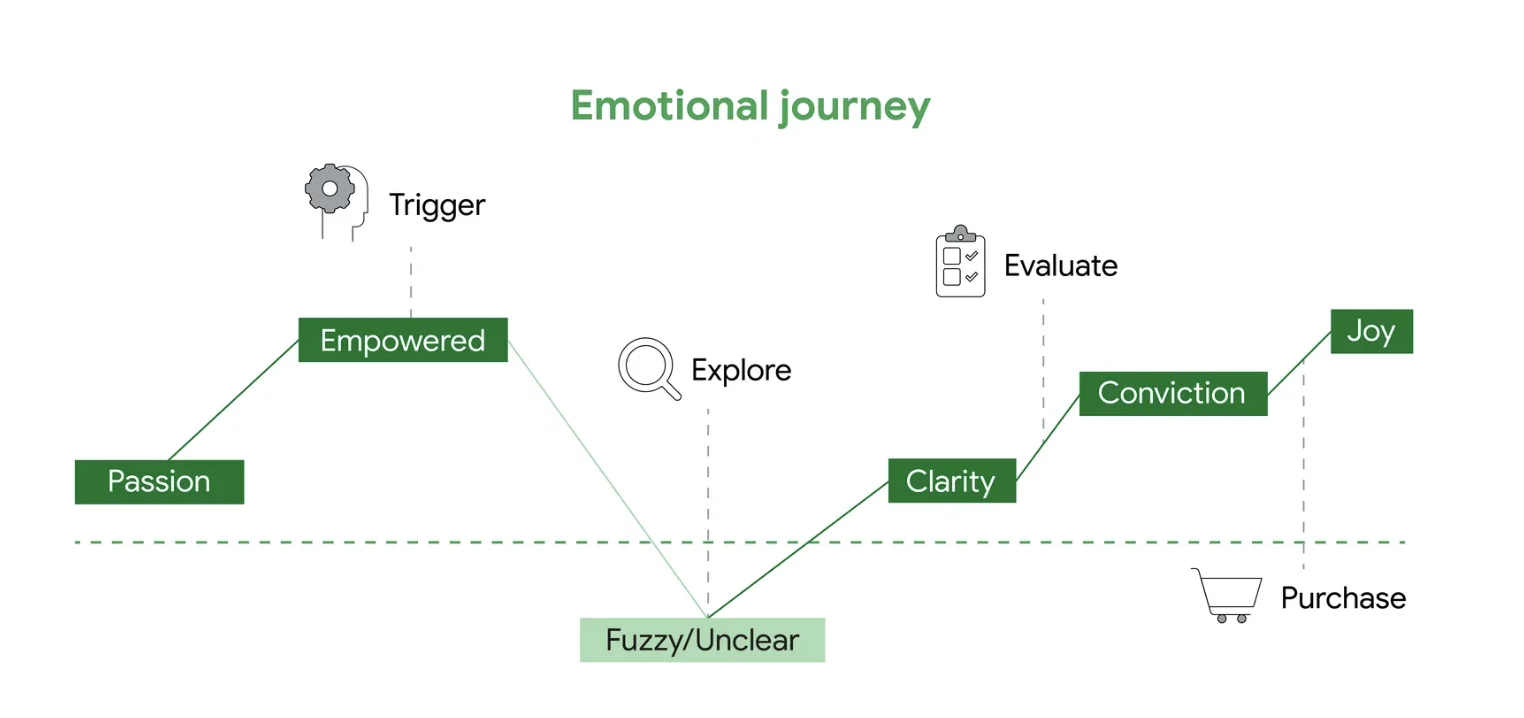
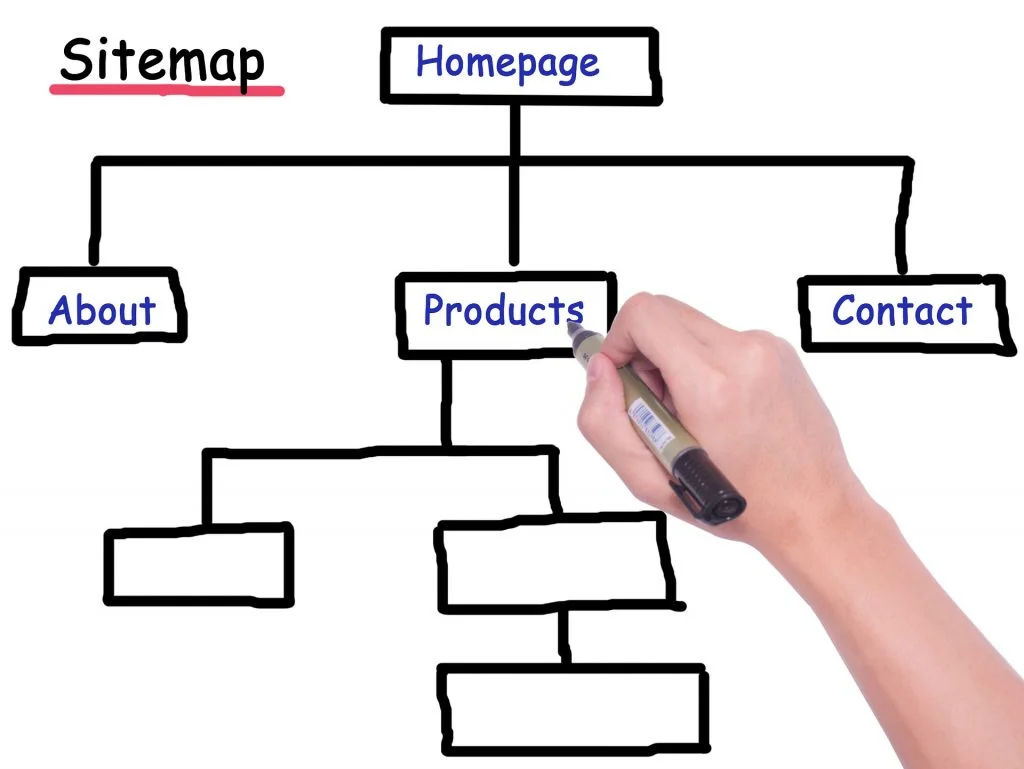
eCommerce user experience - user journey

5 Key Elements of Intuitive Navigation
● Clearly Defined Categories: Items should be sorted into clear, easily understandable categories and subcategories.
● Visible Menu: Navigation menus should be prominently displayed and consistently positioned across all pages.
● Breadcrumbs: Keeps users informed about their location within the site and enable easy backtracking.
● Filter & Sort Options: Refine search results based on parameters like price, popularity, and relevance.
● Autocomplete Feature: Predictive text helps users by suggesting possible matches, even if there are typographical errors.

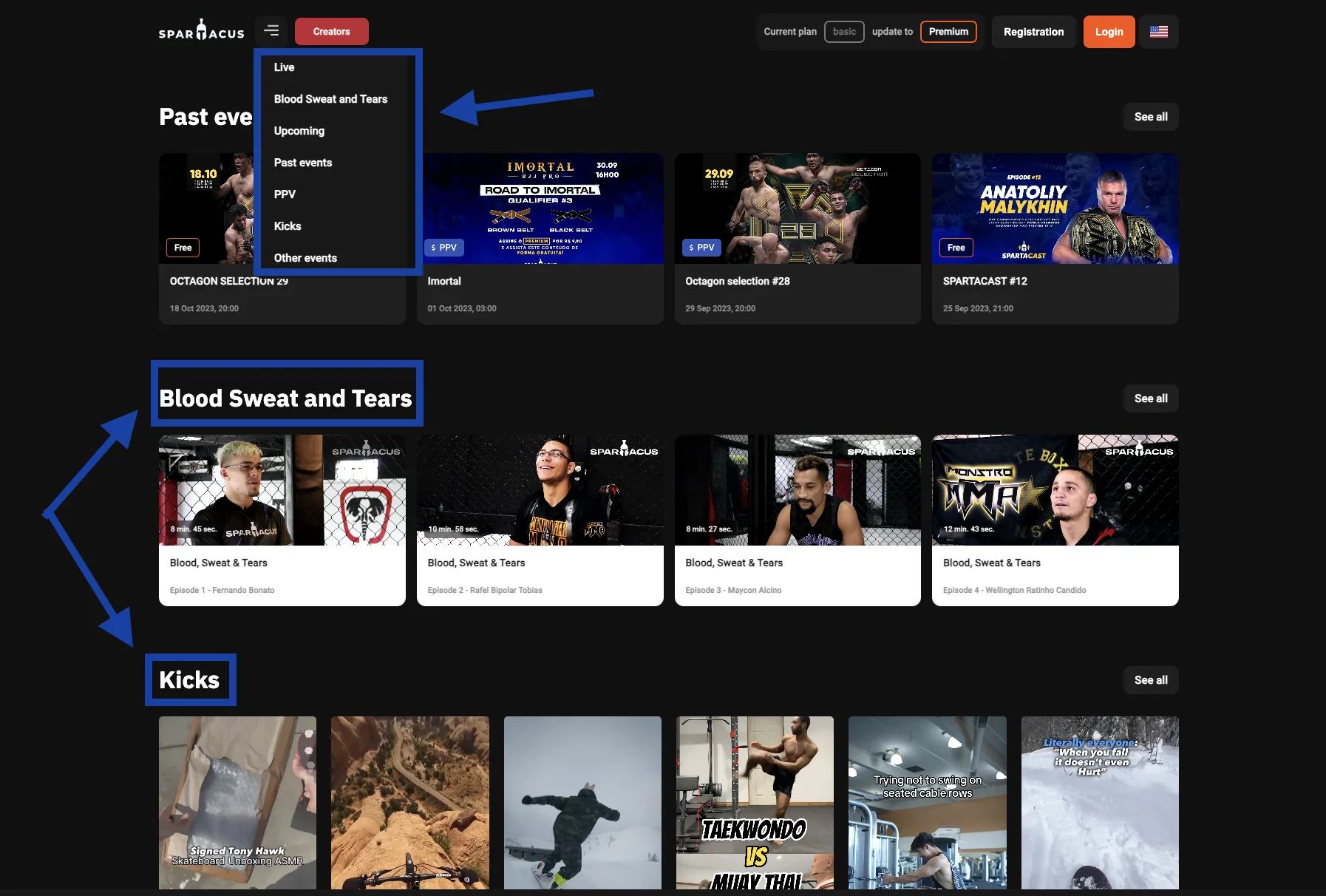
Here’s an excellent example from this mixed martial arts platform. To make it easier for users to navigate the site, they implemented both a dropdown menu and categorized sections after the top fold. From the moment users land on the page until they scroll down to explore, the layout is intuitively structured, guiding them smoothly to their point of interest with zero confusion.

eCommerce user experience - intuitive navigation

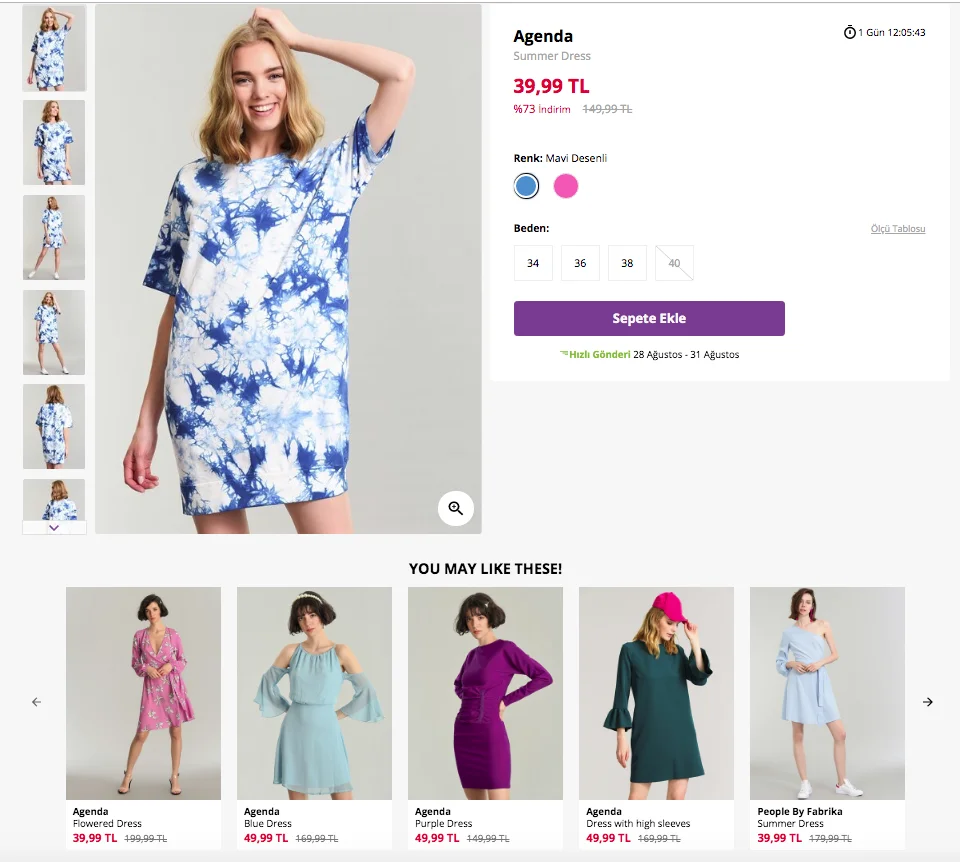
2. High-Quality Product Images & Descriptions

Exceptional product displays and in-depth descriptions serve as the digital equivalent of physically examining items in a brick-and-mortar store. While the product photos create a visual connection, the descriptions sew a narrative that collectively elevates the customer experience.

Shoppers can’t touch or try online products, making images a vital conduit to convey the look, feel, and quality of an item. From varied angles to zoom-in features, quality images offer a visual deep-dive, helping customers understand the product, its features, textures, and colors – crucial factors in their decision-making journey.

Product descriptions should answer pivotal questions like “What are its features?”, “How do I use it?”, and “Why should I buy it?”. The descriptions need to be a blend of vital details, benefits, and a touch of persuasive flair.

Strategies to Enhance Image & Description Quality

● High-Resolution Images: Users should be able to zoom in to crisp product details.
● Multiple Angles: Provide images from different angles and, if relevant, showcase the product in use.
● Engaging Descriptions: Keep them clear, informative, and customer benefit-focused.
● SEO Optimized: Use keywords judiciously in descriptions without compromising natural readability.
● Inclusion of Vital Details: Outline product specifications like size, material, and care instructions.
● Use of Bullets: Use bullet lists for easy skimming of key points.
● Mobile Optimization: Ensure images and text are viewable and readable on mobile devices.

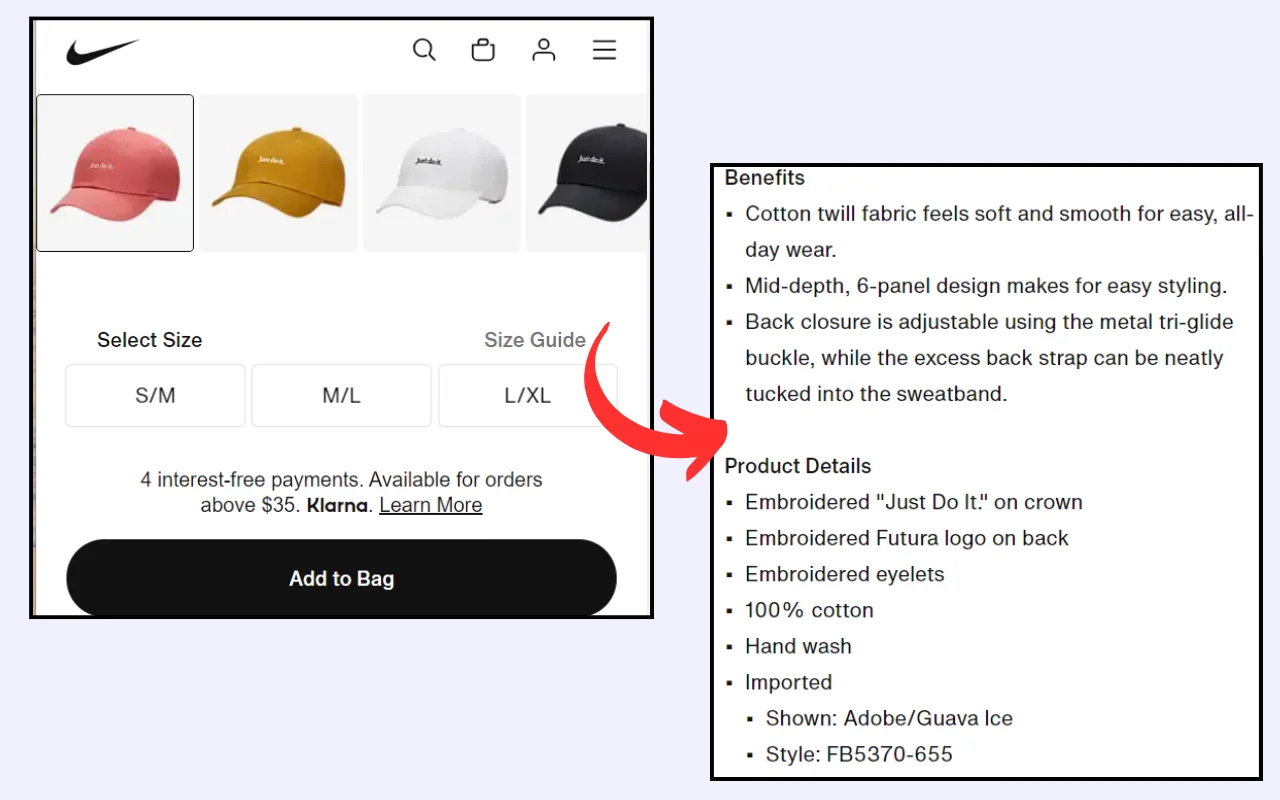
eCommerce user experience - product images - descriptions


3. Seamless Checkout Process

The checkout process is the thin line that separates a browsing visitor from becoming a paying customer. Any friction here can cause abandoned carts. Seamless checkout focuses on making this eCommerce experience smooth, quick, and trustworthy.

Every extra step, like forced registration, increases the chance of the user walking away without completing the purchase. It’s not just about the time it takes; it’s about the cognitive load, the decisions, and the potential hiccups of forgetting passwords or facing login issues. Ensuring a smooth checkout process reduces abandonment rates and boosts sales.

Strategies for a Seamless Checkout Process

● Show users their checkout stages.
● Highlight and explain checkout errors.
● Provide a variety of trusted payment gateways.
● Allow purchases without mandatory account creation.
● Display security badges to ensure secure transactions.
● Implement auto-fill capabilities for known user information.
● Allow easy modifications of cart contents during checkout.
● Allow users to save carts or favorite items for future reference.
● Provide clear post-purchase communication, including confirmation and tracking.

4. Personalization & AI Recommendations

Imagine entering eCommerce stores where the products are arranged in a way that’s uniquely tailored to your preferences and purchase history. That’s the ambiance AI recommendations strive to create in the digital sphere.

By analyzing user data and behavior, AI can curate product suggestions, enhance user engagement, and foster a sense of individualized attention. This improves customer satisfaction and maximizes conversion rates and average order values.

Efficient AI systems can pinpoint and promote items that a user is more likely to purchase, so you can leverage up-selling and cross-selling to tactically elevate purchase volumes.

Imagine AI as your savvy sales assistant and a strategic inventory manager in one. It checks at your stock levels, spots the overstocked items, and strategically promotes them as “recommended products” to potential eCommerce customers. It gives you a blend of smart marketing, customer care, and strategic inventory management.

eCommerce User Experience

Strategies to Implement Personalization & AI Recommendations

● Capture and analyze user data to understand their preferences, behaviors, and purchase history.
● Categorize customers based on shared attributes and shopping behaviors to deliver segment-specific content.
● Develop tailored content, deals, and messages for different user segments. Send them well wishes on special occasions coupled with a seasonal discount.
● Continuously train and optimize the AI algorithm to enhance the accuracy and relevance of product recommendations.

5. Mobile-First Design

With over half of global web traffic coming from mobile, optimizing for mobile experience is no longer just a buzzword; it’s a necessity. It’s about ensuring that site components fluidly adjust to varying screen sizes to provide a cohesive experience from the smallest smartphone to the largest desktop. When we say mobile-first, we’re looking at layouts, buttons, menus, and even typography from a mobile perspective.

88% of customers don’t revisit an online store after a bad user experience. A mobile-optimized site doesn’t merely resize; it responds to mobile user behavior, ensuring every interaction feels natural.

Strategies for Mobile-First Design

● Design touch-friendly buttons and elements.
● Serve varying image sizes depending on the device.
● Use flexible grids that adjust based on the device’s width and orientation.

eCommerce user experience - mobile-friendly

6. Speed Optimization

In the digital era, time is the ultimate luxury. Speed optimization ensures that users don’t waste theirs waiting for your website to load. Fast load times signal efficiency and professionalism. From server responses to visual content, every millisecond counts. Less than 2 seconds of loading speed increases user satisfaction, boosts search rankings, and directly impacts conversions.

Strategies for Speed Optimization

● Opt for a reliable hosting solution and consider using CDNs.
● Use browser caching to store and reuse frequently used data.
● Ensure all images are compressed without sacrificing quality.
● Reduce HTTP requests by combining files and minimizing external scripts.
● Combine and minimize JavaScript and CSS files for speedier page rendering.
● Apply lazy loading to show only necessary images/content, delaying the rest until needed.

7. Display Social Proof

Social proof validates the decision-making process because online shoppers feel more secure purchasing something that others recommend. Within eCommerce, social proof can take numerous forms; testimonials, popularity indicators (e.g., “Best Seller” tags), and user-generated content.

Knowing that a product is popular or well-received among peers builds trust in potential buyers. They act as a digital form of word-of-mouth, offering firsthand accounts of user experiences with products or services.

Display positive reviews from social media platforms like Instagram, Facebook, Reddit, etc. on your eCommerce website. Customer reviews provide additional information about the products, highlighting aspects that might not be covered in product descriptions. This helps customers in their purchasing decisions.

Strategies to Leverage Social Proof

● Incentivize Reviews: Encourage users to leave reviews by offering discounts or loyalty points.
● Highlight Reviews: Place user reviews prominently on product pages to make sure they are easily noticeable.
● Utilize User-Generated Content: Feature user-generated content (photos of real customers using the product) to provide relatable visuals and scenarios.
● Showcase Testimonials: Display testimonials close to CTAs, especially on landing pages and during checkout, to reinforce trust and reliability.
● Leverage Popularity Indicators: Use labels like “Best Seller” or “Popular Choice” to provide subtle nudges to products that other customers love.

8. Accessibility For All

An inclusive digital space ensures all users, regardless of their physical abilities or disabilities, can engage, navigate, and transact effortlessly. Some users rely on assistive technologies like screen readers, braille displays, or alternative input devices.

Various regions have established legal frameworks that mandate digital accessibility, safeguarding the digital rights of those with disabilities. Accessibility isn’t just about fostering inclusivity but also adhering to legislative requirements like the Americans with Disabilities Act (ADA) or the Web Content Accessibility Guidelines (WCAG).

An accessible website broadens your customer base and positively impacts brand perception, showing your commitment to inclusivity and ethical business practices.

Strategies to Ensure Accessibility

● Alt Text for Images: Include descriptive alt text for every image to convey context and content to users using screen readers.
● Keyboard Navigation: Ensure all interactive elements are keyboard accessible and navigable.
● Contrast and Readability: Guarantee text is readable by ensuring sufficient contrast and offering font size options.
● Consistent, Logical Layout: Keep a consistent layout to facilitate easier navigation for users with cognitive disabilities.
● Multimedia Alternatives: Provide text alternatives, such as transcripts or captions, for multimedia content.

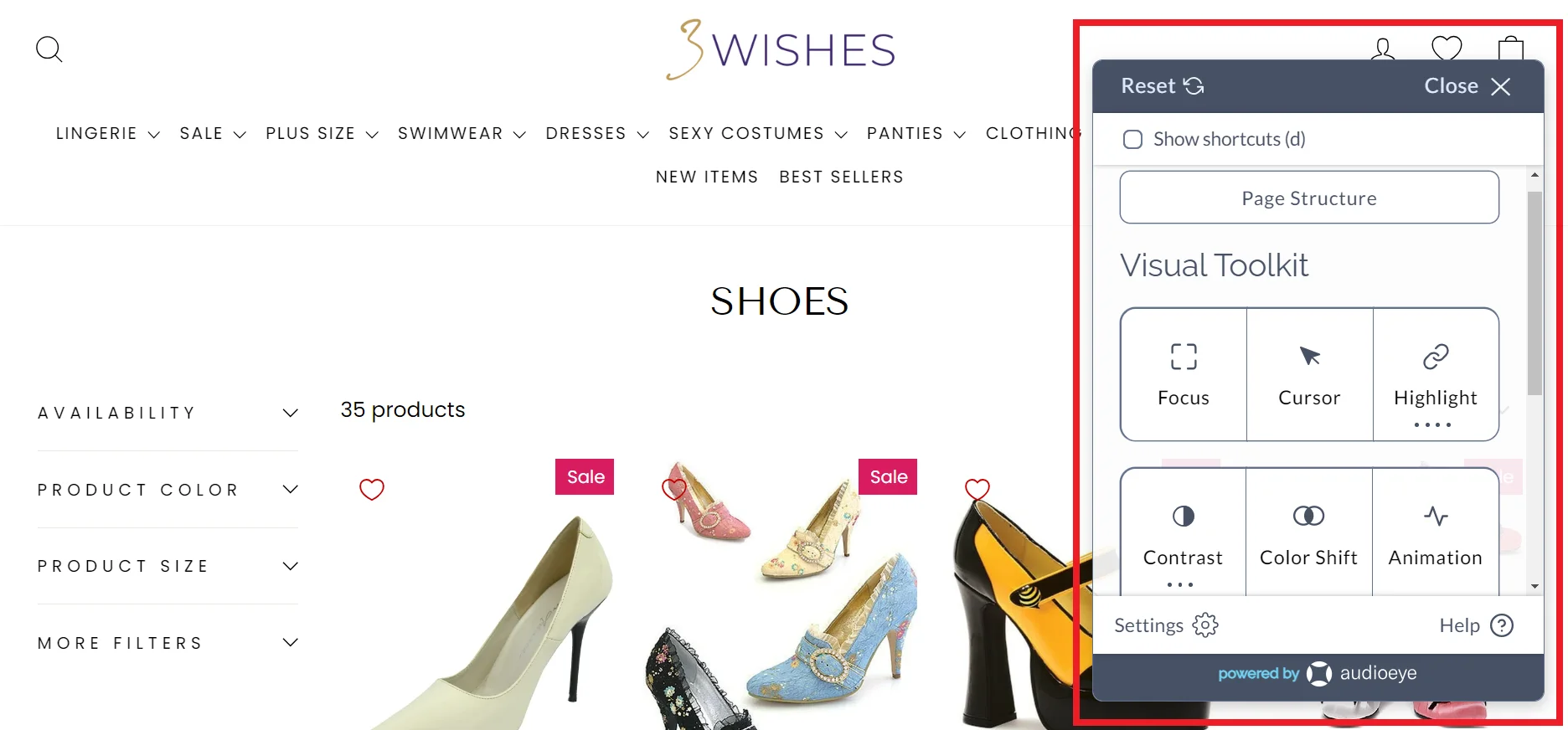
Take the standout example of this disability-friendly online lingerie store. It’s AudioEye Trusted, showing that it adheres to ADA and WCAG compliance. Features like alternative text for images, keyboard navigation, and screen reader compatibility come in handy for visually impaired users.

It ensures every user, regardless of their physical abilities, can navigate, understand, and interact with the website. This creates an enjoyable and frictionless online shopping experience for everyone.

This feature not only helps to expand the brand’s customer base but also builds customer trust. It shows they care and respect every individual in the online shopping journey. It gives a positive brand image and removes any legal risks that come with digital laws.

eCommerce user experience - Accessibility

9. Customer Support & Live Chat

A seamless customer support experience is not just based on solving problems but proactively ensuring customers feel valued and supported. Effective customer support improves user experience by ensuring browsing to purchasing to post-purchase is as smooth and hassle-free as possible.

Representatives guide customers toward making informed decisions. They suggest additional items that complement their purchase and guide them toward alternative items that better suit their needs. This approach subtly enhances conversion and average order value.

Similarly, live chat systems serve as a real-time communication bridge between eCommerce businesses and customers. The immediacy of live chat enables customers to gain instant answers and solutions to their queries.

Both live chat and customer support facilitate personalized experiences. They can provide tailored advice, offer product recommendations, and create a one-on-one interaction that makes customers feel acknowledged and appreciated.

Strategies to Maximize Impact

● Aim for 24/7 live chat and support or communicate the available hours.
● Integrate smart chatbots for after-hours to provide immediate, albeit automated, responses.
● Integrate social networks like Telegram, Facebook Messenger, Instagram, etc. providing instant, on-the-go support.
● Ensure customer support teams are well-trained and knowledgeable about the products and policies. Help them develop self-evaluation to ensure they serve clients the best way possible.
● Leverage real-time data to provide personalized assistance and recommendations.
● Implement a task management system when handling email support so teams know what to prioritize.

Overlooking UX can be a costly misstep. Next, we’ll explore the pivotal advantages you could be forfeiting unless you implement the best practices discussed.

6 Benefits of Implementing eCommerce User Experience Best Practices

Investing in eCommerce User Experience directly impacts sales, brand perception, and customer loyalty. Let’s find out how a seamless website user experience can benefit your business:

A. Increased Conversion Rates

It’s easier for customers to find and purchase products when the shopping journey is intuitive. A smooth user experience will elevate conversion rates.

B. Customer Retention

A user-friendly site not only attracts new customers but retains existing ones. Consistent positive interactions create brand loyalty and a sense of online community. This ensures that customers keep returning for future purchases, thereby increasing each customer’s lifetime value.

C. Reduced Cart Abandonment Rate

Many eCommerce sites face the challenge of users adding products to the cart but not completing the purchase. A frictionless UX, from product selection to payment, minimizes these drop-offs.

D. Positive Brand Perception

An eCommerce site often serves as the first point of interaction between a brand and its potential customers. A well-thought-out UX reflects professionalism and a customer-centric approach, enhancing the brand’s image and credibility.

E. Lower Customer Support Costs

An eCommerce site that’s easy to navigate causes fewer issues or confusion. This means fewer customer support inquiries, saving costs in manpower and resources. Additionally, clear FAQ sections and self-help resources remove the need for direct customer support.

F. Enhanced Customer Satisfaction

Happy customers are more likely to spread the word. An enjoyable shopping experience builds positive reviews, social media shoutouts, and recommendations, serving as organic promotion channels for the brand.

eCommerce user experience - accessibility

Conclusion

Elevating your eCommerce business sales and customer satisfaction doesn’t merely rest on your offers but heavily on crafting an intuitive, seamless experience, and delightful user journey. Through potent UX best practices, you’re not just presenting a platform; you’re providing a path from browsing to purchasing.

This will make sure each visitor is not just a viewer but a potential happy customer. Apply the strategies and techniques discussed to convert your visitors into loyal customers.

Need more help enhancing the UX design of your website? At Telkoware, we do more than just set up shop for you online. We are a user experience design agency that creates your eCommerce website design to stand out in the digital crowd, ensuring that your site is not just another stop for your visitors but their go-to destination. Get ready to watch your site evolve into a bustling hub of conversions and sales by reaching out to us at info@telkoware.com OR (437)223-1771.


Author Bio

Burkhard Berger is the founder of Novum™. He helps innovative B2B companies implement revenue-driven SEO strategies to scale their organic traffic to 1,000,000+ visitors per month. Curious about what your true traffic potential is?

A Comprehensive Guide to Shopify Website Development for Businesses

shopify-website-development

Here’s an overview:

shopify

Introduction to Shopify: Overview and Benefits

Shopify is a leading e-commerce platform designed to enable businesses to create, develop, and manage online stores effortlessly. Recognized for its user-friendly interface and robust capabilities, Shopify has become a popular choice among startups and established brands for eCommerce store development.

Key Features of Shopify

  1. Ease of Use:
    • Shopify offers an intuitive, drag-and-drop interface that simplifies the creation of websites.
    • No advanced technical skills are required to set up and manage an online store.
  2. Customizable Storefronts:
    • A variety of themes are available which can be customized to reflect a brand’s unique style.
    • Access to HTML, CSS, and Liquid, Shopify’s templating language, allows for deeper customization.
  3. Secure and Reliable:
    • Shopify ensures data security with SSL certification and is PCI DSS compliant.
    • Automatic updates and backups ensure the platform’s reliability and security.
  4. Scalable Solutions:
    • Suitable for businesses of all sizes, from startups to large enterprises.
    • Plans and features can scale according to the growth and needs of the business.
  5. Payment Processing:
    • Integrated payment gateway, Shopify Payments, supports multiple payment methods.
    • Seamless transactions with support for international currencies and shipping calculations.

Benefits for Businesses

  • Cost-Effective:
    • Affordable pricing plans with transparent fees. No hidden costs for essential features.
    • Reduces the expense of hiring web developers and IT support.
  • Comprehensive App Store:
    • Access to a wide range of apps and plugins to enhance functionality.
    • Tools available for marketing, SEO, inventory management, and customer service.
  • SEO and Marketing Tools:
    • Built-in SEO features to help stores rank higher in search engine results.
    • Integration with social media platforms and tools for email marketing campaigns.
  • Customer Support:
    • 24⁄7 support through various channels including phone, email, and live chat.
    • Extensive documentation and community resources for troubleshooting and guidance.

“Shopify allows businesses to focus on growth and innovation rather than technicalities.”

Setting Clear Objectives for Shopify Store Development: Defining Business Goals

A fundamental aspect of a successful Shopify website development involves the precise articulation of business goals. Clarity in objectives ensures that all developmental efforts are aligned with the overarching vision of the enterprise. The process begins with understanding and specifying what the business aims to achieve through its online platform.

Identifying Primary Objectives

To start, businesses need to identify their core objectives. These could include:

  • Revenue Growth: Aiming for a specific increase in sales volume over a defined period.
  • Brand Awareness: Enhancing the visibility and reputation of the brand within target markets.
  • Customer Acquisition: Increasing the customer base by a particular number or percentage.
  • Customer Retention: Improving customer loyalty through repeat purchases and engagement.

SMART Goals Framework

Adopting the SMART (Specific, Measurable, Achievable, Relevant, Time-bound) framework serves as a structured approach. For example:

  • Specific: Clearly define what needs to be achieved, such as a 20% increase in sales.
  • Measurable: Quantify the objective to track progress, like attaining 1,000 new subscribers.
  • Achievable: Ensure goals are realistic given current resources and market conditions.
  • Relevant: Align goals with broader business strategies and market needs.
  • Time-bound: Set a deadline, for instance, achieving the objective within the next six months.

Aligning with Business Strategy

Objectives must align with the broader business strategy, incorporating insights from market research, competitive analysis, and customer behavior studies. This ensures that the goals resonate with the market demands and competitive landscape. Alignment also influences:

  • Inventory Management: Stocking products based on predicted demand tied to specific goals.
  • Marketing Campaigns: Designing campaigns that drive towards achieving set objectives.
  • Customer Service: Enhancing support systems to improve customer satisfaction rates.

Monitoring and Adjusting Objectives

A crucial part of setting clear objectives is the willingness to monitor progress and make necessary adjustments. Utilizing analytics tools within Shopify can provide real-time data to assess performance against goals. Regular reviews help:

  • Spot Trends: Identify emerging patterns that indicate whether adjustments are needed.
  • Reallocate Resources: Shift focus and resources towards more effective strategies.
  • Continuous Improvement: Implement iterative improvements to align with evolving business needs.

By setting clear, well-defined objectives, businesses can streamline their Shopify website development, ensuring that all efforts contribute effectively towards accomplishing their unique business aspirations.

Choosing the Right Shopify Plan for Shopify Website Development

Selecting the appropriate Shopify plan is crucial for aligning with business needs and goals. Shopify offers multiple plans: Basic Shopify, Shopify, and Advanced Shopify, each with distinct features and pricing. It is best to consult with Shopify website development company you are working with, to select the most appropriate plan for your company.

Basic Shopify

Basic Shopify is ideal for new businesses or those with modest sales volumes. This plan offers essential features such as:

  • Online Store – Includes a website and blog.
  • Unlimited Products – No cap on the number of products listed.
  • Storage – Unlimited file storage.
  • Sales Channels – Integration with marketplaces and social media.
  • 24⁄7 Support – Round-the-clock customer assistance.
  • SSL Certificate – Secure transactions ensuring customer data protection.
  • Manual Order Creation – Direct order processing from admin interface.

Shopify

The “Shopify” plan is suitable for growing businesses needing advanced report functionality and additional staff permissions:

  • All Basic Features – Includes all functionalities in the Basic plan.
  • Professional Reports – Detailed analytics for better business insights.
  • Gift Cards – Attractive options for customer retention and acquisition.
  • Staff Accounts – Up to five staff accounts for better management.
  • Lower Transaction Fees – Reduced credit card rates and transaction fees.

Advanced Shopify

Advanced Shopify caters to larger businesses with higher sales volumes, providing robust reporting and shipping features:

  • Advanced Report Builder – Custom reports tailored for in-depth analysis.
  • Third-Party Calculated Shipping Rates – Provides real-time carrier shipping rates.
  • Extended Staff Accounts – Up to fifteen staff accounts.
  • Lower Fees – Even lower credit card and transaction fees compared to lower-tier plans.

Considerations

Business owners should consider several factors when choosing a plan:

  1. Budget – Assess the monthly cost against business revenue.
  2. Sales Volume – Choose a plan that minimizes transaction fees and maximizes profit margins.
  3. Required Features – Align feature offerings with specific business needs.
  4. Scalability – Opt for a plan that supports business growth.
  5. Future Projections – Anticipate future requirements to avoid frequent plan upgrades.

Designing Your Shopify Store: Themes and Customization

Shopify offers an array of themes, catering to diverse business needs. Choosing an appropriate theme is the foundation of your store’s visual appeal and user experience. Here are key points to consider when designing your Shopify store:

Selecting a Theme

  • Determine Your Needs: Identify the theme that aligns with your business model. Prioritize themes that support your product range, customer demographics, and brand aesthetics.
  • Customizability: Opt for themes that allow extensive customization. This flexibility ensures that the store can be tailored to meet specific branding requirements.
  • Responsive Design: Ensure the theme is mobile-responsive. A significant portion of users shop using smartphones, and a responsive design enhances user experience and SEO performance.
  • Support and Updates: Choose themes with consistent updates and robust support. Regular updates ensure compatibility with the latest Shopify features and security standards.

Customization Options

Once a theme is chosen, customizing it to fit the brand’s unique style is essential:

Theme Editor

  • Sections: Leverage Shopify’s theme editor, which allows the addition and rearrangement of sections on each page. Sections can include elements like slideshows, testimonials, and featured products.
  • Settings: Customize colors, fonts, and styles directly through the theme editor. This helps in maintaining brand consistency throughout the store.

Shopify Liquid

  • Liquid Templates: For deeper customization, engage with Shopify’s Liquid templating language. Liquid allows developers to create dynamic, content-rich pages by modifying the HTML structure.

CSS and JavaScript

  • Styling: Tailor CSS to tweak detailed design elements. This includes adjusting margins, padding, and other stylistic elements that are not directly accessible via the theme editor.
  • Enhancements: Integrate JavaScript to add advanced interactive features like custom sliders, pop-up notifications, and enhanced user interfaces.

Third-Party Apps

Enhanced functionalities can be achieved through Shopify’s extensive app marketplace:

  • Product Management Apps: Enhance product pages with advanced features like 3D product views, zoom functionalities, and customizable options.
  • Marketing Tools: Implement apps for email marketing, social media integration, and SEO optimization to boost traffic and sales.

By meticulously choosing and customizing a Shopify theme, businesses can launch a visually appealing, functionally robust online store that meets their unique demands.

Product Management: Adding and Organizing Your Inventory

Product management on Shopify involves several critical steps to ensure a well-structured and easy-to-navigate online store.

Adding Products

To add products, businesses should:

  1. Access the Admin Dashboard: Navigate to the “Products” section.
  2. Click on “Add Product”: Start with the primary fields like Title, Description, and Type.
  3. Enter Details:
    • Title and Description: Use compelling and SEO-friendly titles and descriptions.
    • Price: Set the retail price and compare-at price if offering a discount.
    • Categories and Tags: Select relevant categories and add tags for better discoverability.
  4. Images and Media:
    • Upload Images: Use high-resolution images showcasing the product from different angles.
    • Alt Text: Add descriptive alt text for better accessibility and SEO.
  5. Inventory Management:
    • SKU and Barcode: Assign unique SKUs and barcodes to streamline inventory tracking.
    • Stock Levels: Input current stock levels and enable the ‘Track Quantity’ option.
  6. Shipping and Variants:
    • Weight and Dimensions: Add accurate weight and size for shipping calculations.
    • Variants: Create product variants for different sizes, colors, or other attributes.
  7. SEO Optimization: Fill in SEO title, meta description, and URL handle for the product.

Organizing Products

To organize products effectively, businesses need to:

  1. Create Collections:
    • Manual Collections: Handpick specific products for promotional or thematic collections.
    • Automated Collections: Set criteria based on tags, price range, or stock status.
  2. Sort Orders:
    • Default Sorting: Choose from alphabetical, by best-selling, or custom order.
  3. Navigation Menus:
    • Add to Menus: Integrate collections into the main or footer navigation menus for easy access.
  4. Product Types and Vendors: Use these fields to further filter and categorize inventory.
  5. Search Filters:
    • Enable Filters: Allow customers to filter products by price, size, color, etc.

Staying organized ensures a user-friendly shopping experience and efficient inventory management within the Shopify platform. Proper product management is crucial for both user experience and backend operations.

Optimizing User Experience: Navigation, Search, and More

Optimizing user experience is pivotal for increasing engagement and driving conversions on a Shopify website. Properly structured navigation and efficient search functionalities are critical components of user experience.

A well-organized navigation menu ensures that visitors can easily find products and essential information. Consider the following best practices:

  • Hierarchy: Arrange categories and sub-categories in a logical hierarchy. Main categories should cover broad topics while subcategories handle more specific items.
  • Labels: Use clear and concise labels for menu items. Avoid jargon and ensure that labels accurately describe the content they link to.
  • Visibility: Primary navigation should be prominently displayed at the top of the page. Secondary navigation can be nested or placed in sidebars.
  • Responsive Design: The navigation structure should adapt seamlessly across devices, ensuring mobile users have an equally accessible experience.

Search Functionality

Empowering users to quickly find products and content through a search bar is essential. Key elements of effective search functionality include:

  • Auto-Suggestions: Implement auto-suggestions to help users find products faster and reduce typographical errors.
  • Filtering: Allow users to filter search results by categories, brands, price ranges, and other relevant attributes.
  • Synonyms and Common Misspellings: Enhance search accuracy by accounting for synonyms and common misspellings.
  • No Results Handling: Offer users suggestions or alternative products when their search query returns no results.

Additional User Experience Enhancements

Beyond navigation and search, several other elements can significantly enhance user engagement:

  • Breadcrumbs: Utilize breadcrumb trails to help users understand their current location on the site and navigate back to previous pages.
  • Loading Speed: Optimize image sizes, leverage browser caching, and minify CSS and JavaScript files to ensure fast page loading times.
  • Accessibility: Ensure the site is accessible to users with disabilities by following WCAG guidelines.
  • Customer Support: Provide easy access to customer support via live chat, contact forms, or extensive FAQs to assist users with their queries.

Enhancing user experience by focusing on these aspects will make navigation intuitive, searches efficient, and overall interaction more enjoyable on the Shopify website.

Integrating Essential Apps and Tools During Shopify Website Development

In the rapidly evolving landscape of eCommerce, leveraging the right tools and integrations can make a significant difference in the performance and functionality of a Shopify website. Integrating essential apps and tools improves efficiencies and enhances user experience.

E-commerce Plugins

  • Upsell and Cross-sell Plugins: Tools such as Bold Upsell and Cross-Sell by BeeKeting can increase the average order value by suggesting additional products at checkout.
  • Review and Rating Systems: Apps like Yotpo and Judge.me enable customers to leave feedback, which builds trust and informs future customers about product quality.

Marketing Tools

  • Email Marketing: Mailchimp and Klaviyo offer seamless integration with Shopify, facilitating automated email campaigns, customer segmentation, and personalized marketing strategies.
  • SEO Tools: Apps like SEO Manager and Plug in SEO help optimize the website’s content for search engines, driving organic traffic to the site.

Inventory Management

  • Stock Synchronization: Platforms like TradeGecko and Skubana can integrate with Shopify, providing real-time inventory updates and efficient order management.
  • Product Sourcing: Oberlo enables dropshipping businesses by simplifying product importation directly from suppliers.

Customer Support

  • Live Chat Systems: Tools such as Tidio and Gorgias optimize customer service by offering real-time interaction capabilities, ensuring customer inquiries are handled promptly.
  • Help Desk Solutions: Zendesk integrates with Shopify to provide a comprehensive support ticket system, improving customer satisfaction.

Analytics Tools

  • Google Analytics: Integrating Google Analytics can provide critical insights into customer behavior, site performance, and conversion tracking.
  • Hotjar: Allows businesses to visualize user interactions with heatmaps and recordings, helping to optimize the website’s design and user experience.

Social Media Integration

  • Social Sharing Buttons: Apps like Social Share Button by Elfsight enable easy sharing of products on social media platforms, driving referral traffic.
  • Instagram Shop: Shopify apps allow businesses to create shoppable Instagram posts, linking images directly to product pages.

Payment Gateways

  • Multiple Payment Options: Integrating platforms like PayPal, Stripe, and Shopify Payments can cater to different customer preferences, enhancing the checkout experience and reducing cart abandonment.

Strategically integrating these essential apps and tools can streamline various aspects of running an online business, from marketing and sales to customer service and analytics, ultimately leading to improved operational efficiency and customer satisfaction.

SEO and Marketing Strategies for your Shopify Store

Implementing effective SEO and marketing strategies is vital for the success of any Shopify store. Here are several strategies to consider:

On-Page SEO

Optimize Product Descriptions and Titles:

  • Use relevant keywords naturally within product titles and descriptions.
  • Ensure product titles are clear, concise, and aligned with what customers are searching for.
  • Incorporate high-ranking keywords but avoid keyword stuffing.

Meta Descriptions and Tags:

  • Write compelling meta descriptions that include primary keywords and a call to action.
  • Use appropriate tags for all products and blog posts to aid in search engine indexing.

Image Optimization:

  • Use alt text for all images, describing them with keywords where appropriate.
  • Compress images to improve site speed without compromising quality.

Off-Page SEO

Backlinks:

  • Build high-quality backlinks by collaborating with influencers, bloggers, and authoritative websites within the industry.
  • Participate in forums and social media groups relevant to your niche.

Social Media Presence:

  • Engage with followers on social platforms like Facebook, Instagram, Pinterest, and Twitter.
  • Share your products, promotions, and engaging content to drive traffic.

Content Marketing

Blog Posts:

  • Regularly update a blog with informative, engaging, and keyword-rich content.
  • Share stories, buying guides, tutorials, and industry news.

Email Marketing:

  • Develop targeted email marketing campaigns to reach potential and existing customers.
  • Use personalized messages, promotional offers, and new product releases to encourage purchases.

Google Ads:

  • Create targeted Google Ads campaigns to reach users searching for specific keywords related to your products.
  • Use product listing ads to display products directly in search results.

Social Media Ads:

  • Utilize Facebook and Instagram ads to target specific demographics with tailored content.
  • Experiment with different ad formats, such as carousel, video, and story ads.

User Experience & Mobile Optimization

Responsive Design:

  • Ensure the Shopify store is mobile-friendly, as a significant portion of traffic comes from mobile devices.
  • Use a responsive design theme that works well across various screen sizes.

Site Speed Optimization:

  • Improve page load times through image compression, minifying CSS/JS files, and choosing a reliable hosting service.

Analytics and Tracking

Google Analytics:

  • Set up Google Analytics to track user behavior, traffic sources, and conversion rates.
  • Use data to inform decisions and optimize marketing efforts.

Heatmaps:

  • Implement heatmaps to understand where users click and scroll, helping to fine-tune the website layout.

Understanding and implementing these strategies will help improve visibility, drive traffic, and increase sales for Shopify stores.

Setting Up Payment Gateways and Checkout

Setting up payment gateways and checkout on a Shopify website involves several important steps that ensure a smooth transaction process for customers. This section will cover the necessary steps businesses must take to effectively configure these features.

1. Selecting a Payment Gateway

Shopify supports various payment gateways. To select the right one, consider factors like transaction fees, payment methods, and geolocation.

  • Shopify Payments: This is Shopify’s built-in solution, offering seamless integration and lower fees.
  • Third-Party Gateways: Options include PayPal, Stripe, Square, and others. Each has its pros and cons.
  • International Gateways: For businesses targeting global customers, gateways that support multiple currencies should be considered.

Research each option to determine the best fit for the business’s needs.

2. Configuring Payment Gateways

Once a payment gateway is selected, the next step involves configuring it:

  1. Navigate to Settings: Go to the Shopify admin panel, then click on “Settings” at the bottom left.
  2. Select Payments: Click “Payments” in the left-hand menu.
  3. Choose Provider: Select the chosen payment gateway provider.
  4. Enter Credentials: Enter the necessary API keys or other credentials provided by the payment gateway.
  5. Activate Gateway: Save changes to activate the payment gateway.

3. Customizing the Checkout Process

Customizing the checkout process enhances user experience. Consider the following elements:

  • Customer Accounts: Decide whether to make accounts mandatory or optional.
  • Shipping Options: Configure shipping settings, including shipping rates and carrier options.
  • Taxes: Set up tax rates based on the region.
  • Abandoned Cart: Enable automated emails to remind customers of their abandoned carts.
  • Policy Pages: Ensure pages like Privacy Policy, Terms of Service, and Return Policy are visible during checkout.

4. Testing the Checkout Process

Before going live, perform multiple tests:

  • Simulate Transactions: Use test payment gateways to simulate transactions.
  • Mobile Testing: Ensure the checkout is mobile-friendly.
  • Error Handling: Verify that the system handles errors gracefully.

5. Monitoring and Optimization

After setting up, continuously monitor and optimize the checkout process:

  • Analytics: Use Shopify’s built-in analytics to track conversion rates.
  • Customer Feedback: Collect and act on feedback related to payment and checkout.
  • A/B Testing: Experiment with different checkout elements to see what works best.

    Ensuring Security and Compliance

In Shopify store development, ensuring security and compliance is paramount. This involves implementing robust measures to protect both customer and business data. Adhering to legal and industry standards is critical for maintaining credibility and trust.

Implementing Security Protocols

  1. SSL Certificates: Shopify automatically provides an SSL certificate for secure connections. Using HTTPS instead of HTTP encrypts data, preventing unauthorized access.
  2. Regular Updates: Keeping Shopify and any integrated apps updated is vital for protecting against vulnerabilities and exploits.
  3. Strong Password Policies: Encourage the use of complex passwords and implement multi-factor authentication (MFA) to add an extra layer of security.
  4. Access Controls: Limit administrative access to essential personnel only. Implement role-based permissions to minimize the risk of internal threats.

Payment Security

  1. PCI Compliance: Shopify is Level 1 PCI DSS compliant. This ensures that all credit card data is processed, stored, and transmitted securely.
  2. Secure Checkout: Utilizing Shopify’s secure checkout process helps protect customer payment details. Shopify Payments can be used as it complies with stringent security standards.

Data Protection

  1. Encryption: Ensure that all sensitive data, both in transit and at rest, is encrypted. This includes customer information and transaction details.
  2. Backup and Recovery: Regularly back up the site data and have a recovery plan in place. Shopify’s infrastructure includes redundant backups to facilitate this process.
  3. Privacy Policies: Clearly outline data collection, usage, and protection practices. Providing transparency about data handling instills confidence in customers.

Compliance Requirements

  1. GDPR: For businesses operating in the EU, adherence to General Data Protection Regulation (GDPR) is mandatory. This involves obtaining explicit consent for data collection, ensuring data portability, and allowing customers to request data deletion.
  2. CCPA: Compliance with the California Consumer Privacy Act (CCPA) is necessary for businesses that serve California residents. This includes offering the right to opt-out of data selling and prompt responses to data access requests.
  3. Accessibility Standards: Shopify sites should conform to the Web Content Accessibility Guidelines (WCAG) to ensure that individuals with disabilities can access and navigate the website easily.

Monitoring and Incident Response

  1. Security Audits: Conduct regular security audits to identify and rectify vulnerabilities. Utilize available tools and third-party services to perform comprehensive assessments.
  2. Real-Time Monitoring: Implement real-time monitoring for unusual activities or potential breaches. Services like Shopify’s built-in monitoring or third-party solutions can alert to suspicious actions.
  3. Incident Response Plan: Develop a robust incident response plan to address potential security breaches efficiently. Define clear steps for containment, investigation, and communication to mitigate impact.

Integrating these security and compliance practices within the Shopify website development process ensures that the store remains reliable, trustworthy, and legally sound.

Analyzing Performance: Utilizing Shopify Analytics

Shopify Analytics serves as a robust tool for businesses seeking to gauge their eCommerce performance. Through a variety of reports and tools, Shopify provides insights into critical aspects of the online store. This section explores essential features of Shopify Analytics and how to effectively leverage them.

Overview Dashboard

The Overview Dashboard offers a snapshot of key metrics. Users can review:

  • Total Sales
  • Session by Location
  • Online Store Conversion Rate
  • Average Order Value

Reports

Shopify offers a comprehensive range of reports to delve deeper:

  • Sales Reports: Examine sales over time, including by product, sales channel, and customer.
  • Customer Reports: Analyze new versus returning customers, customer retention rates, and lifetime customer value.
  • Product Reports: Observe top-selling products, low-stock items, and inventory turnover.
  • Finance Reports: Evaluate financial summaries including taxes, payments, and liabilities.

Live View

The Live View feature allows real-time watching of activity on the website. Key elements include:

  • Active Cart Visualization
  • Current Visitors
  • Live Map of Customer Locations

Custom Reports

Businesses can also create custom reports to focus on specific data points:

  1. Select the Data Source: Choose elements such as sales, products, or customers.
  2. Filter Data: Apply filters to refine results.
  3. Save and Schedule: Save custom parameters and schedule regular updates.

Integrations

Businesses can integrate other tools with Shopify Analytics to enhance insights:

  • Google Analytics: For deeper web traffic analysis.
  • Facebook Pixel: For tracking advertising efforts.
  • Klaviyo: For understanding email campaign performance.

Utilizing Cohorts

Cohort analysis helps in understanding customer retention and behavior over time:

  • Create Cohorts: Group customers by specific periods.
  • Track Performance: Measure how each cohort progresses in terms of sales and engagement.

Key Metrics to Monitor

Key metrics should be consistently monitored:

  • Traffic Sources
  • Customer Acquisition Cost (CAC)
  • Return on Investment (ROI)
  • Bounce Rate
  • Cart Abandonment Rate

In summary, Shopify Analytics offers a powerful suite of tools and reports to monitor and enhance the performance of an online store.

Maintaining and Updating Your Store: Best Practices

Ensuring the continuous success of a Shopify store requires diligent maintenance and regular updates. Here are some best practices to consider:

  1. Regularly Update Products
    • Keep the product listings current by adding new items and removing discontinued products.
    • Ensure accurate descriptions, specifications, and high-quality images.
  2. Monitor Inventory Levels
    • Use Shopify’s inventory management tools to track stock levels.
    • Set up alerts for low inventory to avoid running out of popular items.
  3. Optimize Store Performance
    • Regularly test the website speed using tools like Google PageSpeed Insights.
    • Minimize the use of heavy scripts and large image files to improve load times.
  4. Implement Security Measures
    • Enable and update SSL certificates to encrypt data.
    • Use two-factor authentication (2FA) for added security on admin accounts.
  5. Review Analytics
    • Analyze sales data, customer behavior, and traffic sources through Shopify’s analytics dashboard.
    • Adjust marketing strategies based on performance data to maximize ROI.
  6. Engage with Customers
    • Respond promptly to customer inquiries and reviews.
    • Implement a loyalty program to encourage repeat purchases.
  7. Update Themes and Plugins
    • Keep the store’s theme and plugins up to date to ensure functionality and security.
    • Routinely check for updates and apply them as necessary for optimal performance.
  8. Backup Data
    • Use apps or third-party services to backup store data regularly.
    • Schedule automatic backups to prevent data loss.
  9. Conduct Regular Audits
    • Periodically audit the store’s design, user experience, and checkout process.
    • Identify and fix issues that may hinder customer satisfaction.
  10. Stay Informed About Shopify Updates
    • Follow Shopify’s official blog and forums to stay informed about new features and updates.
    • Attend webinars and training sessions offered by Shopify to enhance store management skills.

By following these best practices, businesses can maintain a well-functioning Shopify store that offers an excellent shopping experience while maximizing operational efficiency. This approach not only safeguards the store’s functionality but also contributes to sustained growth and customer satisfaction.

Conclusion: Achieving Long-Term Success with Shopify

To achieve sustained success with a Shopify website, businesses must prioritize several key elements. Firstly, continuous monitoring and optimization of website performance are crucial. This includes tracking metrics such as traffic, conversion rates, and customer behavior. Utilizing Shopify’s built-in analytics and third-party tools, businesses can make data-driven decisions.

Maintaining an updated and visually appealing storefront remains paramount. Regular updates to product listings, visuals, and overall design keep the site fresh and engaging. Incorporating seasonal themes or promotions can attract and retain customers.

Essential Practices for Long-Term Success:

  1. Customer Experience:
    • Enhance navigation, search functionality, and checkout process.
    • Implement personalized recommendations based on user behavior.
  2. SEO Optimization:
    • Continuously refine on-page SEO elements like meta tags and descriptions.
    • Create high-quality, keyword-optimized content such as blog posts or product descriptions.
  3. Mobile Responsiveness:
    • Ensure the website is optimized for mobile devices.
    • Regularly test and update mobile-specific features to maintain seamless usability.
  4. Customer Engagement:
    • Utilize email marketing campaigns to keep customers informed and engaged.
    • Leverage social media to interact with the audience and promote products.
  5. Security and Updates:
    • Keep the Shopify platform and any plugins updated to protect against vulnerabilities.
    • Employ robust data protection measures to ensure customer information security.
  6. Customer Feedback:
    • Actively seek customer feedback to identify areas for improvement.
    • Implement changes based on feedback to enhance customer satisfaction.

Growth Strategies:

  • Expanding Product Lines:
    • Introduce new products based on market research and customer demand.
    • Maintain a balance between new and existing product inventory.
  • Strategic Partnerships:
    • Collaborate with influencers or complementary businesses.
    • Explore opportunities for cross-promotions to reach wider audiences.
  • Advanced Marketing Techniques:
    • Implement retargeting campaigns to recover abandoned carts.
    • Use A/B testing to refine marketing messages and strategies.

Financial Planning:

  • Budget Management:
    • Regularly review financial health and adjust budgets to optimize spending.
    • Invest in marketing, technology, and customer service based on ROI analysis.
  • Diversifying Revenue Streams:
    • Explore subscription models, gift cards, or exclusive membership offers.
    • Identify and capitalize on seasonal trends to boost sales.

A holistic approach, focusing on customer experience, technical optimization, and strategic growth, ensures that businesses can achieve long-term success with their Shopify websites.

The Essential Guide to eCommerce Web Design in Canada

guide-ecommerce-website-design-canada

Introduction to eCommerce in Canada

eCommerce in Canada has been expanding rapidly, transforming how consumers interact with businesses in almost every industry. In today’s digital age, Canadians are increasingly turning to online platforms to perform a variety of transactions, from purchasing everyday items to investing in services and high-end products. This surge in online activity is supported by the country’s well-established internet infrastructure and high levels of internet penetration among the population.

eCommerce web design in Canada

Canada’s diverse and tech-savvy population provides a fertile ground for eCommerce growth. The widespread adoption of smartphones and other digital devices has compelled retailers and service providers to adopt an eCommerce-first mentality. As a result, Canadian businesses are investing heavily in online platforms that are not only user-friendly and accessible but also secure and compliant with the country’s consumer protection laws.

  • Evidently, the Canadian eCommerce market is characterized by several key factors:
    • A growing number of consumers prefer shopping online for convenience and accessibility.
    • High-speed internet is widely available across urban and rural areas, facilitating smooth online transactions.
    • There’s an increasing trend toward mobile commerce as smartphones become the device of choice for online shoppers.
    • Trust in online payment systems is robust, with multiple secure options available.
    • Bilingualism in English and French is often necessary for websites to cater to all Canadians effectively.
    • The legal framework, including privacy laws and consumer protection regulations, is strong, ensuring that shoppers feel confident in their online purchases.

This shift to digital commerce has implications for how companies design their online presence. A well-structured eCommerce web design is now crucial for successfully capturing and maintaining consumer interest and trust. It must be intuitive, scalable, and aligned with the preferences of Canadian consumers. Thus, for businesses looking to thrive in the competitive Canadian marketplace, understanding and executing exceptional eCommerce web design is not just advantageous; it has become an essential part of business strategy.

eCommerce web design Canada 2

Understanding Canadian Consumer Behavior Online

In the dynamic landscape of Canadian e-commerce, consumer behavior reveals important purchasing trends and preferences. Canadians are increasingly reliant on online platforms for their shopping needs, with convenience and accessibility being primary drivers. E-commerce web design must therefore resonate with these consumer demands.

  • Value for Money: Canadians are price-sensitive shoppers who often seek the best deals online. They appreciate websites that offer price comparisons, discounts, and loyalty programs.
  • User Experience: The online experience matters. Canadians favour websites that are easy to navigate, have fast loading times, and provide comprehensive product information. A cluttered or complex design can discourage potential customers.
  • Security Consciousness: With rising concerns about data privacy and cyber threats, Canadian consumers prioritize security. Trust badges, secure payment gateways, and transparent privacy policies can help establish a website as trustworthy.
  • Mobile Adaptiveness: With a significant portion of online shopping done via smartphones, mobile-optimized websites are crucial. This includes responsive design that adapts to various screen sizes and offers easy-to-use interfaces.
  • Supporting Local: There is a growing trend of supporting Canadian businesses among online shoppers. Highlighting Canadian identity, including local products or contributions to the local economy, can differentiate a website from international competitors.
  • Sustainability and Ethics: Considering the increasing awareness of environmental issues, Canadian customers are drawn to brands that demonstrate sustainable practices and ethical sourcing.

For e-commerce websites targeting Canadian consumers, tailoring the user experience to these behavioral tendencies is not just beneficial but essential. Acknowledging and adapting to these preferences can significantly affect the conversion rates and overall success of Canadian e-commerce websites.

Essential Elements of High-Converting eCommerce Web Design

In the realm of eCommerce, a website’s design can significantly impact its ability to convert visitors into customers. Canadian businesses looking to optimize their online presence should focus on several key elements within their web design to maximize conversion rates.

Firstly, user interface (UI) and user experience (UX) are the cornerstones of a high-converting website. A clean, intuitive design that allows shoppers to navigate with ease, coupled with a streamlined checkout process, is imperative. Key aspects include:

  • Responsive design that ensures the site is optimized for all devices, including mobiles, tablets, and desktops.
  • Clear, high-quality images and videos that showcase products effectively.
  • Fast loading times, as delays can lead to cart abandonment.
  • Easy-to-use search functions that allow customers to find products quickly.

Secondly, trust signals play a crucial role in converting visitors. These include:

  • Displaying security badges to reassure shoppers that their data is protected.
  • Featuring customer reviews and testimonials to build credibility.
  • Consistent branding across all pages to professionalize the site.

Call-to-Action (CTA) buttons must be strategically placed and designed to stand out. They should guide customers through their shopping journey, from adding items to the cart to completing the purchase.

Lastly, the accessibility of customer service can affect conversions. Providing:

  • Live chat support for immediate assistance.
  • A visible and easy-to-access FAQ section to address common concerns.
  • Multiple contact options, such as phone, email, and social media.

Through the intentional incorporation of these elements, eCommerce businesses in Canada can design websites that not only attract visitors but convert them into loyal customers.

Creating a User-Friendly eCommerce Website Layout

A user-friendly eCommerce website layout is crucial for attracting and retaining customers in Canada’s competitive online market. As designers focus on crafting delightful user experiences, several core considerations emerge:

  • Simplicity is Key: A clutter-free and straightforward design helps users find what they need without confusion. Navigational elements should be clear and easily accessible, reducing the effort required for users to browse and shop.
  • Consistent Branding: Maintaining a consistent brand image throughout the site reinforces recognition and trust. This includes a uniform color scheme, typography, and imagery that aligns with the brand’s values and aesthetics.
  • Mobile Responsiveness: With the increasing number of transactions made via smartphones, designing with mobile users in mind is non-negotiable. A responsive layout ensures seamless shopping experiences across all devices.
  • Fast Load Times: A delay in page loading can lead to cart abandonment. Optimizing images, caching, and leveraging content delivery networks are strategies used to enhance site speed.
  • Clear Call-to-Action: CTAs should stand out and guide users subtly yet persuasively towards making a purchase. The language and placement of these buttons are fundamental to driving conversions.
  • Accessible Design: Adhering to Web Content Accessibility Guidelines (WCAG) ensures that people with disabilities can navigate and interact with the website with ease.
  • Effective Visual Hierarchy: Strategic placement and sizing of elements lead the eye naturally around the screen, highlighting important information such as deals, discounts, and popular products.

For Canadian eCommerce sites, adhering to these principles helps in crafting layouts that don’t just attract users but convert browsing into sales amidst a multicultural customer base with diverse preferences and shopping habits.

Optimizing Website Speed and Performance for Canadian Shoppers

When designing an eCommerce website for the Canadian market, optimizing speed and performance is paramount to ensure a smooth shopping experience. An efficient website caters to the expectations of customers who are often accustomed to quick and seamless service.

Firstly, one should implement reliable hosting services that are equipped to manage high traffic volumes. Canadian shoppers expect consistent uptime, especially during peak seasons like Black Friday or Boxing Day.

Next, it is crucial to optimize images and videos that are not only high in quality but also compressed for the web. This balance ensures visuals are attractive without slowing down the page load time. Techniques such as lazy loading can be utilized so that images load only when they are in the viewer’s browser window.

Leveraging browser caching is another strategy that improves load times for repeat visitors. By storing elements of the site on the user’s device, subsequent page loads become significantly faster.

Moreover, it’s essential to minimize HTTP requests by simplifying design elements where possible. Reducing the number of components on a page lowers the amount of data transferred and thus, accelerates loading times.

  • Utilize Content Delivery Networks (CDNs) to distribute the load. CDNs can host and deliver content from servers that are geographically closer to Canadian users, reducing latency.
  • Employ minification and compression techniques for CSS, JavaScript, and other code files. These practices streamline the code and trim unnecessary characters, improving execution speed.
  • Regularly conduct mobile optimization checks. As many Canadian consumers shop on mobile devices, having a website that is responsive and fast on all devices is not just a nice-to-have but a necessity.

Ultimately, website speed and performance are not just about customer satisfaction. They are also linked to better search engine rankings and improved conversion rates. By focusing on these aspects, eCommerce websites stand to gain a loyal Canadian clientele and boost overall sales efficiency.

Mobile-First Design: Catering to Canadian Mobile Shoppers

In today’s digital era, Canadian mobile shoppers are a rapidly expanding demographic. Understanding their preferences and behavior is crucial for eCommerce success. Mobile-first design prioritizes the needs of users on smartphones and tablets, ensuring that the online shopping experience is seamless across all devices.

First, it’s essential to streamline navigation on mobile devices. Menus should be simplified, with clear categories that can be easily tapped. The search functionality must be prominently displayed, as mobile shoppers often rely on quick searches to find products.

Responsive design is non-negotiable. Sites must automatically adjust to different screen sizes without compromising functionality. Images and text should resize appropriately so shoppers can browse without zooming or scrolling excessively.

Additionally, mobile users expect fast loading times. Optimize images and leverage browser caching to minimize delays, as even a one-second delay can lead to customer drop-offs. Incorporating accelerated mobile pages (AMP) can further enhance the speed for mobile users.

Touchscreen-friendly interfaces enhance the usability of the site. Ensure buttons and links are of adequate size and spacing to prevent accidental clicks. Interactive elements should be responsive to touch and provide immediate feedback to user actions.

Lastly, streamline the checkout process for mobile users by minimizing the number of steps and using digital wallets and one-tap payment options. Security is paramount, so employ SSL encryption and clearly display security badges to reassure customers.

eCommerce web design Canada 4

Crafting a mobile-first design is imperative for reaching the Canadian mobile shopper. It should offer an intuitive and efficient shopping experience, reflecting an understanding of the mobile user’s needs and preferences.

Incorporating Trust Signals and Security Features

In the world of eCommerce, consumer trust is inexorably linked to the perception of security on a website. Canadian shoppers expect a baseline of trust signals and security features before they’re willing to complete a purchase online. For a successful eCommerce web design, incorporating these elements is non-negotiable.

Trust signals can take various forms:

  • SSL Certificate: Displaying a secure sockets layer (SSL) certificate is paramount. This ensures that all data transmitted is encrypted, and shoppers can rest assured their personal information is protected.
  • Trust Badges: Badges from recognized security companies or from payment gateways like PayPal can significantly ease shoppers’ concerns.
  • Clear Contact Information: Consistently visible and easy to find contact details help build trust. Customers feel reassured knowing they can get in touch with real people if issues arise.
  • User Reviews and Testimonials: Including a section for user reviews and testimonials lends credibility to your products and the overall shopping experience.

Security features are the technical backend safeguards:

  • Two-Factor Authentication (2FA): Implementing 2FA can protect customer accounts from unauthorized access.
  • Regular Security Audits: Ensure that your website undergoes regular security check-ups to identify and address vulnerabilities.
  • Data Protection Protocols: Adherence to Canadian data protection laws, such as the Personal Information Protection and Electronic Documents Act (PIPEDA), confirms that you handle customer information responsibly.
  • Up-to-Date Software: Keeping all platform software up to date avoids potential security loopholes that could be exploited by cybercriminals.

Integrating these trust signals and security features into an eCommerce website not only facilitates a secure shopping environment but also enhances overall customer confidence, resulting in improved conversion rates and customer loyalty in the Canadian market.

eCommerce web design Canada

Operating an eCommerce website in Canada requires careful attention to the legal framework governing online sales. Canadian businesses must ensure they abide by a range of laws and regulations to avoid penalties and promote a trustworthy online environment. Here’s a guide to the essentials:

  • Privacy Legislation: Canada’s Personal Information Protection and Electronic Documents Act (PIPEDA) mandates how private sector organizations collect, use, and disclose personal information in the course of commercial business. eCommerce sites must have a privacy policy that complies with PIPEDA’s principles.
  • Consumer Protection Laws: Each province has consumer protection laws that address issues such as return policies, warranties, and deceptive marketing practices. Businesses must provide clear information about products, right to cancel orders, and detailed receipts.
  • Tax Compliance: Adequately setting up and calculating taxes is crucial. This includes the Goods and Services Tax (GST), Provincial Sales Tax (PST), or Harmonized Sales Tax (HST), depending on the province or territory.
  • Accessibility Standards: The Accessibility for Ontarians with Disabilities Act (AODA) requires web content to be accessible. While it applies to Ontario, adopting similar standards nationally is a best practice.
  • Anti-Spam Legislation: Canada’s Anti-Spam Legislation (CASL) controls the sending of commercial electronic messages. Compliance means obtaining consent before sending marketing emails and including an unsubscribe mechanism.
  • Intellectual Property Law: Respecting copyright, trademarks, and other intellectual property rights is vital to avoid infringement and potential legal issues.
  • Age Verification: For products that have age restrictions, such as alcohol or tobacco, online retailers must implement age verification processes.

Navigating through these regulations might seem daunting, but it’s an integral part of establishing a reputable and sustainable eCommerce presence in Canada. Businesses are advised to seek legal expertise to ensure full compliance and update their practices as laws evolve.

Leveraging Local SEO for Canadian eCommerce Success

Local Search Engine Optimization (SEO) is a powerful tool for Canadian eCommerce businesses seeking to attract more local customers and increase visibility in search engine results. By optimizing for local SEO, companies can ensure that their products and services are prominently displayed when consumers in their area search for related keywords.

Optimize for Local Keywords

To capitalize on local searches, businesses should:

  • Conduct thorough keyword research to identify terms that locals use when searching for products.
  • Include city names, local landmarks, and regional slang in their keywords.
  • Create location-specific pages that highlight their presence in different Canadian locales.

Google My Business Optimization

Enhancing a Google My Business profile can significantly boost local SEO. Canadian eCommerce sites should:

  • Claim and verify their listing, ensuring all details are current and accurate.
  • Regularly update their profile with fresh content and promotions.
  • Encourage customers to leave positive reviews to improve credibility and attractiveness.

Mobile Optimization

With increasing numbers of searches happening on mobile devices, sites must be:

  • Responsive and mobile-friendly, offering a seamless experience across all devices.
  • Fast-loading, as loading times can significantly impact bounce rates and overall user experience.

Developing a strong backlink profile with local relevance is crucial. eCommerce sites should:

  • Partner with local businesses for cross-promotion or sponsor local events to earn backlinks.
  • Engage with local influencers who can discuss their products and provide backlinks to their site.

Leveraging local SEO is not an overnight strategy but a continuous process that requires attention and adaptation to the unique Canadian market. By concentrating on local signals, Canadian eCommerce websites can effectively position themselves to their target audience, nurturing brand loyalty, and driving sustainable growth in the competitive online space.

Implementing Effective eCommerce Navigation and Search Functions

Designing an eCommerce website in Canada requires special attention to navigation and search functionality. These elements are the backbone of a user-friendly online shopping experience, determining how easily customers can find and purchase products.

Firstly, the navigation menu must be intuitive and structured with a logical hierarchy. Incorporating a mega menu for sites with extensive product ranges allows users to see categories and subcategories at a glance. It’s crucial to maintain consistency with menu item placements to foster a sense of familiarity as users browse the site.

The search bar, meanwhile, should be prominently positioned and support functionality such as autocomplete, spelling corrections, and search suggestions. This reduces frustration and assists in quickly directing customers to the desired products. For advanced user experiences, consider implementing filters and sort options that enable shoppers to refine search results based on criteria like price, popularity, or newness.

For bilingual regions of Canada or diverse customer bases, multi-language support in navigation and search can greatly enhance usability. Reliable translation ensures that all customers, regardless of their preferred language, can navigate and search the website with ease.

On mobile devices, reducing navigation to a hamburger menu can declutter the screen, but make sure key categories are still accessible with minimal taps. Simplified search functionality on mobile devices, including voice search options, will account for the growing segment of mobile shoppers.

Lastly, regularly analyze user interaction data to fine-tune navigation and search functions. Understanding how customers engage with these features helps in continually refining the user experience for the betterment of the eCommerce platform.

Showcasing Products with High-Quality Images and Descriptions

In the realm of eCommerce web design in Canada, the visual presentation of products is paramount. The adage, “A picture is worth a thousand words,” is particularly relevant in online shopping, where customers cannot physically touch or examine items. Therefore, high-quality images are non-negotiable for any Canadian eCommerce site looking to engage and convert visitors.

  • Use professional, high-resolution images that accurately represent products.
  • Include multiple angles and zoom-in features to give a comprehensive view.
  • Ensure images are optimized for quick loading times without sacrificing quality.
  • Provide a consistent image style to maintain brand identity and site aesthetics.

In addition to imagery, detailed and compelling product descriptions are essential for informing and persuading potential buyers.

  • Write clear, concise descriptions that highlight key features and benefits.
  • Use bullet points for easy scanning of product specifications.
  • Incorporate storytelling elements where appropriate to create an emotional connection.
  • Avoid jargon and industry terms that might confuse the customer.

Also, considering the diverse linguistic landscape of Canada, offering images and descriptions in both of Canada’s official languages, English and French, can broaden market reach and enhance customer experience.

Providing context is another critical factor. Showing products in use through lifestyle images can help customers visualize the item in their daily lives, a powerful motivator for making a purchase.

Remember, the goal of showcasing products on your eCommerce website is not just to inform but also to entice. Striking the balance between aesthetics, information, and usability is the hallmark of an effective eCommerce web design in Canada.

The Role of Content Marketing in Canadian eCommerce Web Design

In the digital commerce space of Canada, content marketing emerges as pivotal to successful eCommerce web design, shaping the online retail experience with a strategic focus on consumer engagement. The integration of content marketing within web design goes beyond aesthetic appeal, drawing in potential customers with valuable, relevant, and consistent content tuned to address the distinct needs and questions of the Canadian market.

Canadian consumers are becoming increasingly savvy and demand not only products but also meaningful interactions with brands. Content marketing serves this demand by:

  • Bolstering Brand Identity: Consistently presenting brand-aligned content creates a powerful and recognizable brand voice, establishing trust with the customer.
  • Enhancing Search Engine Visibility: Strategic use of SEO in content helps Canadian eCommerce sites to rank higher on search engines, making it easier for potential customers to find products or services.
  • Educating Customers: High-quality content educates users about products and services, often simplifying complex offerings, and leading to informed purchasing decisions.
  • Driving Customer Engagement: Interactive content, like quizzes, polls, and videos, keep customers engaged longer, reducing bounce rates and leading to higher conversion rates.
  • Supporting Social Media Efforts: Shareable content can take the form of blog posts, infographics, and product demos, helping to extend the reach of the eCommerce platform into social media.
  • Building Community: Engaging storytelling and the sharing of user-generated content can foster a sense of community among brand loyalists.

For Canadian eCommerce platforms, content is not merely filler; it is a strategic asset. It should be meticulously woven into the fabric of web design, reflecting the brand ethos and catering to the preferences of the target audience, to solidify a seamless and captivating online shopping experience.

Integrating Social Proof and Reviews to Boost Credibility

In today’s digital marketplace, trust is a currency as valuable as any other. Canadian eCommerce businesses can substantially enhance their credibility by integrating social proof and customer reviews into their web design. Shoppers often seek reassurance from fellow consumers before committing to a purchase. Displaying reviews, ratings, and testimonials prominently on a product page can decisively influence buying decisions.

To implement social proof effectively, consider the following strategies:

  • Feature User-Generated Content: Include a section on product pages for customer photos and stories. This approach not only showcases real-life uses of the product but also adds a layer of authenticity that polished brand content cannot match.
  • Leverage Ratings and Reviews: Position star ratings and reviews where they are easily seen, such as near product titles and price information. Encourage customers to leave reviews by making the process straightforward and by offering incentives.
  • Highlight Testimonials: Create a dedicated testimonial page or a highlight reel that cycles through customer praises on the homepage. Choose testimonials that speak to diverse aspects of the brand and shopping experience.
  • Showcase Trust Badges: Display security badges, membership in professional organizations, and any awards received to signal to customers that the store is a reputable and trustworthy entity.
  • Utilize Social Media Feeds: Integrate a live feed of the brand’s social media on the site. Actions like sharing, likes, and comments act as endorsements, enhancing the brand’s social proof.
  • Implement Review Aggregation: For larger brands, using review aggregators that compile reviews from various platforms can demonstrate widespread trust and satisfaction.

By integrating these elements into an eCommerce site’s design, Canadian businesses can foster confidence among potential customers, leading to improved conversion rates and customer loyalty. Trust, once built, has the potential to turn first-time buyers into lifelong advocates for the brand.

Understanding Payment Gateways and Currency Considerations

In the realm of eCommerce web design, the integration of a reliable payment gateway stands as a critical factor, especially for Canadian businesses targeting both domestic and international customers. A payment gateway is a merchant service that processes credit card payments for online and traditional brick-and-mortar stores, acting as the intermediary between the merchant’s website and the acquiring bank.

When selecting a payment gateway for an eCommerce website in Canada, one must take into account various aspects:

  • Security: Ensure that the gateway complies with the Payment Card Industry Data Security Standard (PCI DSS) to safeguard sensitive information.
  • Compatibility: The gateway should seamlessly integrate with your website’s shopping cart and other technology stacks employed.
  • Payment Methods: Cater to a broad customer base by supporting various payment methods, including credit cards, debit cards, and digital wallets like PayPal.
  • Transaction Fees: Comprehend the fee structure, which may include setup fees, monthly fees, and per-transaction fees, to make cost-effective decisions.
  • Customer Experience: Streamline the checkout process with a user-friendly interface to minimize cart abandonment rates.
  • Currency Support: Since currency exchange rates fluctuate, a payment gateway capable of handling multiple currencies will facilitate easier transactions for international customers and potentially increase sales.

For Canadian eCommerce websites, currency considerations also play a pivotal role. Websites should:

  • Display Prices in Canadian Dollars: Primary pricing should be in CAD to accommodate the domestic market.
  • Offer Currency Conversion: Implement real-time currency conversion for international shoppers to view prices in their local currency, enhancing the customer experience.
  • Adjust for Tax Implications: Account for provincial and federal taxes in product pricing while respecting the tax regulations of international buyers.

By meticulously addressing these elements, Canadian eCommerce sites can develop a robust framework that aligns with their business models and customer expectations, fostering trust and encouraging smoother transactional processes.

The Importance of Customer Service Features in Web Design

In the competitive landscape of eCommerce in Canada, customer service can be the distinguishing factor that propels a business ahead of its rivals. When designing an eCommerce website, integrating customer service features is not merely an afterthought but a central component in shaping a positive user experience. High-quality customer service features can significantly improve customer satisfaction, loyalty, and ultimately, conversion rates.

Incorporating seamless customer service tools such as live chat enables real-time assistance, answering queries and resolving issues while customers navigate the site. This immediacy not only facilitates the purchasing process but also builds trust. In addition, comprehensive FAQ sections help address common concerns, allowing customers to quickly find solutions without the need to reach out directly, thus promoting self-service.

Other features, such as easy-to-find contact information, demonstrate transparency and open lines of communication. It reassures customers that support is readily available, enhancing their sense of security when making online transactions. Creating a simple, intuitive process for returns and exchanges can also alleviate potential apprehensions about purchasing online, leading to increased sales.

Moreover, incorporating feedback mechanisms allows customers to express their opinions and experiences. This not only provides valuable insights for the business to improve but also makes customers feel valued and heard. Incorporating customer testimonials and reviews further enriches the site by showcasing real customer experiences, influencing others’ purchasing decisions, and reinforcing credibility.

Ultimately, an eCommerce website that prioritizes customer service features in its design sends a powerful message that the business cares about its customers. It is a critical investment that can result in heightened customer satisfaction, advocacy, and sustained business growth.

Harnessing Analytics to Improve User Experience

In the ever-evolving landscape of eCommerce web design within Canada, the utilization of analytics stands as a cornerstone for enhancing user experience. By meticulously examining data, businesses can pinpoint user behaviors, preferences, and pain points, which in turn inform strategic design improvements.

Firstly, analytics empower site owners to track vital metrics such as bounce rates, page views, and session durations. These metrics unveil areas where the user journey may be faltering, allowing designers to proactively address and rectify issues that may be causing friction.

  • Conversion rates are also closely monitored through analytics. Understanding the paths that users typically take to complete a purchase can highlight elements in the design that drive conversion, and those that may need revamping.

Additionally, heatmaps and click-tracking tools can provide a visual representation of how users interact with the site. Identifying hotspots where interaction is high can aid designers in placing important content or calls to action in those areas to maximize visibility and engagement.

  • User segmentation is another powerful feature of analytics. Tailoring user experience based on demographics, location, and behavior ensures that the design resonates with the intended audience.

Moreover, A/B testing is an essential part of leveraging analytics. By presenting different versions of a web page to users, data can be gathered on performance, enabling an evidence-based approach to design optimization.

  • Feedback mechanisms, like surveys and user testing, often complement analytical data, providing qualitative insights that can refine the user experience further.

For Canadian eCommerce sites, the integration of analytics into the web design process is not just desirable – it’s indispensable. It facilitates a user-centric design strategy, ensuring that every change is aligned not only with aesthetic values but also with user satisfaction and business objectives.

Conclusion: Building a Sustainable eCommerce Presence in Canada

Sustaining a successful eCommerce presence in Canada demands strategic planning and continuous adaptation in response to consumer behavior and technological advancements. Businesses must prioritize user experience, ensuring their website designs are not only aesthetically pleasing but also intuitive and responsive. An efficient and accessible online platform can dramatically enhance customer satisfaction and loyalty.

To achieve long-term success, Canadian eCommerce sites should:

  • Adopt a mobile-first approach, considering the extensive use of smartphones for online shopping.
  • Implement SEO best practices to increase visibility and draw organic traffic to their websites.
  • Incorporate robust security measures, such as SSL certificates, to foster trust with consumers.
  • Leverage analytics and user data to personalize experiences and refine marketing strategies.
  • Stay compliant with Canadian laws and regulations, including language requirements and tax laws, to avoid potential legal obstacles.

Engaging with local cultures and communities can also provide an edge, as localized content and marketing resonate with Canadian consumers. In addition, pursuing sustainability in operations and showing social responsibility can elevate a brand’s image, catering to the growing number of consumers who value ethics in their purchasing decisions.

Collaboration with local suppliers and eco-friendly logistics options can further strengthen an eCommerce business’s commitment to sustainability. By demonstrating dedication to these principles, companies can build a robust and enduring eCommerce presence that thrives amidst the dynamic digital landscape of Canada.

Innovative eCommerce Web Design Ideas for a User-Friendly Experience

innovative ecommerce web design

Introduction to User-Centric eCommerce Web Design

In the competitive landscape of online retail, user-centric web design stands as a pivotal factor in crafting a successful eCommerce website. It revolves around tailoring the browsing and shopping experience to align with the needs, preferences, and behaviors of the user. This philosophy ensures that the website is convenient, accessible, and enjoyable to use, which in turn, can significantly boost customer satisfaction and conversion rates.

At the core of user-centric design is a thorough understanding of your audience, which entails comprehensive research into user demographics, psychographics, and browsing patterns. The insights gained from this research feed into every aspect of the design process, from layout to functionality.

Key elements of user-centric eCommerce web design include:

  • Simplicity and Clarity: A clean, intuitive interface helps users navigate the site with ease, making the path to purchase as straightforward as possible.
  • Responsiveness: A design that adapts seamlessly to various screen sizes ensures a quality experience across all devices.
  • Speed: Users expect fast-loading pages, and optimizing site speed is crucial to preventing customer drop-off.
  • Accessibility: Designing for accessibility means ensuring that all users, including those with disabilities, can interact with the site without barriers.
  • Personalization: Offering personalized recommendations and content can make the shopping experience more relevant and engaging for users.
  • Visual Hierarchy: Strategic use of size, color, and layout guides users’ attention to the most important elements of the site.

By placing the user at the forefront of the design process, eCommerce businesses can create websites that not only look good but also perform well in terms of user experience and conversion efficiency.

The Importance of Responsive Design in eCommerce

In the digital age, where shopping can take place on a variety of devices, responsive design has become a cornerstone of a successful eCommerce strategy. With a myriad of screen sizes across smartphones, tablets, laptops, and desktops, an eCommerce website must deliver a consistent and seamless shopping experience across all platforms.

Responsive design ensures that an eCommerce site adjusts its layout, content, and functionalities to accommodate different screen resolutions. Here are key reasons why responsive design is crucial:

  • User Experience (UX): At its core, responsive design is about providing a positive user experience. By ensuring that users can easily navigate and interact with an eCommerce site on any device, businesses reduce frustration and enhance customer satisfaction.
  • Increased Reach: Many consumers use multiple devices throughout their purchase journey. Responsive design allows for a cohesive experience that can drive engagement and conversions regardless of the device being used.
  • SEO Benefits: Search engines, like Google, prioritize mobile-friendly websites. A responsive eCommerce site is more likely to rank higher in search results, leading to increased visibility and organic traffic.
  • Lower Maintenance Costs: Maintaining a separate mobile site alongside a desktop version can be costly and time-consuming. Responsive design negates the need for multiple site versions, reducing maintenance and development resources.
  • Higher Conversion Rates: When users find a website easy to use on any device, the likelihood of them completing a purchase increases. This streamlined path to purchase is fundamental for improving conversion rates.

Incorporating responsive design in eCommerce is not merely a trend; it is an essential aspect of modern web design that directly impacts a business’s bottom line. Companies that invest in responsive design are equipping themselves to meet the evolving needs of their consumers, staying competitive in a crowded online marketplace.

Leveraging Minimalism for Clearer Navigation

In the realm of eCommerce, where every pixel can be the key to customer retention and conversion, minimalism is not just an aesthetic choice—it’s a strategic decision. A minimalist approach in web design strips away the non-essential elements, allowing core functionalities like navigation to take center stage. This design philosophy emphasizes simplicity, enabling users to find their desired products with ease.

Here’s how to leverage minimalism for clearer navigation:

  • Reduction of Elements: Begin by removing any superfluous elements that don’t serve a direct purpose. The focus should be on the inventory and finding ways for consumers to quickly access products.
  • Streamlined Menus: Simplify the main menu by limiting the number of categories. Nested menus should be avoided whenever possible. Dropdowns can be used but keep them straightforward and concise.
  • Uniformity in Design: Maintain a consistent visual language throughout the site. Use a uniform color scheme, font style, and button shapes to foster an intuitive interface where users can navigate subconsciously.
  • Visibility of Search Bar: The search bar should be prominent and easy to locate. Users who prefer to search for products directly can do so without navigating through multiple pages.
  • Whitespace Usage: Utilize whitespace strategically to draw attention to navigation elements. Ample spacing reduces clutter and lets the user’s eye naturally gravitate towards navigation pathways.
  • Iconography: Employ universally-recognizable icons that connote home, shopping cart, account, and menu. When text is necessary, keep it succinct.

Remember, the goal is to guide the user to their intended destination with the least amount of friction. By leveraging minimalism in navigation design, eCommerce websites can deliver a user-friendly experience that not only pleases aesthetically but also functions with remarkable efficiency and simplicity.

Incorporating High-Quality Imagery and Video Content

In the realm of eCommerce, visual elements play pivotal roles in engaging customers and encouraging transactions. Utilizing high-resolution images allows for clear, crisp product displays, which can increase the perceived value and quality of the offerings. eCommerce sites should leverage this by featuring large, zoomable images that allow viewers to appreciate product details, similar to the tactile engagement of in-store shopping experiences.

When incorporating video content, businesses must ensure that it serves a functional purpose, such as demonstrating the use or benefits of a product. Videos should be short, captivating, and informative, ideally showing the products in action. This dynamic form of content can significantly aid in reducing the ambiguity that often accompanies online shopping, providing a more comprehensive understanding of the product.

It is vital for videos and images to be optimized for web use to ensure they do not negatively impact site load times. Image compression tools and proper video hosting solutions can help maintain website performance while still delivering high-quality visuals.

Furthermore, alt-text should be employed for all imagery and video content to enhance SEO and ensure accessibility for users with visual impairments. Descriptive, keyword-rich alt-text can aid in product discoverability via search engines.

Lastly, eCommerce platforms must be mindful of how imagery and video content will render on various devices, especially smartphones. With an increasing number of consumers shopping on mobile devices, responsive design is essential. Images and videos must adapt seamlessly to different screen sizes, maintaining quality and user experience across all platforms.

To encapsulate:

  • Use high-resolution, zoomable images for product detail.
  • Include short, functional videos showing products in use.
  • Optimize all visuals for fast loading.
  • Implement descriptive alt-text for SEO and accessibility.
  • Ensure responsive design for mobile compatibility.

    Optimizing Site Speed for Enhanced User Experience

A rapid site speed is critical in eCommerce web design as it directly influences user experience, engagement, and conversion rates. Here are strategic methods to enhance site speed:

  • Leverage Browser Caching: Caching stores parts of your site on a user’s device upon the first visit, decreasing load time on subsequent visits. Setting up proper caching protocols can make your website much more responsive.
  • Minify CSS, JavaScript, and HTML: Removing unnecessary characters from code—like spaces, line breaks, and comments—can speed up site loading times without altering the functionality.
  • Enable Compression: Tools such as Gzip reduce the size of your CSS, HTML, and JavaScript files which are larger than 150 bytes. This technique can drastically cut down data transfer times.
  • Optimize Images: Reducing file sizes for images without compromising quality can lead to significant performance improvements. Use formats like JPEG for high-quality results and PNG for graphics with fewer than 16 colors.
  • Use a Content Delivery Network (CDN): CDNs distribute your content across multiple, geographically diverse servers to reduce the distance between users and website resources, improving load times.
  • Eliminate Render-Blocking JavaScript and CSS: Modify the order of scripts and styles to ensure that the loading of non-critical resources does not impede the display of content.
  • Improve Server Response Time: Evaluate performance bottlenecks like slow routing, database queries, or lack of adequate memory and address them. Consider using a dedicated hosting environment if necessary.
  • Utilize Lazy Loading: Loading non-critical resources only when they are needed, like images below the fold, can enhance initial page load times and save bandwidth.

By implementing these strategies, eCommerce platforms can significantly minimize load times, leading to an improved user experience and potentially higher conversion rates.

Utilizing Advanced Search Features for Efficiency

In the competitive realm of eCommerce, efficiency is a cornerstone for customer satisfaction and retention. Integrating advanced search features within web design is instrumental in streamlining the shopping experience for users. A smart search bar is the first step;as it enables customers to input queries and receive relevant suggestions instantly. Predictive search, using machine learning algorithms, can provide personalized recommendations based on user behavior and search history.

Categorization enhances this further by allowing users to drill down into specific areas of interest. Filters such as price range, color, size, and brand help refine the search results, delivering a more targeted selection that aligns closely with customer preferences. These filters should be easily accessible and adjustable to facilitate a seamless shopping journey.

Tag-based search functionality is another powerful tool. It allows products to be associated with multiple descriptors or ‘tags’, which users can select to discover items matching specific criteria or themes. This method broadens the horizon of search without overwhelming the customer with irrelevant options.

To cater to a global audience, multilingual search capabilities ensure that language barriers do not hinder the shopping experience. Incorporation of natural language processing (NLP) can interpret and process queries made in various languages, displaying results in the user’s preferred language.

Finally, visual search technology empowers users to search for products using images. By uploading a photo of an item, customers can find similar or complementary products, offering a modern and intuitive way to shop.

In summary, optimizing eCommerce web design with these advanced search features not only elevates user experience but also paves the way for higher conversion rates and enhanced customer loyalty.

Personalization Techniques in Web Design

Contemporary eCommerce web design trends emphasize the importance of crafting a shopping environment that caters to the unique preferences and behaviors of individual users. Personalization is paramount, employing various techniques that enhance the user’s experience and potentially boost conversion rates.

  • Dynamic Content Display: Smart algorithms track user behavior to tailor the content displayed on an eCommerce site. For instance, returning customers might see a homepage customized with products related to their past browsing or purchase history.
  • Personalized Recommendations: Integrating recommendation engines allows websites to suggest products that align with the user’s preferences, encouraging exploration and repeat purchases. This might include items frequently bought together or other customers’ top choices within the same category.
  • Custom User Profiles: Giving customers the ability to create profiles enables a more personalized shopping experience. These profiles can store size preferences, favorite products, and purchase history, to facilitate expedited checkouts and provide tailored shopping suggestions.
  • Geo-Location Targeting: By using the visitor’s location, websites can display location-specific information, offers, or pricing, which makes the shopping experience more relevant and convenient for users.
  • Behavioral Triggers and Retargeting: Tracking user actions such as items added to a cart but not purchased can enable targeted marketing tactics like retargeting ads or triggered emails designed to re-engage potential customers.
  • Adaptive Content and A/B Testing: Employing A/B testing of various design elements permits the optimization of personalized content. This testing can help determine the most effective strategies for engaging individual users based on their interaction with the site.

By infusing these personalization techniques into web design, eCommerce sites can create a more intuitive and user-friendly environment that resonates with the individual, ultimately fostering loyalty and driving sales.

Integrating Social Proof to Build Trust

In the digital realm where direct interaction is nonexistent, businesses face the challenge of fostering trust with potential customers. Social proof emerges as a powerful tool to bridge this gap. Integrating social proof within an eCommerce web design can significantly influence purchasing decisions by leveraging human psychology’s trust in the collective opinion.

To effectively incorporate social proof into an eCommerce platform:

  • Showcase Customer Reviews and Testimonials: Transparently displaying customer feedback on product pages provides insight into user satisfaction and product quality. High ratings and positive reviews can elevate the credibility of the offerings.
  • Highlight User-Generated Content: Sharing photos or videos of customers using the products, often seen on social media platforms, can resonate with new customers, as it provides a more relatable and authentic form of endorsement.
  • Feature Social Media Mentions: Adding a live-feed or a curated selection of social media mentions shows real-time usage and satisfaction of products by existing customers, demonstrating popularity and trustworthiness.
  • Display Endorsements from Influencers or Experts: Collaborations with industry influencers or experts who endorse products can amplify trust, as their reputations lend additional credibility to the brand.
  • Leverage Trust Badges: Symbols such as money-back guarantees, secure checkout badges, and association with recognized organizations, ensure customers of a safe and reliable transaction.

By strategically implementing these social proof elements, eCommerce websites can create a more user-friendly experience rooted in trust. It’s a potent method to alleviate consumer anxieties and convert visitors into satisfied customers.

Creating an Intuitive Checkout Process

Crafting an intuitive checkout process is pivotal in ensuring a seamless shopping experience for customers in the world of eCommerce. The following strategies can be considered to streamline the checkout experience:

  • Minimize Steps: Keep the checkout process as brief as possible. Ideally, the user should be able to complete a purchase in just a few clicks. Implement a single-page checkout design where customers can fill in all necessary information without having to navigate through multiple pages.
  • Form Simplification: Use clear, straightforward forms with auto-fill options for returning customers. Limit the number of fields to essential information to reduce the burden on the user.
  • Payment Options Variety: Offer a wide range of payment methods including credit/debit cards, PayPal, and mobile payment options to cater to different preferences.
  • Prominent Call to Action (CTA): Ensure that the ‘Complete Purchase’ button stands out and is easy to find. The user’s attention should naturally gravitate towards the CTA.
  • Visual Clarity: Use progress indicators to show customers where they are in the checkout process. This helps to reduce confusion and gives a sense of completion as they progress.
  • Guest Checkout Option: Allow customers to checkout without creating an account. While encouraging them to sign up can be beneficial for the business, requiring it can lead to cart abandonment.
  • Security Reassurance: Display security badges and use SSL encryption to show customers that their personal and payment information is secure. Trust is key to conversion at this stage.
  • Error Handling: Design clear error messages that help users correct mistakes without frustration. Errors should be specific and provide guidance on how to fix them.
  • Mobile Optimization: Since a significant portion of users shop via mobile devices, the checkout process must be fully responsive and easy to navigate on smaller screens.

By adhering to these principles, businesses can create an efficient and user-friendly checkout process that minimizes friction, encourages completion, and ultimately boosts conversion rates.

Implementing AI and Chatbots for Improved Interaction

The integration of Artificial Intelligence (AI) and chatbots into eCommerce websites is setting new benchmarks for customer interaction. AI-driven features are revolutionizing the way users shop online by offering personalized recommendations and intelligent search capabilities. For instance, AI algorithms can analyze a user’s browsing history and purchase patterns to suggest products that align with their interests, thereby enhancing the user experience significantly.

Chatbots, powered by AI, have become indispensable tools for providing real-time customer support. Their ability to engage with customers 24⁄7 ensures that inquiries and concerns are addressed promptly, eliminating lengthy wait times for human assistance. The deployment of chatbots also streamlines the shopping process by guiding consumers through the sales funnel, from product discovery to final checkout.

Here are ways to implement AI and chatbots effectively in eCommerce web design:

  • Prioritize Natural Language Processing (NLP): Integrating NLP enables chatbots to understand and interpret user queries more accurately, thus providing relevant responses and solutions.
  • Personalize User Interactions: Utilize AI to curate personalized experiences based on user data, making product recommendations more precise and appealing.
  • Optimize for Mobile Use: Ensure that AI and chatbot features are fully functional on mobile devices, considering the increasing trend of mobile shopping.
  • Transparent Data Usage: Inform users about how their data is used by the AI systems to build trust and comply with data protection regulations.

By embracing these technologies, eCommerce businesses can significantly enhance their web design to deliver user-friendly experiences that meet the expectations of a tech-savvy market. These implementations not only serve to streamline the shopping experience but also to build a strong rapport with customers, fostering loyalty and encouraging repeat business.

Accessibility Considerations in eCommerce Design

When designing an eCommerce platform, inclusivity means creating a shopping environment accessible to all users, including those with disabilities. Here are key considerations to ensure your website design meets accessibility standards:

  • Contrast and Color Usage: Ensure high contrast between text and background colors to assist users with visual impairments. Avoid using color as the sole means of conveying information, as colorblind users may not perceive the content as intended.
  • Keyboard Navigation: Some users rely on a keyboard instead of a mouse. Ensure that all interactive elements are navigable using a keyboard alone, providing a clear focus indicator as the user tabs through the content.
  • Alt Text for Images: All images should have alternative text descriptions. This is not only helpful for screen reader users, but also for situations where images can’t be displayed.
  • Accessible Forms: Forms should be designed with clear labels and error messages that are announced by screen readers. Consider providing instructions or examples to guide users through the form completion process.
  • Aria Attributes: Use ARIA (Accessible Rich Internet Applications) attributes when necessary to communicate the role, state, and function of web elements to assistive technology.
  • Responsive Design: The site should be easily usable on any device, including mobile phones and tablets, which are commonly used by individuals with motor skill difficulties.
  • Screen Reader Compatibility: Regularly test your site’s compatibility with popular screen readers to ensure all content is accessible.
  • Multimedia: Provide transcripts for audio content and captions or sign language interpretation for video content. This ensures that users with hearing difficulties can access multimedia information.

In conclusion, it’s imperative for eCommerce websites to consider accessibility as part of their user-friendly design. An accessible website not only broadens your customer base but also reflects a commitment to inclusivity and social responsibility. With these considerations in place, businesses can create an equitable environment for all shoppers, regardless of their abilities.

Adopting Progressive Web App Features for eCommerce

In the dynamic world of online retail, leveraging Progressive Web App (PWA) technology can be a game-changer for eCommerce businesses. A PWA combines the best of web and mobile apps to deliver a seamless, reliable, and engaging shopping experience directly from a browser, without the need for consumers to download an app.

Key PWA features to consider integrating into an eCommerce platform include:

  • Offline Access: PWAs can work offline or on low-quality networks. By caching key resources, shoppers can browse products and even add to their carts without an active internet connection, enhancing the user experience in connectivity-challenged environments.
  • Push Notifications: As with native apps, PWAs can send push notifications to customers. This feature is invaluable for re-engaging users, announcing special deals, or reminding them of abandoned carts.
  • Fast Load Times: Speed is critical in eCommerce. PWAs are designed to load instantly, even on flaky networks, reducing bounce rates and improving customer satisfaction.
  • Home Screen Accessibility: Users can save the PWA to their home screen, which makes it readily accessible, just like a native app. This encourages repeat visits and provides a consistent experience.
  • Safe and Secure: PWAs are served via HTTPS to prevent snooping and ensure that content has not been tampered with, which is a vital consideration for transactional eCommerce websites where security is paramount.
  • Responsive Design: A PWA should fit any form factor: desktop, mobile, tablet, or whatever comes next. This flexibility ensures a user-friendly experience regardless of the device used to access the eCommerce site.

By adopting PWA features, eCommerce platforms can retain the ease of access and user-centric benefits of mobile apps while circumventing the drawbacks, such as the requirement for downloads and updates, thus optimizing the customer journey and maximizing conversion opportunities.

The Role of Color Psychology in User Experience

Color psychology plays a pivotal role in crafting a user-friendly eCommerce web design. It involves the use of color to evoke specific feelings and behaviors in shoppers, ultimately influencing their user experience and purchasing decisions.

  • Attract Attention: Strategic use of color can draw the user’s eye to important elements such as calls-to-action (CTAs) and promotional banners.
  • Brand Recognition: Consistent color schemes resonate with brand identity, making the website memorable and strengthening brand presence.
  • Emotional Influence: Colors evoke emotions—red can create a sense of urgency, blue can instill trust, while green can relax and reassure users.
  • Aesthetic Appeal: A well-thought-out color palette enhances the visual appeal of the website, making the browsing and shopping experience more enjoyable.
  • Usability: Contrasting colors improve readability and navigability, guiding users effortlessly through the website’s content and functionality.

By understanding the target audience’s response to different colors, designers can tailor the visual experience to align with user preferences and expectations. Moreover, A/B testing different color applications can provide empirical data on their effectiveness in improving user engagement and conversion rates.

While color influences are subjective and can vary across cultures and individuals, incorporating color psychology into web design ensures a more intuitive and satisfying user experience. This thoughtful approach promotes positive interactions with the eCommerce platform, potentially leading to increased customer satisfaction and loyalty.

As we look toward the future of eCommerce web design, several compelling trends appear poised to shape the online shopping experience. Web designers must vigilantly adapt to these changes to create user-friendly, cutting-edge platforms.

  • Artificial Intelligence and Personalization: Online stores will increasingly harness AI to offer personalized user experiences. Tailored product recommendations and customer service chatbots will become more nuanced and effective, providing shoppers with a sense of individual attention.
  • Voice Search Optimization: With the rise of digital assistants, optimizing for voice search will become crucial. This will require web designers to consider natural language processing and long-tail keywords in their designs, making the user experience seamlessness across devices.
  • Augmented Reality (AR) Integration: AR technology is predicted to grow within eCommerce, allowing customers to visualize products in their own space or even on themselves before making a purchase, significantly reducing the guesswork and enhancing satisfaction.
  • Sustainability and Ethical Design: Consumers are becoming more conscious of the environmental and social impact of their purchases. eCommerce websites will highlight sustainability through ethical design choices, including transparency in sourcing and sustainable practices.
  • Mobile-First Design: Mobile commerce is set to continue its upward trajectory. A mobile-first approach to web design will be non-negotiable, demanding fast loading times, one-handed navigation, and seamless checkout processes.
  • Advanced Security Features: As cyber threats evolve, so must eCommerce security measures. Expect web designers to integrate sophisticated security features to protect customer data and build trust, such as biometric authentications and advanced encryption methods.

These trends indicate a dynamic future for eCommerce web design, where anticipating and adapting to user needs, technological advancements, and global sensibilities will be essential for success.

Top eCommerce Web Design Trends Dominating the Canadian Market

top ecommerce web design trends

Introduction to the Evolving Canadian eCommerce Landscape

With the digital world constantly shaping modern consumer behaviour, the Canadian eCommerce landscape has been undergoing a significant transformation. As an inherently diverse and dynamic market, Canada presents unique opportunities and challenges for online retailers. The burgeoning sector has seen a surge in online shopping, driven by factors such as increasing smartphone penetration, advancements in secure payment technology, and changing consumer preferences leaning towards the convenience of home shopping.

In recent years, especially post-pandemic, there’s been a noticeable increase in both domestic and international players vying for a slice of the Canadian online market cake. This influx of competition has spurred innovation in web design, as businesses strive to stand out and provide user experiences that are not just transactional, but also engaging and brand-enhancing.

Key aspects influencing the e-commerce trends in Canada include:

  • Localization: Recognizing the cultural tapestry that is Canada, with its two official languages and a mosaic of communities, businesses are tailoring their online experiences to be as inclusive as possible.
  • Mobile Optimization: With mobile commerce, or m-commerce, gaining ground, websites are placing a premium on responsive designs that deliver seamless shopping experiences across devices.
  • Environmental Consciousness: Canadian consumers are growing more eco-conscious, leading to an increase in demand for sustainable practices within eCommerce businesses, including sustainable packaging and carbon-footprint reduction efforts.
  • Personalization: Leveraging data analytics, businesses are increasingly providing personalized shopping experiences for customers through tailored recommendations and customer-centric interfaces.

Understanding how these elements come together to shape the eCommerce landscape is crucial for retailers looking to capitalize on web design trends that resonate with Canadian consumers. As such, the web design trends that are dominating the Canadian market reflect not only technological advancements but also the evolving values and expectations of Canadian shoppers.

Mobile-First Design: A Non-Negotiable Trend

In the realm of Canadian eCommerce, mobile-first design has transitioned from a forward-thinking approach to an absolute necessity. With a majority of online consumers engaging through smartphones and tablets, optimizing an eCommerce website for mobile devices is paramount.

A mobile-first strategy involves designing an online experience for mobile before scaling up to larger screens. This trend is vital for several reasons:

  • Enhanced User Experience (UX): Mobile-first sites prioritize navigation, load times, and content organization for smaller screens, leading to a seamless user experience. The goal is to accommodate the mobile user’s need for fast and efficient interactions.
  • Improved Search Engine Ranking: Search engines, like Google, favor mobile-friendly websites. A mobile-first design can improve a site’s search engine ranking, driving more traffic and potential sales.
  • Increased Conversion Rates: When users encounter a mobile-friendly site, they are more likely to stay engaged and complete a purchase. Mobile optimization directly correlates to better conversion rates and revenue.
  • Future-proofing: With mobile usage continually on the rise, a mobile-first design ensures that an eCommerce site remains relevant and accessible moving forward.

Considering the rapid advancement of mobile technology, and the evolving consumer behavior in Canada, eCommerce businesses cannot afford to overlook mobile-first design. It is a strategy that not only meets the current demand but also anticipates the direction of online commerce, positioning businesses to thrive in an increasingly mobile-centric market.

Minimalism: The Art of Less is More in Web Design

In the fast-paced realm of eCommerce, Canadian web designers are embracing minimalism, a trend that prioritizes simplicity and functionality. This design philosophy is rooted in the idea that less is indeed more, and by reducing clutter and focusing on essential elements, a more enjoyable user experience is cultivated.

  • Stripping Down to Basics: Minimalist web designs strip away non-essential graphics, text, and features to leave only the most important content. This approach ensures that users can focus on the core message and value proposition without distractions.
  • Clean Layouts: By utilizing ample whitespace, also known as negative space, minimalist websites achieve a clean, organized layout. This spacing provides breathing room for all design elements, aiding in clear visual communication.
  • Typographic Excellence: Font choice and typographic design become key in minimalist design as text is often one of the few design elements on the page. A careful selection of typefaces and attentive typesetting enhance readability and visual appeal.
  • Intentional Color Palettes: Minimalism does not equate to monochrome. However, a restrained color palette is often employed to establish visual harmony and brand consistency. Selective use of colors can help highlight important buttons or calls to action.
  • Purposeful Imagery: Instead of relying on large numbers of images or decorative graphics, minimalist design focuses on purposeful imagery. Each visual element is chosen for its impact and relevance to the content.
  • User-Centric Navigation: Navigation is simplified to guide users seamlessly through their buying journey. Minimalist design often features a straightforward, easy-to-use menu that prevents users from being overwhelmed by choices.

In embracing minimalism, Canadian eCommerce sites are not only achieving an aesthetic of understated elegance but are also improving site performance and load times. Indeed, in web design, minimalism can lead to a maximized user experience, where every element serves a deliberate and beneficial purpose.

AI and Personalization: Creating Tailored Shopping Experiences

In the ever-evolving realm of eCommerce, Canadian merchants are harnessing the power of artificial intelligence (AI) to deliver highly personalized shopping experiences. AI technology allows for the analysis of vast amounts of data, enabling online stores to understand customer preferences and behaviors like never before.

Personalization is achieved through various AI-driven methods:

  • Product Recommendations: AI algorithms analyze customers’ past purchases, search history, and browsing patterns to recommend products that are more likely to appeal to them.
  • Dynamic Pricing: AI can tailor pricing based on market demand, customer profile, and purchasing history, ensuring the price point is attractive to individual shoppers.
  • Chatbots and Virtual Assistants: These AI tools engage customers in real-time, providing personalized assistance and helping guide them to relevant products or services.
  • Customized Marketing: Email campaigns and online adverts are personalized using AI, targeting customers with content and offers that align with their preferences and previous interactions.

Such personalized interventions have proven to increase customer engagement and conversion rates. They also help in building brand loyalty, as shoppers are more likely to return to a site that understands their unique needs and preferences. Moreover, AI-enabled personalization provides valuable insights into aggregated consumer trends, guiding inventory decisions and marketing strategies.

Canadian eCommerce platforms are keenly adopting these AI-driven personalization tools to stand out amidst a competitive online marketplace. By prioritizing a shopping experience that feels individually tailored, they are setting a new standard for customer satisfaction in the digital shopping domain.

Interactive Product Visualizations and AR

The integration of interactive product visualizations and augmented reality (AR) in eCommerce web design is revolutionizing the online shopping experience for Canadian consumers. These advanced features enable shoppers to engage with products in a more immersive and informative way, directly from their devices.

Interactive Product Visualization:

  • 3D Modeling: eCommerce sites increasingly feature 3D models that users can rotate and examine from different angles, providing a comprehensive view of the product.
  • Zoom and Pan Capabilities: High-definition images with the ability to zoom and pan allow customers to scrutinize product details closely, thereby reducing uncertainty and enhancing buyer confidence.
  • Customization Interfaces: Some websites offer interfaces where customers can customize products in real-time, selecting colors, patterns, or components, and seeing their choices reflected immediately.

Augmented Reality (AR):

  • Try Before You Buy: AR enables consumers to visualize products in their own space before making a purchase. For instance, customers can see how a piece of furniture would fit and look in their home, which significantly enhances the decision-making process.
  • Immersive Experiences: By leveraging AR, retailers can create memorable, immersive experiences that entertain and engage users, leading to increased brand loyalty and higher conversion rates.
  • Accessible Technology: With the proliferation of smartphones, AR technology is widely accessible, allowing even small retailers to integrate these features into their websites without significant investment.

The implementation of these technologies not only offers a competitive edge but also meets the growing expectation for interactive and personalized shopping experiences. As the technology advances and becomes more cost-effective, we can anticipate a broader adoption rate among Canadian eCommerce businesses, propelling the market towards a more dynamic and user-centered future.

Voice Search Optimization: Catering to Hands-Free Users

In the dynamic landscape of Canadian eCommerce web design, voice search optimization has emerged as a pivotal trend, attentively catering to the increasing number of users reliant on hands-free interactions.

The proliferation of voice-activated devices, such as smart speakers and smartphone assistants, has engendered a transformation in search behavior. Users now seek the convenience of speaking to their devices to find products and services, a shift that necessitates a complimentary change in eCommerce web design strategies.

To optimize for voice search, web designers must prioritize clarity and conciseness in content creation. Strategies include:

  • Incorporating Natural Language Keywords: Voice searches tend to be conversational, with longer and more natural-sounding phrases. Websites must adapt by integrating these long-tail keywords into their content to align with spoken queries.
  • Optimizing for Local Searches: A significant volume of voice searches are local. Including location-based keywords and local business information can improve visibility for local consumers and drive traffic from voice search queries.
  • Ensuring Fast Loading Times: Voice search users expect immediate answers. Enhancing site speed is critical to maintain the pace required by voice search users.
  • Creating FAQ Sections: A section dedicated to frequently asked questions, concisely answered, aligns well with voice search inquiries, directly addressing common queries.
  • Implementing Schema Markup: Schema markup helps search engines understand the content on a website, thereby improving the chances that it will be featured in voice search results.

Adapting to voice search optimization is more than a passing trend—it is an essential component in designing user-friendly eCommerce platforms that serve the needs of all Canadians. By anticipating the nuances of voice interactions, Canadian eCommerce businesses can ensure they remain accessible and relevant in a hands-free world.

Sustainability and Ethical Design: Building Trust with Transparency

In the contemporary Canadian eCommerce landscape, sustainability and ethical design have emerged as pivotal elements in gaining consumer trust. Shoppers today are increasingly conscientious about their purchases, seeking transparency in business operations and product origins.

Web design conveys a brand’s commitment to these principles through several strategies:

  • Eco-Friendly Visuals: Use of nature-inspired palettes and imagery can subtly communicate the brand’s focus on sustainability.
  • Transparency Features: Incorporate sections that detail sustainable practices, such as material sourcing, manufacturing processes, and corporate social responsibility initiatives.
  • Sustainability Badges: Badges and certifications from recognized environmental organizations can be prominently displayed to affirm ethical credentials.
  • Minimalist Design: A clean, uncluttered layout not only improves user experience but also reflects the brand’s commitment to reducing waste, both digitally and physically.
  • Eco-Friendly User Interactions: Integrate options that allow customers to opt for eco-friendly packaging or contribute to a green cause at checkout.
  • Accessibility and Inclusivity: Ensure the website design is accessible to all users, highlighting a commitment to fairness and social responsibility.
  • Informative Content: Provide comprehensive product information, including the environmental impact of products, to facilitate informed purchasing decisions.

By effectively integrating these design elements, an eCommerce platform can cultivate an image of authenticity and accountability. This approach not only aligns with the values of environmentally conscious consumers but also fosters a sense of community and partnership between the brand and its customers. Capitalizing on sustainability and ethical design enables eCommerce brands to position themselves at the forefront of responsible business practices, appealing to a growing demographic of shoppers who prioritize these factors in their consumption choices.

Animations and Micro-Interactions: Enhancing User Engagement

As the eCommerce landscape becomes increasingly competitive, particularly in the Canadian market, the need to captivate and retain users’ attention has never been greater. One of the key web design trends achieving this objective is the integration of animations and micro-interactions. These subtle design elements can significantly boost user engagement and give an eCommerce website a dynamic and modern feel.

Animations, when implemented thoughtfully, can draw users’ attention to important elements and guide them seamlessly through their shopping journey. Here are a number of ways animations contribute to an improved user experience:

  • Introducing new products: Delicate animations can spotlight new arrivals or featured items without overwhelming the user.
  • Loading sequences: Creative and entertaining loading animations can keep users engaged during wait times, reducing bounce rates.
  • Navigation aids: Animations can highlight menu transitions and provide visual cues that enhance the user’s ability to navigate the site.

Micro-interactions are the small, yet powerful, details that facilitate a more intuitive user experience. These include:

  • Button feedback: Buttons that change color, size, or shape upon interaction can reassure users their action has been acknowledged.
  • Form input validations: Instant animations or icons that confirm correct data entry can streamline the checkout process.
  • Shopping cart updates: Real-time animations that show items being added to a cart confirm user actions and encourage completion of a purchase.

The strategic use of these animations and micro-interactions serves not only to delight the user but also to subtly persuade them to take desired actions, ultimately leading to higher conversion rates. Keeping these effects quick and light ensures they do not detract from the overall user experience. In the ever-evolving world of eCommerce, the Canadian market is clearly recognizing the value in leveraging such web design innovations to maintain a competitive edge and foster customer loyalty.

Chatbots and Customer Service Automation

In the dynamic terrain of Canadian eCommerce web design, the integration of chatbots and customer service automation is becoming increasingly essential. These AI-driven tools are not only revolutionizing how customers interact with online platforms but also how businesses manage their customer service workflows.

Chatbots are programmed to mimic human conversation, enabling eCommerce websites to provide instant responses to common customer inquiries. This instantaneity is crucial for maintaining customer engagement and satisfaction, especially when online shoppers are known for their expectation of immediate support. With advancements in machine learning, chatbots in the Canadian market are now capable of handling complex queries, learning from interactions, and providing personalized shopping advice.

  • Automated customer service systems further streamline the customer experience by:
    • Handling routine questions and service requests efficiently, leaving human agents free to resolve more intricate issues.
    • Providing round-the-clock customer service, which is a significant advantage given the global nature of eCommerce and the varied time zones that Canadian businesses cater to.
    • Collecting and analyzing data from customer interactions, which can be utilized to tailor future communications and improve product offerings.

These systems are continuously learning from user interactions, leading to progressively improved customer experiences. Furthermore, the integration of these technologies into an eCommerce platform is a reflection of a brand’s commitment to innovation and customer-centricity.

Adopting these automated solutions signals to consumers that a business values their time and seeks to provide convenience at every digital touchpoint. Consequently, chatbots and customer service automation not only represent current trends but also embody the onward march of eCommerce towards more personalized, efficient, and sophisticated customer service paradigms.

Video Content: Bringing Products to Life

In the dynamic realm of eCommerce web design in Canada, the incorporation of video content has emerged as a captivating trend for engaging consumers. Online retailers are increasingly leveraging the power of video to showcase their products in action, providing a multidimensional shopping experience that still images alone cannot convey.

  • Videos serve as a pivotal tool for storytelling, allowing brands to infuse personality and emotional resonance into their product presentations.
  • They offer an in-depth view of the product, including its texture, functionality, and real-life application, bridging the sensory gap often felt by online shoppers.
  • Through tutorials, 360-degree views, and testimonials seamlessly embedded in product pages, videos enhance the clarity of the value proposition and usage of the product.
  • eCommerce platforms are employing video content in various formats, from short clips highlighting key features to longer, more detailed explanations.
  • The use of background videos on landing pages contributes to setting a tone for the brand, often leading to increased conversion rates as visitors are immediately captivated.

Canadian online shoppers appreciate video content as it helps them make informed decisions, reducing the likelihood of returns and reinforcing customer satisfaction. Retailers are recognizing this and are investing in high-quality video production to stand out in a competitive market.

Ultimately, video content has become an indispensable feature for eCommerce websites, with a focus on mobile optimization to ensure that customers who predominantly use smartphones and tablets for shopping are not left behind. This integration of video content into eCommerce design illustrates a commitment to providing an immersive and informative user experience.

Conversion-Driven Checkout Processes

In the competitive landscape of Canadian e-commerce, streamlining the checkout process has become a focal point for web designers. This meticulous approach is fueled by the objective to minimize cart abandonment rates and enhance the overall customer experience, thereby driving conversions.

To achieve this, leading e-commerce platforms are adopting a number of strategies:

  • Simplification and Focus: Checkout pages are being designed with minimal distractions. Logos, navigation bars, and other non-essential elements are significantly reduced or removed to focus the buyer’s attention on completing the purchase.
  • Progress Indicators: By integrating progress indicators, customers are provided with a clear understanding of how many steps are left in the checkout process, thus reducing frustration and cancellations.
  • Guest Checkout Option: A seamless experience is offered through the guest checkout feature, allowing users to make a purchase without the need for creating an account.
  • Auto-Fill and Saved Information: To expedite the process, returning customers can enjoy auto-filled information based on their past inputs or saved data, securely shortening the time spent at checkout.
  • Payment Flexibility: A variety of payment options, including credit cards, digital wallets, and buy now, pay later services, ensures that different customer preferences are accommodated.
  • Mobile Optimization: As an increasing number of transactions occur on mobile devices, checkout processes are meticulously optimized for both speed and ease of use on smaller screens.

These targeted efforts contribute to a frictionless checkout experience that not only retains but also converts browsing visitors into loyal customers, solidifying the brand’s position in the bustling Canadian e-commerce market.

The Rise of Omnichannel eCommerce Solutions

Omnichannel eCommerce solutions have begun to redefine retail by offering consumers a consistent and integrated shopping experience across various platforms and devices. In the Canadian market, the adoption of omnichannel strategies has particularly been accelerated by customer demand for seamless transitions between online and offline interactions.

Retailers in Canada are now investing in sophisticated eCommerce platforms that integrate with physical store systems, ensuring inventory and customer data synchronization. This connectivity allows for features such as:

  • Buy online, pick up in-store (BOPIS): Shoppers can conveniently purchase items online and retrieve them at a local store without waiting for shipping. This has become increasingly popular amongst Canadian consumers seeking immediacy.
  • Unified customer profiles: Crafting a seamless customer experience requires a deep understanding of shopper behaviors across all channels. Omnichannel solutions gather and analyze data to personalize interactions, recommending products based on past purchases whether the customer shops online or in person.
  • Cross-channel returns and exchanges: Omnichannel strategies facilitate hassle-free returns and exchanges, enabling customers to return online purchases at physical store locations, thereby increasing customer satisfaction and loyalty.

Additionally, the incorporation of AI and machine learning into omnichannel platforms allows for predictive analytics and more refined personalization, anticipating customer needs and optimizing inventory management. As Canadian consumers become more tech-savvy and expect greater convenience, the pressure on retailers to offer comprehensive omnichannel experiences intensifies, shaping eCommerce web design trends to accommodate these sophisticated systems.

The success of an omnichannel approach hinges on its design and usability. The role of web design in this arena becomes critical, ensuring that interfaces are user-friendly, visually consistent, and functional across all channels and touchpoints. Robust responsive design adapts seamlessly to different devices, maintaining brand identity and ensuring that regardless of how a customer accesses the store, their experience is uninterrupted and cohesive.

Conclusion: Staying Ahead in Canada’s Competitive eCommerce Market

Staying ahead in Canada’s competitive eCommerce market requires a continual assessment of web design trends and a strategy that prioritizes user experience above all else. Businesses must recognize the importance of adapting to the ever-evolving landscape where customer expectations are always on the rise. A professional, sleek, and responsive web design that leverages the latest trends can greatly enhance an online store’s appeal, driving more traffic and boosting conversions.

To ensure an edge in the market:

  • Prioritize User Experience (UX): Ensuring a seamless, intuitive user journey is paramount. Incorporate clear navigation, fast loading times, and engaging content to keep users on your site longer.
  • Incorporate Mobile-First Design: With a majority of users shopping via mobile devices, a mobile-first approach isn’t just recommended; it’s necessary. The design should be responsive across all devices and platforms.
  • Leverage Visual Impact: High-quality images, videos, and interactive media can significantly influence buying decisions. Employ visually rich content in a way that aligns with your brand’s identity and values.
  • Utilize Advanced Technology: AI, AR, chatbots, and personalized shopping experiences are no longer futuristic—they’re here. Integrate these technologies to provide a cutting-edge user experience.
  • Ensure Security: A secure website is critical for building trust with consumers. Display security badges and adhere to the latest protocols to protect user data.
  • Stay Informed & Agile: Keep abreast of the latest trends and be willing to adapt. Regularly refresh your web design to stay relevant and cater to your target audience’s evolving preferences.

Ultimately, in Canada’s growing eCommerce arena, businesses that are flexible and proactive in their approach to web design will not only survive but thrive. It’s about creating an online presence that is both trend-forward and timeless, ensuring longevity and success in the digital marketplace.

10-Step Shopify SEO Process to rank #1 on Google in 2023

Shopify SEO

With thousands of eCommerce companies contending for first place in search engine results, the battle does not appear to be subsiding anytime soon. It is obvious that your Shopify eCommerce business must be configured for search engine results in order to rank at the top of the search results. Creating an aesthetically pleasing store is important to convert customers, but does not help bring more traffic.

Previously, rating your site on Google was simple. With limited competition, a website owner only needed to cram their website content with the relevant keywords, and everything else would fall into place. People ranked their websites at the top of search engines simply by adding lots of keywords into their pages or by purchasing backlinks. That era has long passed.

Google has imposed a penalty for keyword-stuffed webpages. Aside from that, Google’s ranking system is more sophisticated than ever. So merely putting a handful of relevant keywords is not enough. To optimise your website for search engine ranking, you must consider various on-site and off-site aspects. This Shopify optimization guide is for eCommerce business owners who want to rank first on Google. Let’s get this ball rolling.

What exactly is Shopify SEO?

Have you been wondering what exactly is Shopify SEO?

What is SEO?

Well, Shopify SEO is the procedure of optimizing your Shopify website so that it appears higher on search engine result pages (SERP). The more qualified prospects find your website on Google, the more revenue your business will generate. Organic search is among the most cost-effective and profitable strategies to drive traffic to your website. Based on comparison between all Digital Marketing strategies, SEO has the best ROI.

According to Google, 49 percent of buyers use Google to find new products. If you appear during these results, you will attract potential customers, who are actively shopping for your products. However, if you have a Shopify store, you have to do more than simply use conventional SEO techniques.

While Shopify platform includes basic SEO options out of the box, they are not enough. For having the best chance of ranking on top of search results, you have to check off all boxes. Shopify also presents unique SEO issues, such as duplicate content or bulky plugins that slow down website speed. If you want to boost your chances of SEO success, you need to be aware of these issues and customize your SEO approach accordingly. That’s where Shopify SEO comes into play.

Shopify SEO refers to a collection of modifications aimed to optimize Shopify stores for search engines such as Google and Bing. By following the 10 simple steps listed below, you have the best chance of being on top of search engine rankings.

shopify SEO

Shopify SEO Steps to rank #1 on Google

1. Site Structure and User Experience Optimization

shopify SEO

To get started with Shopify SEO, we’ll start with site structure and user experience (UX). The reason is that at the end of the day, your consumers are the ones who buy your items. So the e-Commerce store needs to look good and be user-friendly. This entails developing a basic navigation system that is straightforward for consumers to utilize. Customers are the heart of any digital product, and a great UX design guarantees that they have a pleasant experience when shopping on your website.

With so much time spent online these days, it is critical that consumers can navigate easily through different pages, product collections, and product pages. This allows the user to locate not just what you’re offering, but also who you are and any other relevant information about your shop. The better the user experience, the more probable it is that users will stay on your website and make purchases.

Providing an excellent user experience (UX) is critical for every Shopify shop. After all, consumers are less likely to remain on your website and buy the product if it is complicated to browse or looks terrible on multiple devices. It is also beneficial to collaborate with a Shopify SEO agency to get the best results.

2. Connect with free Google Tools

When Google gives you free yet effective and powerful tools, why not take advantage of them?

The second step is to ensure that you have Google Analytics and Google Search Console installed and linked to your Shopify website. All online businesses who are serious about search engine optimization should register their site with Google Search Console and Google Analytics. You are informing the Internet universe (metaphorically speaking) that this website exists, which will assist it in ranking better in SERPs (Search Engine Results Page). Google Analytics and Google Search Console are some of the most essential Shopify SEO expert tools. They give you important data about your site’s activity and effectiveness in search engine results (SERPs). Here are some relevant details on both of them.

● GOOGLE ANALYTICS
Google Analytics is significant for SEO since it gives details on your site’s traffic sources, time on page, bounce rates, and which pages your customers are visiting. Google Analytics can also be configured to track ‘add to carts’, ‘transactions’, and so much more.

Log into your Google Analytics account and choose “Admin” at the top to connect your Google Analytics account to Shopify. Choose “Tracking Code” from the “Tracking Info” menu. Log in to your Shopify store and copy your code. Select the Google Analytics area under Preferences:

To finish your Google Analytics installation, paste your tracking code into Shopify’s “Google Analytics account” section. Google Analytics should be activated once you’ve properly entered your international site tag to the Google Analytics account box. You may then enable eCommerce tracking to get more purchase and income statistics about your website.

If you are looking for a step by step guide, here’s a detailed article:
https://help.shopify.com/en/manual/reports-and-analytics/google-analytics/google-analytics-setup

● GOOGLE SEARCH CONSOLE:
Google Search Console is useful for SEO since it informs you about your site’s presence in Google search results. It shows you how frequently your site displays in search results, what searches prompted it to emerge, and how much traffic your site receives from Google searches. This data can assist you in determining which keywords are doing well for you and which require work. It may also assist you in identifying any possible problems with your site that may be affecting its appearance in Google search results.

Sign in to your google search console account and open the property selector dropdown menu. From that menu, click add property and choose the type of property to add.

3. Submit sitemap to Google Search Console

If you are just starting out with Shopify, the first thing you should do is submit your sitemap to Google Search Console. A sitemap.xml file is generated dynamically for all Shopify stores. All of your products, pages, photos, categories, and blog entries are linked in a sitemap.xml file. Sitemaps are used by Google and other search engines to crawl your Shopify store’s webpages so that they appear in SERPs.

conversion web design

While search engines can explore and evaluate your business on their own, there is no certainty when they will do so. Posting your sitemap to Google Search Console ensures that Google, which controls 87.35 percent of the search engine market, can locate your store’s web content. Here are the specific methods for locating your sitemap, integrating Search Console into Shopify, and submitting your sitemap.

  • First, locate your sitemap. The sitemap for your Ecommerce store can be located at yourstore.com/sitemap.xml.
  • When you add or delete items from your site, Shopify’s sitemap dynamically refreshes. Make sure your site is not password secured in order for Google to scan and analyse it.
  • Following the discovery of your Shopify store’s sitemap, Google Search Console verification follows. This validates that you are the legitimate owner of the shop before GSC allows you to use their services.
  • Go to Google Search Console > Settings » Ownership verification » HTML tag and copy the meta tag, Including the angle brackets in the meta tag.
  • Navigate to Online Store » Themes in Shopify.
  • Find the theme you wish to change, then go to Actions » Edit code.
  • Click theme.liquid in the Layout tab to open the file in the code editor.
  • Copy and paste the meta tag underneath the opening head> tag on a blank line.
  • Then click the Save button.
  • It is now time to submit your sitemap to Google.
  • Go to Google Search Console » Sitemaps to get started.
  • Simply type sitemap.xml in the field box and click SUBMIT under the Add a new sitemap area.
  • Google typically takes four days to one month to begin crawling your website.

4. Website Speed Optimization

Nobody loves slow loading and sluggish websites so website speed optimization is a must!

Google specifically says that Page Speed and Page Experience are important ranking factors. Users are less inclined to browse on your website and place an order if it is sluggish. There are various ways to improve the performance of your Shopify store’s website.

As per SEMrush, “if your website displays in 2.9 seconds, it is quicker than about 50% of the internet.” If your website loads in 1.7 seconds, it is quicker than over 75% of the internet. If your website displays in 0.8 seconds, it is quicker than nearly 94% of the web.”

ecommerce-website-5

Using a cache plugin is one technique to improve the performance of your website. A cache plugin accelerates your site by storing a duplicate of your web pages and documents so that they may be viewed faster. Another technique to improve site speed is to reduce picture sizes to 100KB or less. Compressing your photos minimizes their file size, which increases the speed with which your websites load.

Browser caching is another technique for speeding up your site. Shopify will already have your platform’s inner contents cached by default. This implies that you might have some of the material, such as pictures, JavaScript, and CSS, securely stored within consumers’ web browser, which they will be able to view quicker from a single visit instead of requiring all new downloads each time somebody else views this same resource in their searching session—saving a great deal of broadband!

5. Keyword Analysis and Targeting

shopify SEO

One of the most critical things to do when optimizing your website for SEO is to study keywords and see which one’s customers are looking for on Google. You have two possibilities for doing so: You may use a free application like Google’s Keyword Planner, or you can use paid tools like SEMrush, aHrefs, or Moz. Once you’ve decided on which terms to target, make absolutely sure your site’s meta titles and descriptions are optimized for those keywords. You may also utilize them into your article to assist increase your SERP rankings.

6. Slug Optimization

The slug is the part of the URL that follows the domain name. Slugs are significant for SEO since they are among the elements that Google utilizes to assess how related a website is to a specific keyword. To optimize your slugs, add your target keyword as near to the beginning as feasible and make sure it appears in the title tag as well. Both search engine crawlers and users will be able to grasp what is on a particular page if URL slugs are pleasant and easily readable. It’s like giving each web page a name tag!

7. Optimization of Images

image optimization

Pictures are all the buzz right now. From websites to social media sites, they rule the digital media!
Pictures are also vital in every eCommerce website since we need to be able to present what consumers are looking to buy! However, photographs may use up a lot of space. So it’s crucial to optimize them for speed by shrinking their image size as much as possible without sacrificing quality. There are two most common ways of using images to help with SEO efforts:

● COMPRESSED IMAGES:
Compression is the practice of lowering file sizes in order to facilitate more storage and faster speed. There are two techniques to lower the size of your pictures: Lossless compression decreases the size of photographs without removing any data, allowing them to take up less space without compromising on image quality. Lossy compression is where you may lose resolution but have to trade-off between quality choices such as “lower” options, which keep more colour fidelity than higher-quality alternatives while still obtaining decent file size reductions.

Returning to the topic of site performance, image compression does play a role in site speed, which, as previously said, is another aspect that determines how highly your site appears in search results pages (SERPs).

● ALT IMAGES:
Including alt text to your photographs is an excellent technique to boost the SEO of your website. It not only assists you rank better in search results, but it also assists your viewers comprehend what’s on the website if the image doesn’t load correctly. You may increase your rating even further by including keywords in your alt text. Use meaningful alt text for all of your photos, and remember to incorporate your target keywords wherever feasible.

8. Product Page and Title Optimization

Product pages are one of the most significant components of any eCommerce website since they are what visitors view when they land on a product listing in the Google search results page (SERP). To ensure that these product pages stand out from the crowd, they must be optimized for both SEO and usability. A smart method to achieve this is to use header tags appropriately and write meta descriptions that describe what people will find when they click on it by searching through the website.

The header tags show at the head of a website page and often feature your site’s title or logo as well as any key data about your items or services. With Shopify, you may select from a number of pre-made headlines, such as the headline for your shop and web pages. Shopify sets the default tag as your H1, but you can also use H2 through H6 tags to signify different parts inside a post or page on Shopify.

These should be utilized appropriately so that search engines understand where each part starts and finishes, as well as so that people can easily locate what they’re searching for on different pages. Basically, header tags are utilized in the same way that opening paragraphs are to designate what the next part of body content will be about.

9. Content Creation and Marketing

So far, we’ve discussed a lot about on-page SEO, but what about getting quality traffic to your store via informative and insightful content?

Well, among the most successful ways to drive visitors to your website is through content marketing. You may produce more revenue by obtaining your visitors’ information and persuading them to subscribe to your email campaign by generating high-quality content that is relevant to your target demographic. Many online shops underestimate the benefits of an eCommerce blog. A blog may not only boost conversions, but it can also help to develop trust and loyalty with prospective future consumers.

A successful eCommerce blogging approach will increase brand recognition while attracting new readers who may ultimately become devoted customers.
One of the most essential benefits of blogs for an eCommerce company, believe it or not, is the opportunity to create more visitors from organic searches. You can produce long-form content that ranks on Google by providing high-quality material that is relevant to the audience.

You don’t want to upload your blog content all by yourself. Your blogging should be part of a larger content marketing strategy, so that your marketing strategy is not just focused on blogs, but rather complements the broader marketing approach with improved social media content and email marketing activities. For a real multichannel marketing strategy, your content should be cohesive and compliment well together to attract visitors from all channels.

10. Quality Link Building

The practice of obtaining connections or links from other domains to your own is known as link building. To establish the rating of each page, search engines scour the internet and look at the connections between websites. The more high-quality backlinks your site has referring to it, the better it will appear on search engine results pages (SERPs).

Internal links also help PageRank move across your site. Simply said, the greater a page’s PageRank, the more internal links it has. However, it is not only about the number; the quality of the link is also important.

link building

You may obtain links for your eCommerce business through a variety of link-building approaches such as content creation, guest blogging, directory uploads, and social networking outreach. Guest posting on high-authority publications is among the most efficient strategies to create high-quality links for your eCommerce company. The technique of producing a blog article for another website and putting a link back to your own is known as guest blogging. This will not only assist you in developing high-quality links, but it would also assist you enhance traffic and business exposure.

Adding your website to internet directories is another excellent technique to create high-quality backlinks for your eCommerce company. Sites that permit companies to include their website or company in a directory of relevant websites are known as online directories. You may add your eCommerce shop to a variety of internet directories, including Google My Business, Bing Places for Business, and Yelp.

Another wonderful technique to create high-quality backlinks for your eCommerce company is through social media marketing. You may forge friendships with other company owners by contacting them on social networking sites and working on content initiatives. This will help you get high-quality backlinks for your page.

Final Thoughts

That concludes the most effective step-by-step Shopify SEO expert guide to take your eCommerce website to the top of search results. Shopify has numerous SEO-friendly capabilities out of the box, but there’s so much more you can do to improve your ranking. While SEO depends on keywords, getting your website to rank higher requires more than merely scattering some keywords into your website and content. Follow the procedures outlined above to thoroughly optimize your Shopify site and generate more organic visitors in order to rank better in search results. Also, try to contact a good Shopify SEO agency to get the best possible result of your SEO efforts.


Frequently Asked Questions

Is Shopify SEO friendly?

Shopify is not only an eCommerce website creator, but it is also a superb SEO system that is filled with a number of tools that will help your website rank better in search results pages. It is also an SEO eCommerce platform for individuals who operate online stores.

How should a Shopify website be optimized for search engines?

There are several techniques to SEO a Shopify website, such as content optimization and organization, enhanced user experience, top SEO plugins for Shopify, focused keywords, link building, and so on. Choosing the finest Shopify product tags SEO also helps you reach your objectives.

How critical is SEO for my Shopify store?

Higher ranking is extremely vital for your Shopify business, as it will drive more customers to your website. Since those customers used specific keywords on Google and found your website, they are looking specifically for your products. Now it is just a matter of converting that visitor into a customer via product details and user experience. So you must ensure that the website is fully optimized for SEO.

Is Shopify SEO different from regular e-commerce SEO?

No, it is not any different from standard e-commerce SEO; both operate under the same set of principles that is defined by Google. Because Shopify SEO is simpler than that of other e-commerce sites, we recommend that you select the finest Shopify SEO expert for a higher position in no time. Indeed, as per a recent study on the best eCommerce platform for SEO, WooCommerce and Shopify rank first and second, with 97 and 98 points, respectively.

40 Awesome Examples of eCommerce Website Design

online shopping website

When you have an ecommerce business, the first thing that you want to do is ensure that your eCommerce website design is an accurate representation of who you are and what you do. After all, it is the one chance that you have to make a good, lasting impression on your potential customers.

So, to give you some inspiration, we’ve put together this list of what we think are the best ecommerce website designs out there. If you’re in the process of designing your site and need a little inspiration, then you’ve come to the right place. Read on for more.

1. The Parfait Stand

eCommerce-website-design-parfait

Starting us off strong is the Tokyo-based ecommerce website that changes from a flat theme to a unique dimensional one through the use of suggesting motions. The Parfait Stand also makes use of stylized product visuals, as well as full screen animations that changes to modal views when the user hovers over them.


2. Ban.do

eCommerce-website-design-bando

Next is Ban.do, a lifestyle ecommerce website design that features an intuitive and playful theme with bursts of vibrant colors. It is this combination that gives the site its youthful feel, while the simple navigation makes the website incredibly easy to make your way about.


3. Bougessa

eCommerce-website-design-bougessa

The homepage for this ecommerce website exudes luxury from the moment you land on the site. Bougessa is a fashion brand that prefers to let images take center stage of its website, relying on beautiful pictures to sell the products while taking a minimalist approach to navigation.


4. Premium Teas

eCommerce-website-design-tea

Premium Teas is an ecommerce store whose website is clean, sophisticated, and modern. The teas are presented in a way that makes it incredibly easy for visitors to scroll through the website and pick out the product that speaks to them.


5. Simply Chocolate

eCommerce-website-design-chocolate

This Denmark-based chocolate company uses an ecommerce website design that provides enough space to let each product shine individually. When scrolling down the page, a new chocolate bar will float up to the middle, with each bar having its own fun theme and unique name.


6. Bon Bon Bon

eCommerce-website-design-bonbon

Bon Bon Bon is not just a fun name but an artisan chocolate company with an impressive ecommerce website design strategy. While there’s certainly a lot going on with this website, it’s all fun, featuring plenty of colors, patterns, and designs.


7. Northernism

eCommerce-website-design-northernism

The unique thing about Northernism’s ecommerce website design is that it uses images placed on a grid to stand out – something you don’t see with any other ecommerce store. With its modern design, this website makes clever use of free space and simple images to create a non-crowded feel.


8. Boxhill

eCommerce-website-design-boxhill

Boxhill is a beautiful ecommerce website design whose theme features plenty of white space, helping draw more attention to each product that they offer. The website’s design is super clean and neat, giving it an overall professional and sophisticated feel.


9. Dainty Jewell’s

eCommerce-website-design-dainty-jewell

Dainty Jewell’s is an example of a clothing store with a very soft, vintage look. The main colors are gold, white, and light pink emphasized through delicate patterns. The design of this ecommerce store works well with the products that the company sells.


10. SISU Guard

eCommerce-website-design-sesu

When it comes to sports, SISU Guard features one of the most well-designed ecommerce websites. Their site features categories that make it much easier for you to navigate to your category of interest, while the minimalist design keeps you focused on the products.


11. Di Bruno

eCommerce-website-design-debruno

Di Bruno’s website design is hard to ignore from the moment you land on the home page. One of this website’s design highlights is the fact that it features short descriptions for each product, which you can read when you view product category pages.


12. Black Butterfly

eCommerce-website-design-butterfly

The eCommerce website design of Black Butterfly aims to represent a modern, simplistic feeling with its basic theme. With its cute graphics and fun photos scattered throughout the site, you’re easily able to navigate to the category of dresses that you’re interested in.


13. P&Co

eCommerce-website-design-pco

P&Co is on this list because of its incredible attention to product detail. It is a clothing eCommerce website that has a very particular design model, showing off dozens of angles for each of their shirts. The company also features many different specifications for each item.


14. Oi Polloi

eCommerce-website-design-poloi

The Oi Polloi homepage might be minimal, but it’s undeniably fun. This ecommerce website proves that minimalism does not automatically mean cold, thanks to the giant photos and colorful background that this store uses to showcase its products.


15. All Birds

eCommerce-website-design-allbirds

All Birds is the master of footwear action shots. This ecommerce website is vastly different from other shoe companies, giving each shoe a feeling of true motion with each image. All Birds is different, effective, and extremely memorable.


16. Knotty Tie Co.

eCommerce-website-design-tie

Knotty Tie Co. uses some brilliant design elements to showcase their unique offering – custom tie designs. The company makes this immediately obvious by allowing visitors to fill out a custom design survey without having to sign up, eliminating friction and allowing more visitors to explore their products.


17. The Letter J

eCommerce-website-design-letter-J

This next ecommerce website is one that sells typographical products, like prints and phone cases, which means that it needs a unique and interesting web design model by necessity. The Letter J puts a unique spin on product photos and backgrounds.


18. Rest

eCommerce-website-design-rest

Rest is a wooden desk accessory seller, and naturally, the company’s website is based on lifestyle shots of their products on desks. The product pages feature well-thought out details of products, as well as examples of how the products look together.


19. Frank Body

eCommerce-website-design-frank-body

Frank Body is the epitome of modern beauty in the ecommerce space. This company’s website design caters to a youthful and fun audience, and this strategy is reflected in their use of pastel colors and a monotype font.


20. Ratio

eCommerce-website-design-ratio

Ratio makes use of ecommerce web design to show its customers that the company sells high-end products. They are a coffee company whose product pages explain the brilliance of their products in great detail, while the rest of the website is packed with beautiful images.


21. RSVP

eCommerce-website-design-RSVP

RSVP features a very interesting ecommerce website design. There’s a lot happening on every page, but nothing feels like it’s competing for your attention. The titles are large and eye-catching, while the buttons are subtle but effective at conveying exactly what they do. Everything is set to a soft background that makes RSVP’s website a pleasure to look at.


22. Skullcandy

eCommerce-website-design-skull-candy

Skullcandy’s ecommerce website design strategy is anything but simple. The site comes to life with a splash of vibrant colors on every page, and the company uses just the right level of visuals and text to enhance the experience of visiting this website.


23. Hardgraft

eCommerce-website-design-hard-graft

Hardgraft makes its point immediately known through its ecommerce website design. From the moment you land on the home page, it’s clear that this is a men’s fashion brand. The font is sophisticated and not too large, while the textured background in a soft gray makes the whole site very easy on the eyes.


24. Helbak

eCommerce-website-design-helbak

Helbak is a prime example for small businesses of how you don’t have to overdo it in order to have an effective ecommerce website. The products showcased on this site are clean and beautiful, while the design makes use of both white space and product colors to great effect.


25. Sierra Designs

eCommerce-website-design-sierra

Sierra Designs is an excellent example of inspirational eCommerce web design. Their professional, eye-catching photography and user-friendly website interface strikes a fantastic balance between a responsive design and a clean one.


26. Muroexe

eCommerce-website-design-muroexe

The layout of the shoe products on Muroexe’s website is wonderful. The product images are aligned in a neat, concise grid, which makes it incredibly easy for visitors to browse the site. There is a lot of white space present, which makes each product stand out.


27. Grovemade

eCommerce-website-design-grovemade

This next website has a heavy reliance on lifestyle product shots. Grovemade includes stunning photos of their wooden accessories on desks and tables, which gives visitors a good idea of what the company’s products would look like in their own homes. We have to compliment the photo composition as well.


28. Jackie Smith

eCommerce-website-design-jackie

Jackie Smith is another ecommerce website design that takes advantage of bright colors and vibrant imagery. However, this company is different in that the colors aren’t just limited to their promotions and product photos – their fonts are just as colorful.


29. Poketo

eCommerce-website-design-poketo

Poketo makes full use of bright colors, but in a way that avoids being overwhelming. The website is set to a white background, while the colorful product images add a layer of vibrance to the entire website. Product categories are also visible from the very top of the home page, making the site very easy to navigate.


30. Mahabis

eCommerce-website-design-mahabis

Mahabis.com pays special attention to showcasing their high-quality products right off the bat, and they do this through their brilliant website design. The minute you land on the Mahabis home page, you’ll be greeted with a description of the comfort of their products.


31. ESQIDO

eCommerce-website-design-esqido

ESQIDO.com eCommerce website design focuses on the beauty of their main product, which is eyelashes. The website is packed with close-ups of their products and their intricate package, and there is even a short video on the homepage that provides a quick tutorial on how to apply false eyelashes.


32. The Horse

eCommerce-website-design-horse

There’s nothing that isn’t memorable about TheHorse.com.au, from the brand name to the website design. Speaking of, their website features big, bold images, with a few words scattered here and there. If you want to be unique, The Horse is a great source of inspiration.

33. Dick Moby

eCommerce-website-design-dick-moby

You may not have guessed from the name, but dick-moby.com is an eCommerce glasses retailer. Their website features incredible design elements, such as fun patterns and high-quality product images. On the shop page, the glasses are showcased by themselves without anything else in the background, which is an effective way to show off your company’s offerings.


34. POGG

eCommerce-website-design-pogg

Next up is POGG, a sweet potato pie brand that does a fantastic job at portraying the texture of its products on its website. You’ll be able to see elegant white templates that are accented with golds and pinks in the product shots. The layout is reminiscent of a magazine with its delicate UI and high-quality photographs.


35. Chubbies

eCommerce-website-design-chubbies

Chubbies is a swimwear company that knows exactly how to grab your attention. They use bright colors and vibrant product photos to get visitors into a fun vacationing mood. A great aspect of this site is that it shows the company’s swim trunks in a tropical jungle environment.


36. Ambsn

eCommerce-website-design-ambsn

This company is another clothing ecommerce website, which is packed with colorful images of their shorts, jackets, and shirts. They use orange as their accent color, which is not only a less-common color to use, but also stands out beautifully against the minimalist background.


37. Bohemian Traders

eCommerce-website-design-bohemian

If you want excellent inspiration when it comes to designing a clothing website, then a good place to start would be Bohemian Traders. It’s no surprise that this website uses Bohemian touches in its design, and the site is very easy for visitors to navigate.


38. Dress Up

eCommerce-website-design-dress-up

This company specializes in selling fashionable clothing items. Dress Up uses big, bold texts and contrasting colors to highlight sales, new arrivals, and seasonal promotions, and they even have a ‘Chat With Us’ option on their website that is fairly uncommon for fashion retailers. Something to consider!


39. Bliss

eCommerce-website-design-bliss

Bliss is an ecommerce website that channels fun energy through its design using bright colors that communicate a very excited and joyful feeling. What’s more, the photography on this website is excellent, with big images on the homepage to set the mood for the rest of the site and its product showcases.


40. Miansai

eCommerce-website-design-miansai

And last, but certainly not least, we have Miansai’s beautiful eCommerce website design. The company makes immaculate use of minimalism to make their product photos feel more immersive. The site feels more like you’re walking through a museum of abstract photographical art than scrolling through an ecommerce store, and that’s what we love about it.


Wrapping Up

While designing your ecommerce website can certainly be a tricky business, with a little bit of inspiration, you can make the task much easier and much more enjoyable. Be sure to refer to the websites above for all of the ecommerce web design inspiration you’ll ever need.

If you aren’t sure about your eCommerce website design or want another opinion, feel free to reach out to us at info@telkoware.com OR 1(437)223-1771 for some friendly feedback.